31
Menu mode
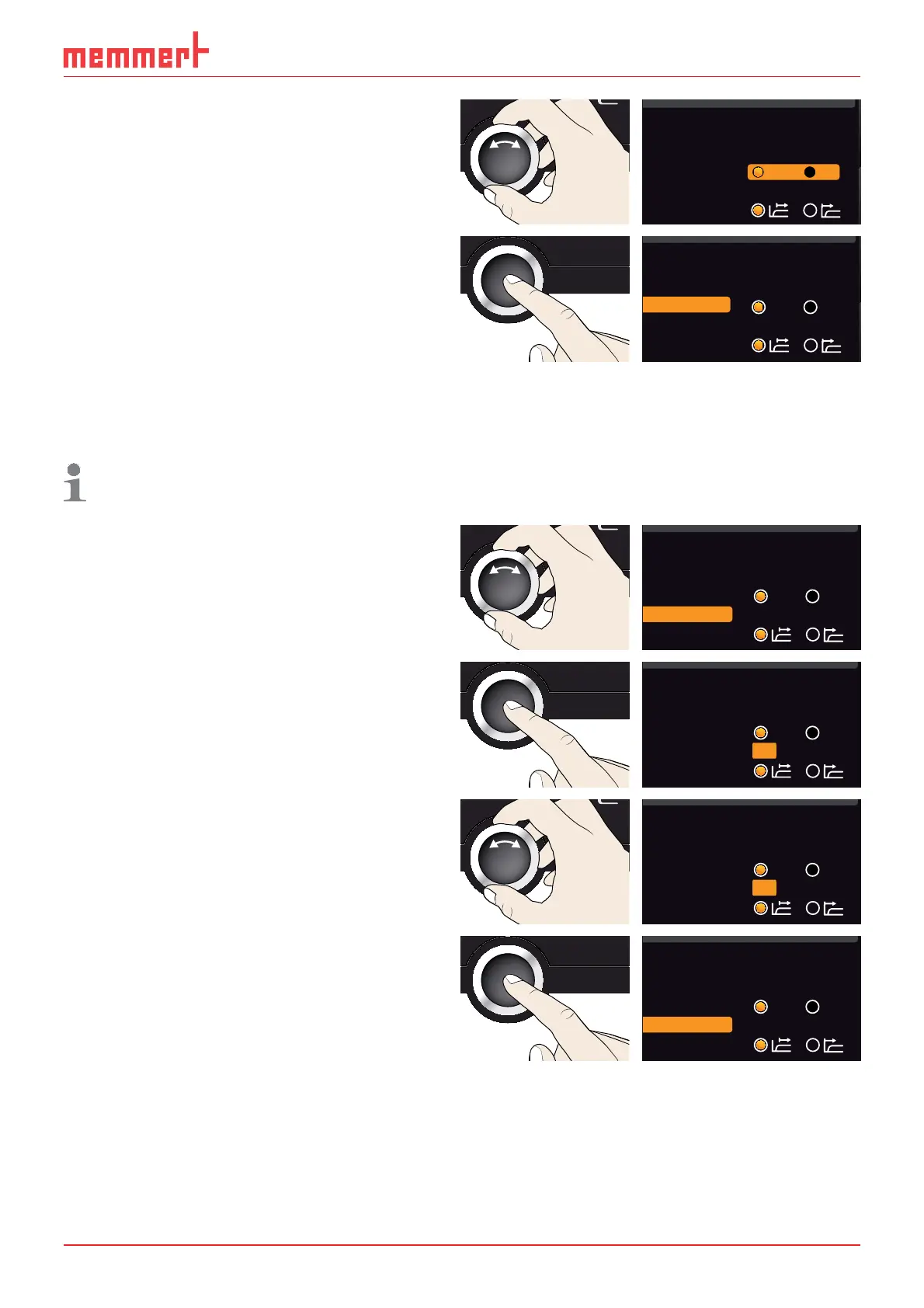
3. With the turn control, select the de-
sired unit – in this example °C.
Unit
IP address 255.145.136.225
Subnetmask 255.255.0.0
Alarm Temp
24 °
Timer Mode
°C °F
4. Save the setting by pressing the confir-
mation key.
Unit
IP address 255.145.136.225
Subnetmask 255.255.0.0
Alarm Temp
°C °F
24 °
Timer Mode
7.3.3 Temperature monitoring ( Alarm Temp)
Here, you can set the trigger temperature of the automatic temperature monitoring
system (description on page 22 and following).
The monitoring temperature must be set sufficiently high above the maximum set
temperature. We recommend 1 to 3 K.
1. Activate the
SETUP display and select
Alarm Temp with the turn control.
Unit
IP address 255.145.136.225
Subnetmask 255.255.0.0
Alarm Temp
°C °F
24 °
Timer Mode
2. Accept the selection by pressing the
confirmation key. The current settings
are automatically highlighted.
Unit
IP address 255.145.136.225
Subnetmask 255.255.0.0
Alarm Temp
°C °F
24 °
Timer Mode
3. With the turn control, select the de-
sired new trigger temperature - in this
example
38 °.
Unit
IP address 255.145.136.225
Subnetmask 255.255.0.0
Alarm Temp
°C °F
38 °
Timer Mode
4. Save the setting by pressing the con-
firmation key. The electronic tempera-
ture monitoring system will now be
triggered when the actual temperature
reaches 38 °C.
Unit
IP address 255.145.136.225
Subnetmask 255.255.0.0
Alarm Temp
°C °F
38 °
Timer Mode



 To Next Page