Internal Mem
The Memotron m2k features an internal memory from which the tracks will be played. On delivery, the
hundred tracks of the Basic Collection are preinstalled here. To use other tracks, they first must be imported.
Besides its own Memotron sample files (file extension ".mtk"), also sample files of the plug-in M-Tron® of G-
Media (file extension "cpt") can be used. With G-Media's newer M-Tron Pro® plug-in, the Memotron m2k is
not compatible.
• On a Windows® PC installed M-Tron® sample files can not be used in the Memotron m2k as
these were converted during the installation of the plug-in. Use the original sample files of
the M-Tron® CD-Roms instead.
With the following functions you can import individual tracks or all tracks of a directory, remove individual
tracks or erase all internal memory of the Memotron m2k. In addition, the info page gives information on the
number of installed tracks, the remaining capacity for other tracks and the maximum number of installable
tracks.
Importing Tracks
This function allows you to import individual tracks from an external memory card to the internal memory. If
you want to import a complete Sound Collection or more tracks, then please see the "Importing Directories"
section.
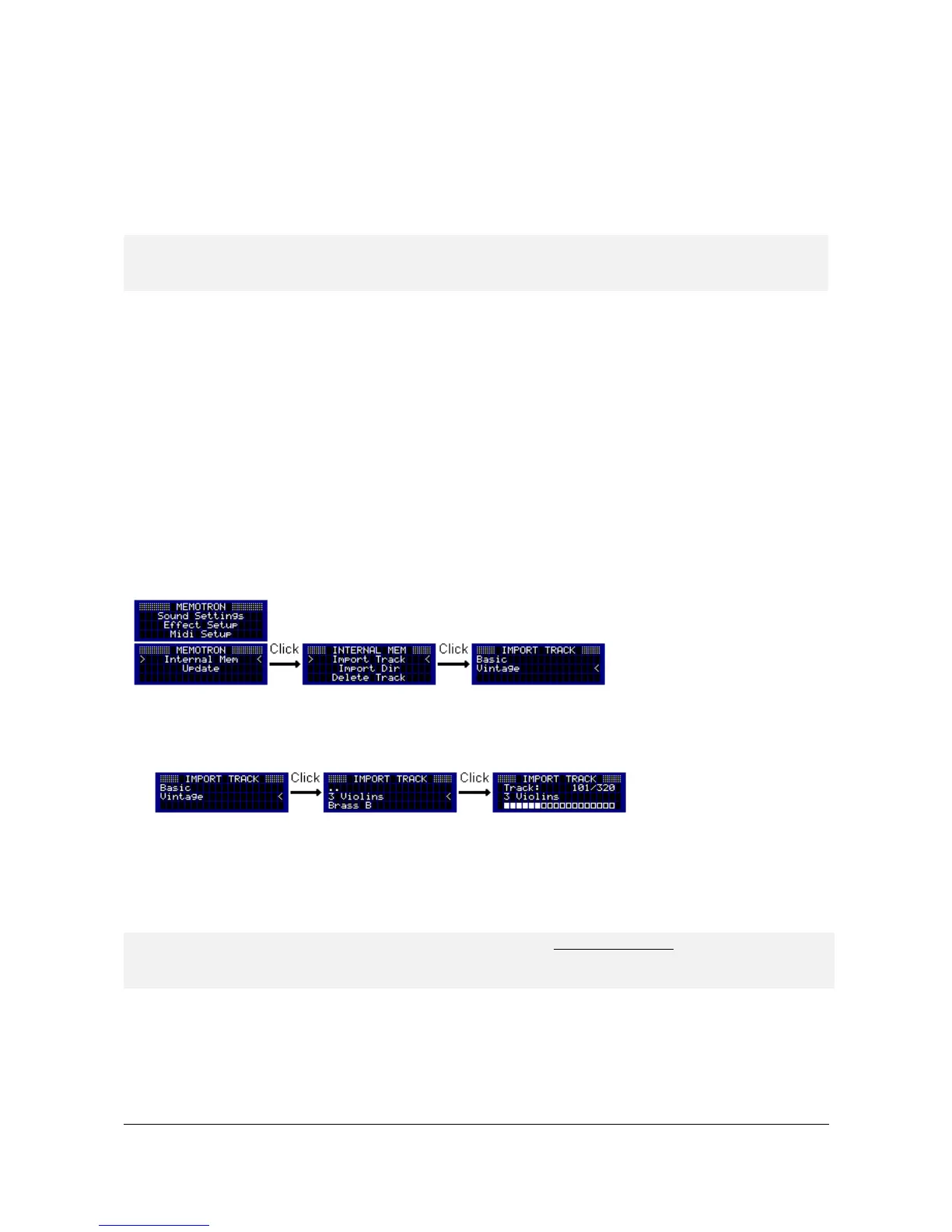
To import a single track into the internal memory of Memotron m2k, go first to the "Internal Mem" menu. By
selecting the menu item "Import Track", you change to the file system of the external memory card.
Navigate through the file system and select the track you want to import. By pressing the ESC key, you can
exit the file system at any time without importing a track.
After selecting the desired track, the Memotron m2k starts the import which takes a few seconds to
complete. After a successful import, you are returned to the file system of the external memory card and can
now select another track. If you do not want to import any other track, you return by pressing the ESC key to
the "Internal Mem" menu. With one more press on the ESC key, you return to the main menu.
• If a Memotron sample file (“.mtk“) is not too big (some original samples were recorded longer
than others!), the first two keys (F & F#) will be interpolated during the import and the track
can then be played with the full keyboard range.
Memotron m2k OS v1.3 User Manual 12


 To Next Page