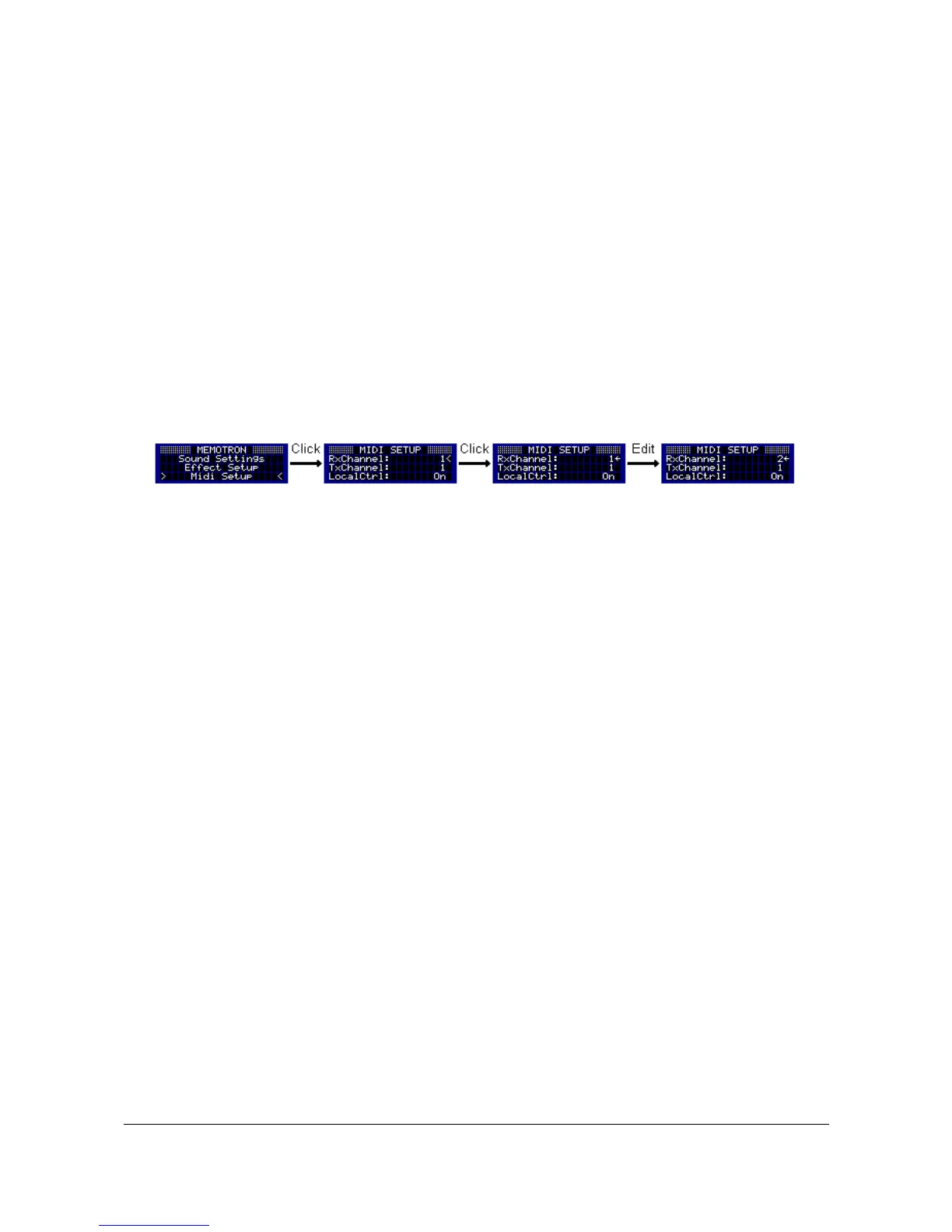
MIDI Setup
The MIDI Setup controls all functions that are used to play the Memotron m2k from a suitable external MIDI
device (e.g. a master keyboard or a MIDI sequencer such as the Manikin Schrittmacher).
The following parameters can be edited:
Rx Channel 1 ... 16 MIDI channel on which the track receives MIDI data
Tx Channel 1 ... 16 MIDI channel on which MIDI data is sent
Local Control Off / On Separates the controllers from the Memotron m2k's sound
generator.
Enter the MIDI Setup via the main menu. A selected MIDI parameter can be edited by pressing the DATA
knob. The cursor will turn into a pointer. Turning the DATA knob will now alter the parameter values. Pressing
the DATA knob again will confirm the value changes and by turning the DATA knob, another parameter can
be selected.
By pressing the ESC key, you can leave the MIDI Setup and you are returned to the main menu.
21 Memotron m2k OS v1.3 User Manual


 To Next Page