Introduction
About the Memotron m2k
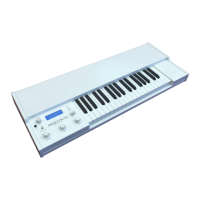
The Memotron m2k is an advanced sample playback based musical instrument. It can emulate the famous,
specific and genuine sound in highest audio quality. Thanks to its digital technology, the Memotron m2k is
most reliable and easy to use. Features are:
Access to up to three sounds simultaneously
Fully polyphony
Internal, adjustable effect processor
Complete MIDI implementation
Internal data storage, import of new sounds by means of an external memory card (SD card)
Compatible with G-Media M-Tron® sound library
The special characteristics of the original have been carefully emulated. This includes a maximum duration
of a played note of about 8 seconds (about 16 seconds at HALF SPEED).
The Memotron m2k supports standard data structures of memory cards. This compatibility enables you to
create and organize your own Memotron m2k sound library with your PC.
The Memotron m2k is fully compatible with G-Media’s M-Tron® plug-in and can play its sounds
(recognizable at the ending .cpt). The Memotron m2k is not compatible with the newer M-Tron Pro® plug-in.
About this manual
This manual is intended to make the first steps of using the Memotron m2k easier for you. Moreover it also
provides support and hints to the experienced user for his/her daily work.
Symbols used
To ensure a better overview, this manual uses standardized spelling and symbols which are explained below.
Important notes are highlighted in bold print.
! Attention – Pay special attention to this note to avoid malfunctions
• Some short additional information is given
Instructions – Mind these instructions to execute the requested function
Marking of parameters
All designations of buttons, controllers and parameters of the Memotron m2k in the text are highlighted in
bold print.
Example: Press the ESC button
The value range permitted for a parameter setting is highlighted by indicating the maximum and minimum
values in italics, separated by three dots. Settings, which can not be represented by a value range, are
separated by a comma.
Example: Rx Channel 01... 16, omni
1 Memotron m2k OS v1.3 User Manual


 To Next Page