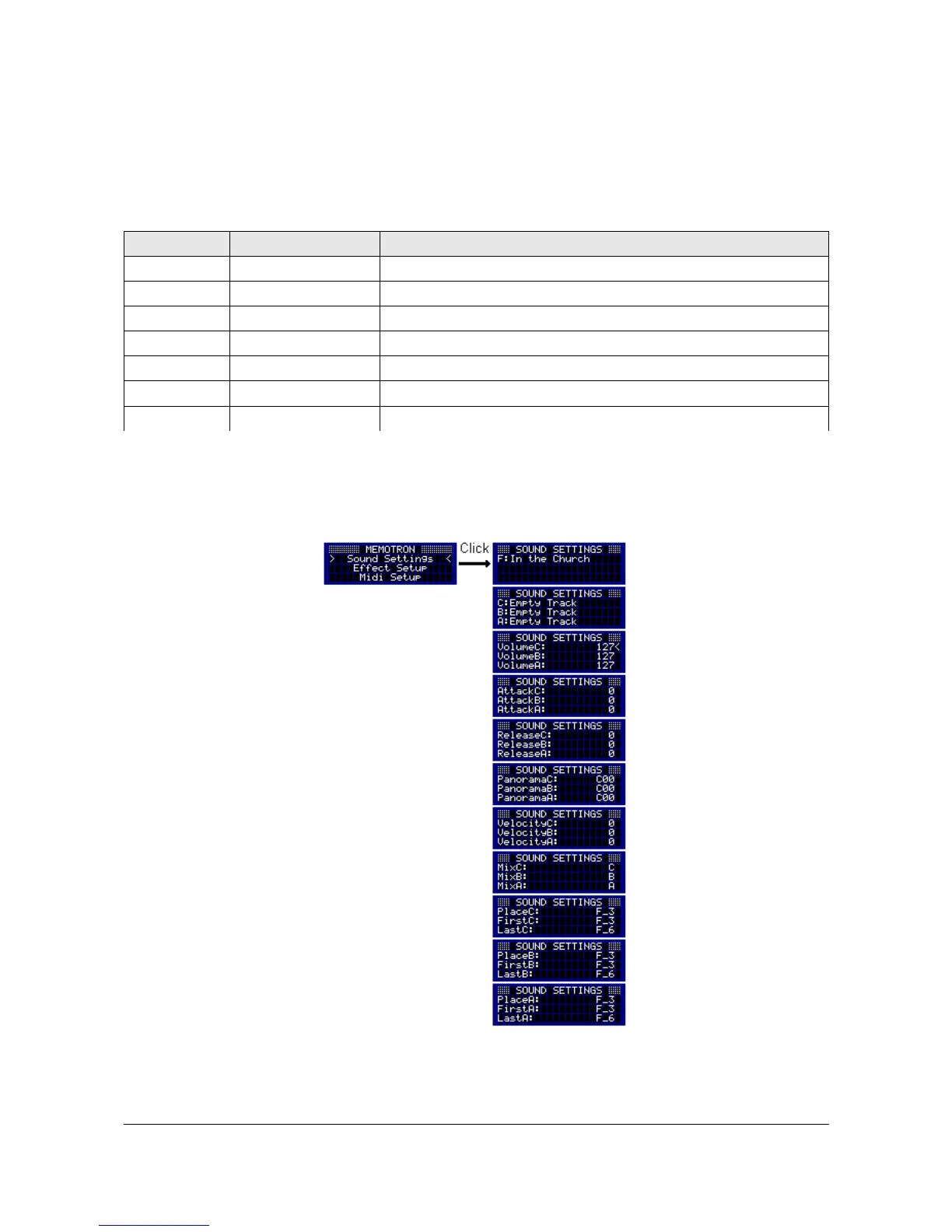
Sound Settings
The Sound Settings contain Frame and track names as well as various parameters to tailor each track to
your personal needs.
The following parameters can be adjusted on each of the three tracks:
Parameter Value Range Description
Volume 0 ... 127 Volume of a track
Attack 0 ... 127 Fast or slow attack phase of the sound
Release 0 ... 127 Fast or slow decaying of the sound after the key release
Panorama L64 ... C00... R63 Stereo panning
Velocity -63 ... 0 … 63 Touch response (max. inverted … off … max. active)
Mix Off, A, B, C Blending of tracks
Place Place, First, Last Positioning of tracks
All Sound Setting parameters can be accessed by turning the DATA knob. A selected parameter can be
edited by pushing the DATA knob. The cursor will turn into a pointer. Turning the DATA knob, will now alter
the parameter values. Pushing the DATA knob again, will confirm the value changes and by turning the
DATA knob, another parameter can be selected for tailoring.
By pressing the ESC button, you can leave the Sound Settings and return to the main menu.
15 Memotron m2k OS v1.3 User Manual


 To Next Page