Deleting the Internal Memory
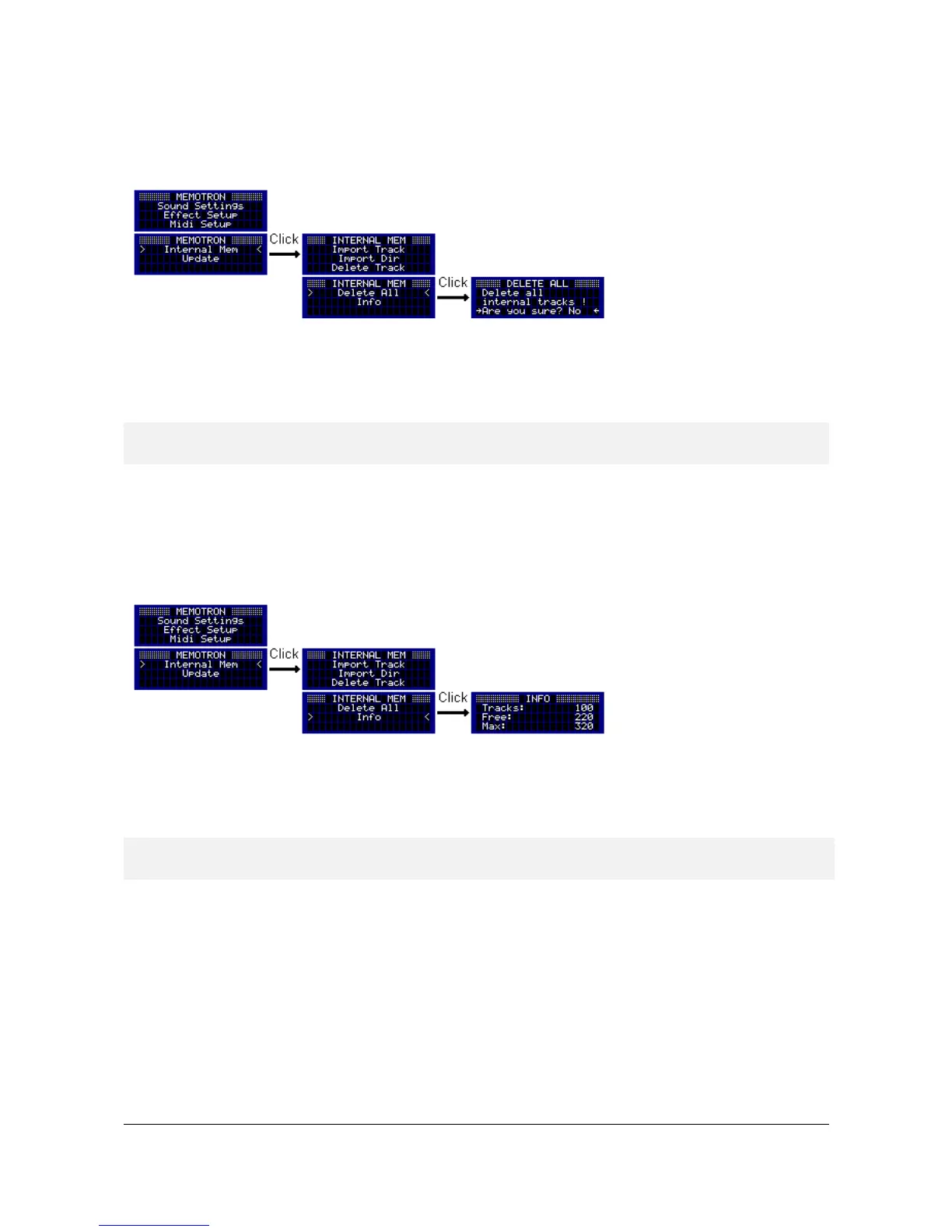
This feature deletes the Memotron m2k's entire internal memory. To do this, switch to the "Internal Mem"
menu and select the menu item "Delete All".
The internal memory can be deleted after confirming a confirmation prompt. To cancel the operation, select
"No" in the prompt or press the ESC key. After the deletion, you will automatically return to the Sound
Settings.
! Deleting the internal memory can not be undone. To use the Memotron m2k again, tracks
have to be imported with the "Import Track" or "Import Dir".
Memory Information
This function provides an overview of the way the internal memory is used. First change to the “Internal
Mem" menu and select the menu item "Info".
On the Info Page, the number of the already installed, the free and the maximum installable tracks appears.
You leave the Info Page by pressing the ESC key and return to the "Internal Mem" menu. One more press on
the ESC key brings you back to the main menu.
! The maximum amount of installable tracks depends on the built-in internal memory card and
may therefore differ from the displayed amount.
Memotron m2k OS v1.3 User Manual 14


 To Next Page