Importing Directories
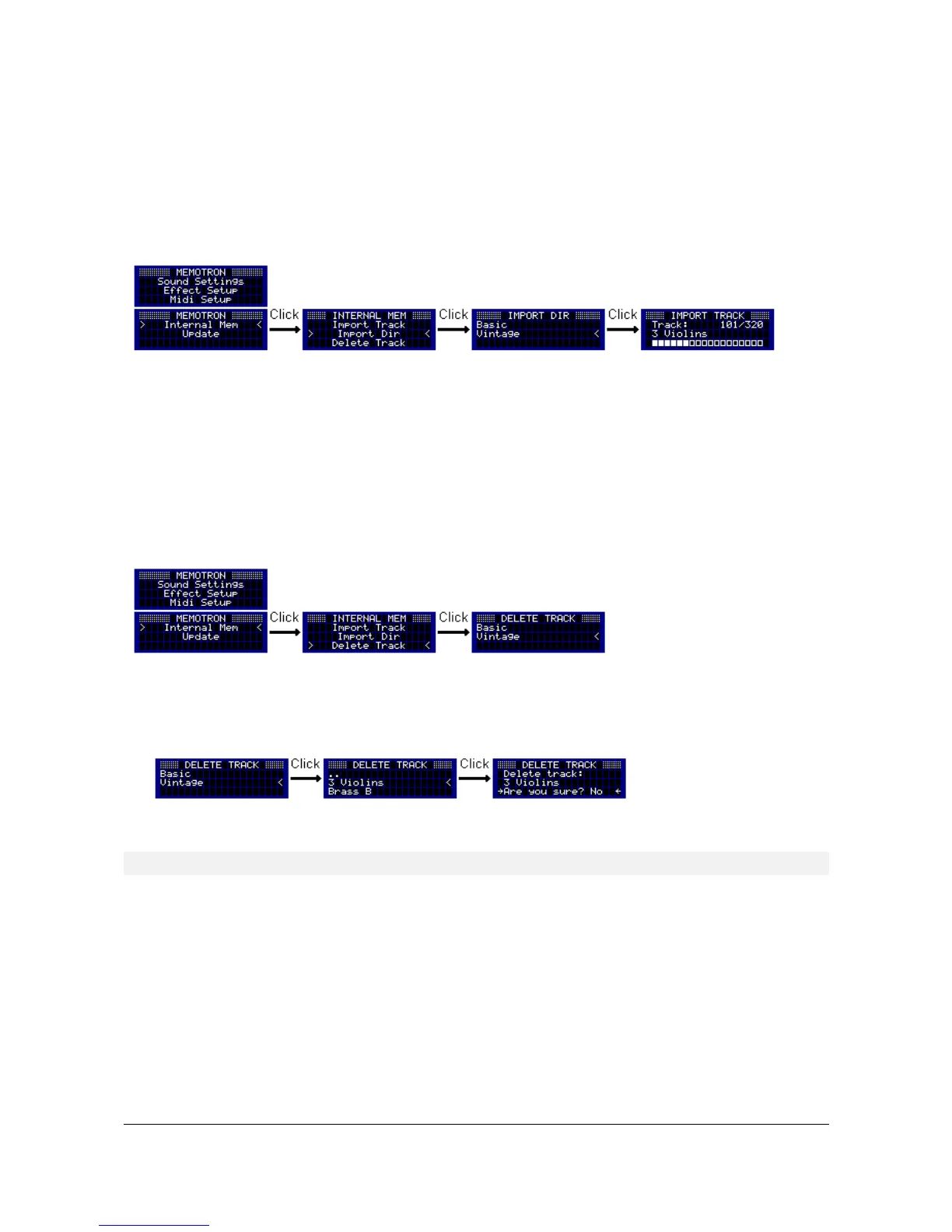
If all tracks of a sound collection shall be imported to the internal memory of Memotron m2k, the function
"Import Dir" is very useful. With this function, all tracks within a directory can be imported from an external
memory card to the internal memory of the Memotron m2k.
To start the import, first switch to the "Internal Mem" menu. By selecting the menu item "Import Dir", you
change to the file system of the external memory card.
Navigate through the file system and select the directory that contains the tracks you want to import.
Depending on the amount of tracks, the import of multiple tracks from a directory can take a few minutes to
complete. The current import can be cancelled at any time by pressing the ESC key.
Deleting Tracks
To delete individual tracks from the Memotron m2k's internal memory, first go to the "Internal Mem" menu. By
selecting the menu item "Delete Track", you switch to the file system of the internal memory.
The track to be deleted can now be selected and deleted after confirming a confirmation prompt. To cancel
the operation, select in the prompt "No" or press the ESC key. After the deletion, you will automatically return
to the Sound Settings.
! The deleted track can only be restored by importing it again!!!
13 Memotron m2k OS v1.3 User Manual


 To Next Page