85-03-01194 FV48 Page 75
5.5 REMOTE CONTROL OPERATING INSTRUCTIONS
To Turn on the Fireplace
NOTE: If the fireplace does not respond to the remote-control commands, the fireplace system may have entered “safety
lockout” mode. To reset the system, see Chapter 5.11.12 Why won’t my fireplace turn on?
1. Press the on/off button. The remote-control display will show all active icons on the screen.
2. Select the thermostat mode by pressing the thermostat button: OFF (meaning Manual), ON (meaning Normal
Thermostat) or Smart (meaning Smart Thermostat).
a. If the thermostat icon displays as “OFF” (Manual), the fireplace will ignite and start on Hi.
b. If the thermostat icon displays as “ON” (Normal Thermostat), the fireplace will only ignite if the thermostat
temperature is greater than the room temperature.
c. If the thermostat icon displays as “SMART” (Smart Thermostat), the fireplace will only ignite if the
thermostat temperature is greater than the room temperature.
To Turn off the Fireplace
Press the on/off button.
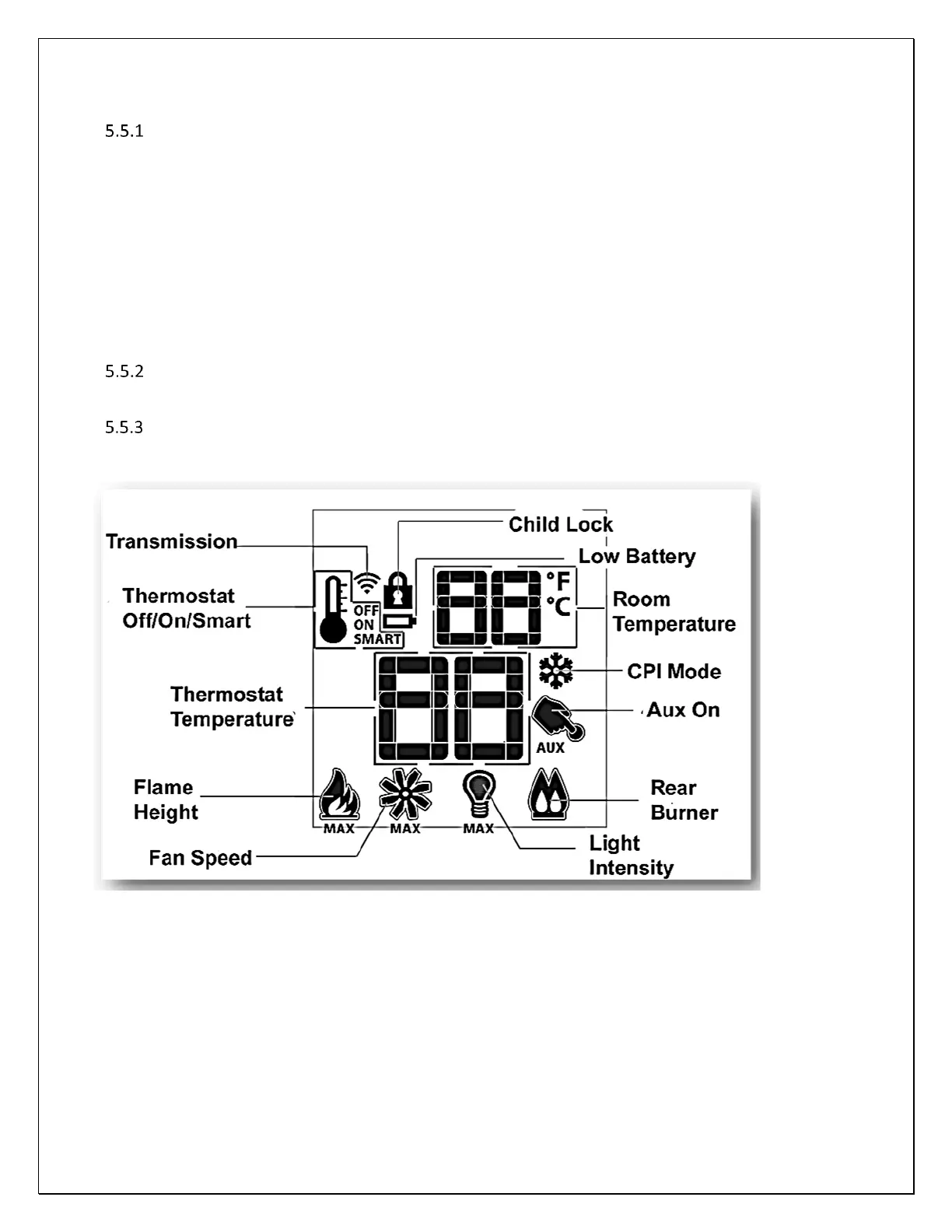
Understanding Your Remote-Control Icons
Your remote control displays and controls the following functions. See below for detailed control explanations.
Note: the “AUX On” function is not used in this fireplace.



 To Next Page