Status: LTC IN: Corresponds to the incoming LTC frame rate
Horus PTP status: MASTER or SLAVE
Video Format Detected:
Supported Formats:
PAL – NTSC
720p23.98– 720p24 – 720p25 – 720p29.97 – 720p30
720p50 – 720p59.94 – 720p60 (not recommended video formats)
1080i25 – 1080i29.97 – 1080i30
1080sf25 – 1080sf29.97 – 1080sf30
1080p23.98 – 1080p24 – 1080p25 – 1080p29.97 – 1080p30
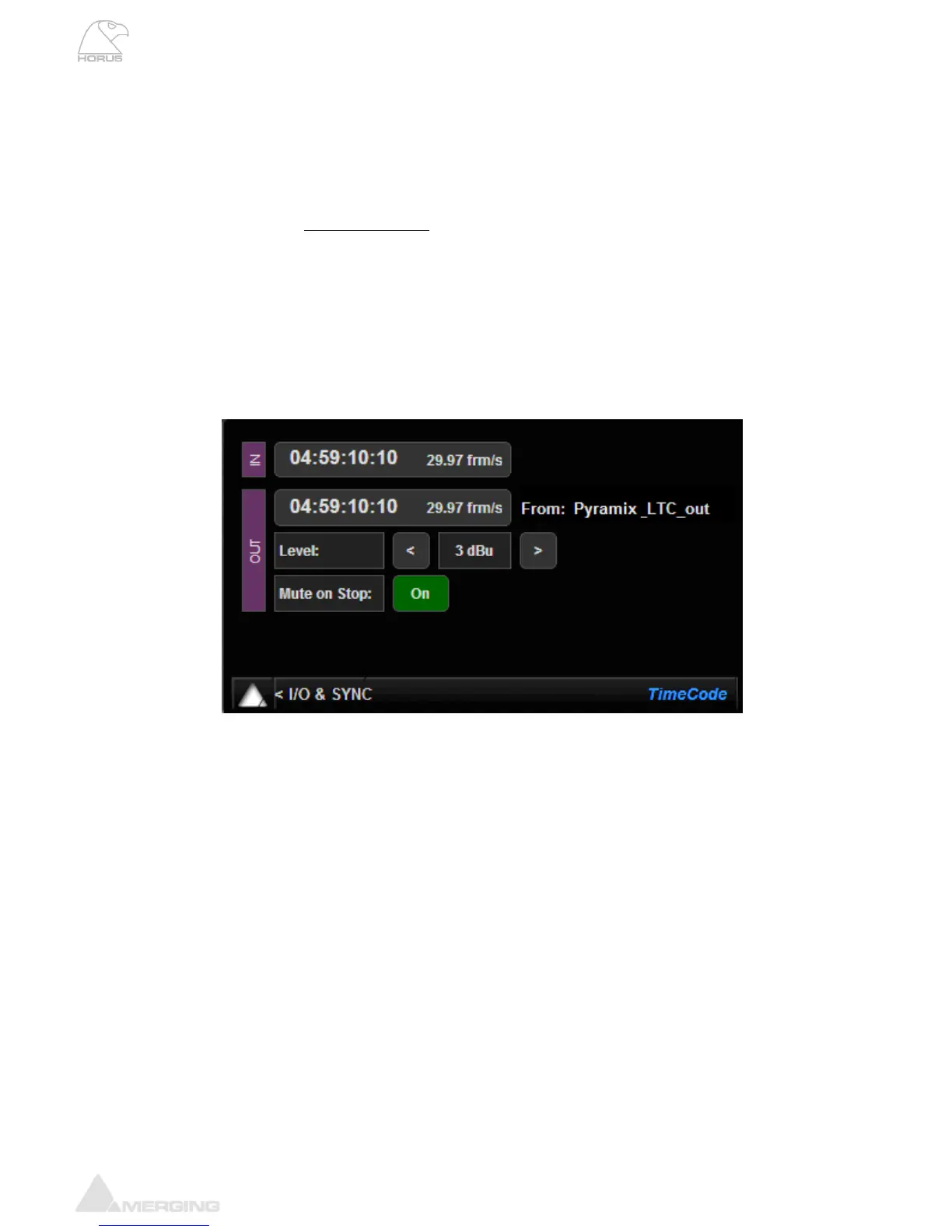
TIMECODE Menu (I/O & Sync)
IN Timecode: Will display the current incoming LTC/Timecode
OUT Timecode: Will display outcoming LTC/Timecode
Frame Rate: The current LTC/Timecode Frame Rate is indicated next to the Timecode IN &
OUT display
From: Indicates the Timecode provider (in example above the Pyramix DAW)
Timecode Level: Shows the current LTC output level in dBu. The selector offers a choice of
output level from -18dBu to +9dBu in 3dBu increments, or can be switched off
Mute on Stop: If OFF the LTC output will not be active (default)
If ON the LTC output is generated constantly



 To Next Page