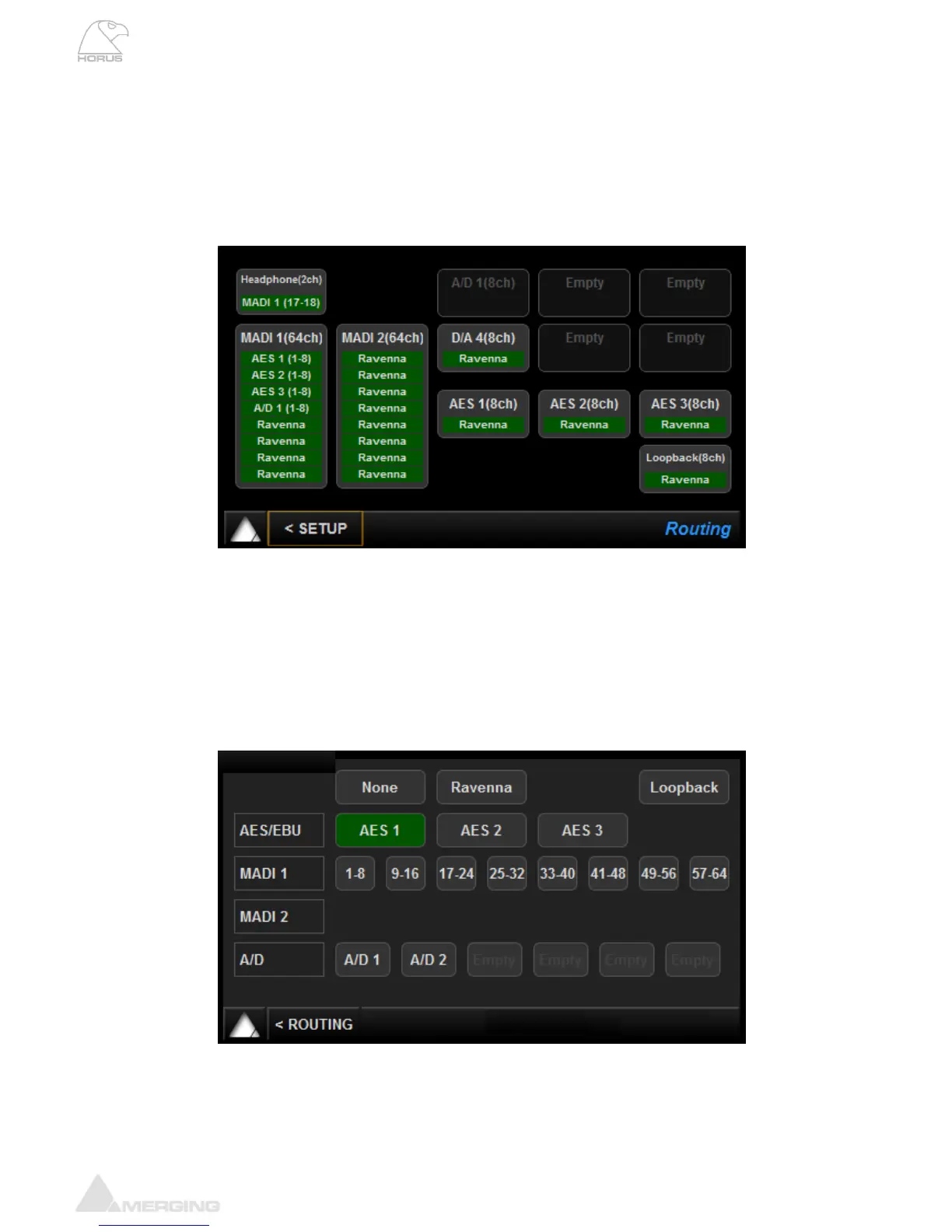
Routing Menu (Setup)
Module routing menu describes where the signal for each module in the Horus is coming from. Each
button leads to a sub-menu that allows the user to change the source of the signal to that specific
module. For instance, the Headphone Button in the Routing menu will allow the user to change the
routing to the Headphone.
Choices are made in blocks of 8 channels (except for the Headphone, which is a Stereo signal).
Headphone: Takes you to the Headphone Routing configuration page (refer below)
MADI 1: Takes you to the MADI 1 Routing configuration page (refer below)
MADI 2: Takes you to the MADI 2 Routing configuration page (refer below)
D/A: Takes you to the D/A Routing configuration page (refer below)
AES: Takes you to the AES Routing configuration page (refer below)
A/D: Disabled as one cannot route TO an Input!
Loopback: Takes you to the Loopback module (present only in debug mode)
Routing: Configuration
Headphone - D/A - AES - MADI Routing Output Source (similar)
For all of the output modules (AES 1-3, D/A N, MADI & Headphone Jack) the user can set where the
signal feeding it comes from. Any combination is possible using the Output source page linked to any of
the output modules.
* All routing in the Horus is currently achieved using banks of 8 channels*



 To Next Page