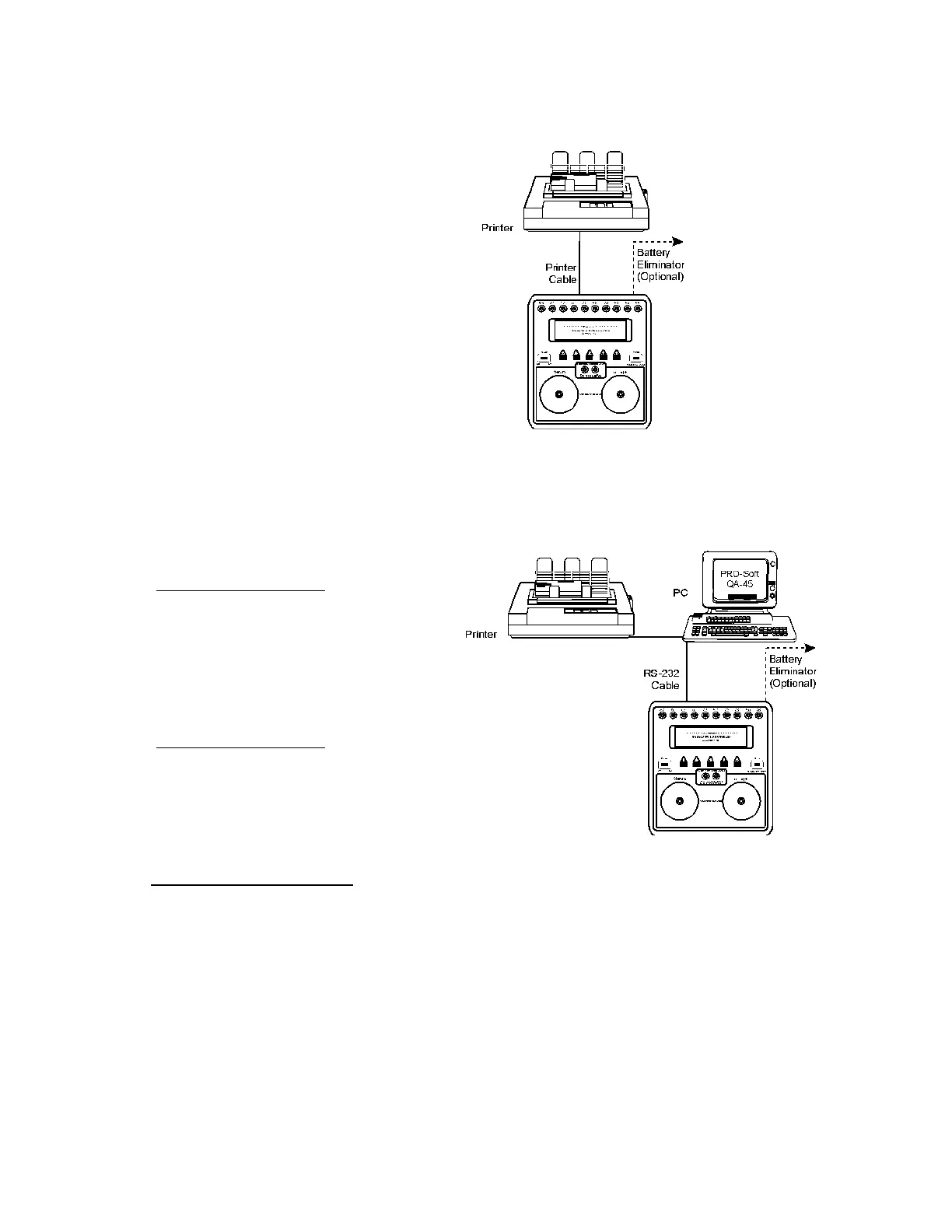
2. If PRO-Soft QA-40M/45 is being used, attach an RS-232 (null
modem/data transfer configured) cable to the 9-pin D-sub outlet
port located at the rear of the QA-45. Do not attach the printer
cable to the QA-45. See below. However, if you are not using
PRO-Soft QA-40M/45, and are sending directly to a printer for
printouts, attach the printer cable to the 25-pin outlet port.
2.3 Power
1. Main On/Off Switch. QA-45 should remain off for at least 5
seconds before switching on again, in order to allow the test cir-
cuits to discharge fully.
2. Low Battery Power. If battery power falls below 6.9 volts
(± 0.3 volts), the display will show 'Change battery, and reset
system'. This means that the battery should either be replaced or
the instrument should be connected to a battery eliminator. The
NOTE
Some RS-232C cables are
missing the connection be-
tween the seventh and the
eighth wires in the cable. The
cable may still be called
NULL-modem, but it will not
work with the QA-45. Refer to
the PRO-Soft QA-40M/45
Users Manual for more informa-
tion.
2


 To Next Page