MGE UPS SYSTEMS
Pulsar ESV 8+/11+/14+/22+ EB 22/EB 22XLA : 86-153277-00
18
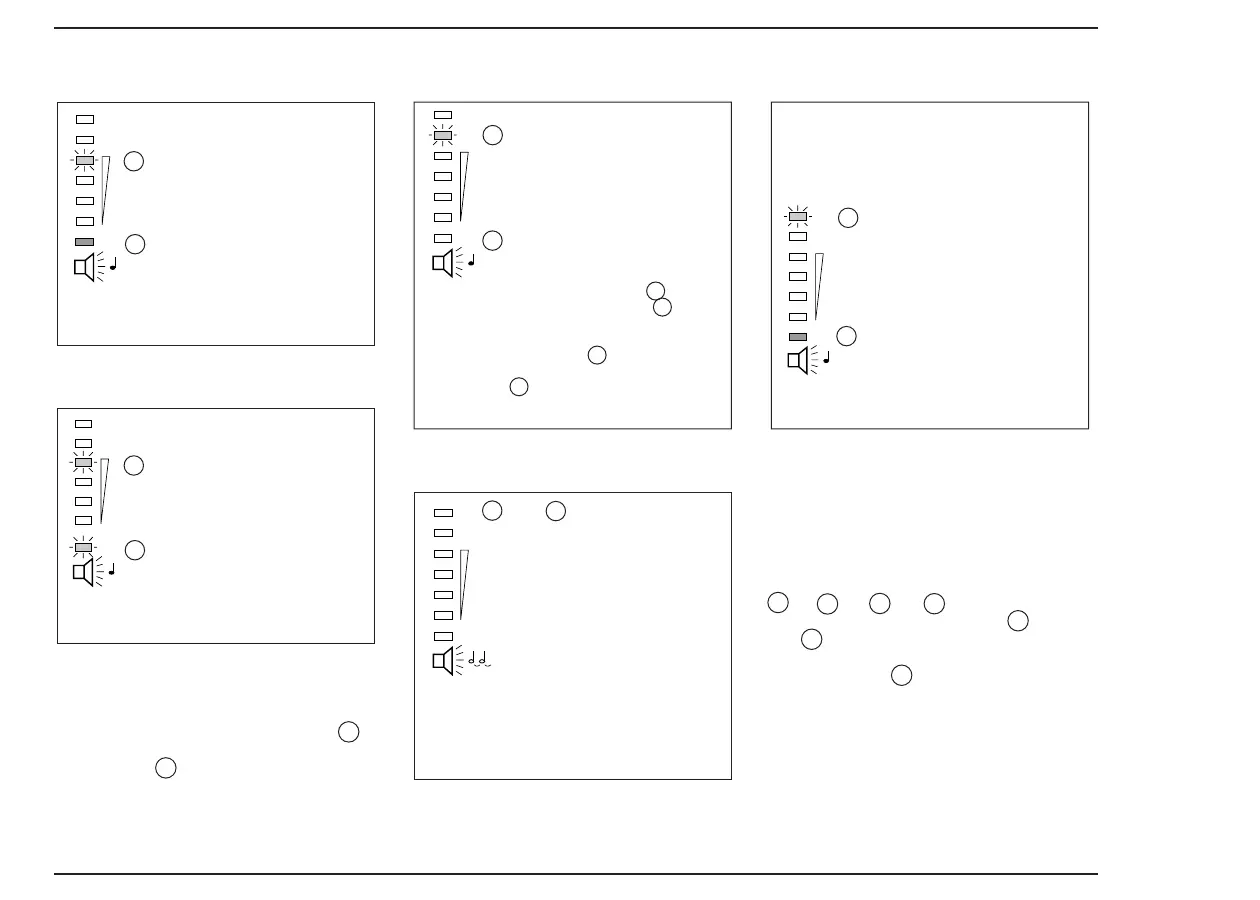
overload
utility power present
operating anomalies
device fault
battery fault
1c flashing
1g on
1 beep every second
Pulsar switches off automatically after
operating in overload for approximately 5
min.
no utility power present
1c flashing
1g on
1 beep every second
Pulsar switches off automatically after a
length of time which depends on the level
of overload.
NOTE:
Overload occurs if the electricity
consumption of the load connected is
greater than the rated power of Pulsar.
To acknowledge the fault, push button 3 ,
temporarily disconnected Pulsar from the
wall socket 5 , disconnect non-priority
loads and re-start Pulsar.
■■ switch off Pulsar (push button 3 ), dis-
connect from the wall socket (flex 5 ), and
check that Pulsar has not short-circuited (dis-
connect all applications),
■■ check the input fuse
6b
and replace it
with a fuse of the same rating or reset ther-
mal breaker 6 ,
■■ re-start Pulsar.
A battery test is carried out while Pulsar, is in
start-up phase, then automatically every 7 days
(overhaul times adjustable using ESV Driver).
If a battery fault is detected, the following
occurs:
recharge your battery for 8 hours.
If battery fault persists, see next page.
utility power outside limits
1a to 1g off
continuous beep
after the start-up sequence, if the audio
warning device sounds continuously, check
the voltage and frequency of your utility
power (see the § entitled "characteristics")
and/or recharge your battery for 8 hours.
Start/Stop control on onput
receptacles 1 and 2
(PowerShare)
You can use the applications included on
the CD-ROM to remote control the
Start/Stop sequences on output receptacles
7a
(or
7b
). If
7a
(or
7b
) is disabled
through software, front panel led
1f
(or
1e
) flashes, with 1 beep every second.
Beep can be deactivated by
"function" button 2 .
NOTE:
If the previous symptoms persist, contact
our after sales department.
1b flashing
1g on
1 beep every second
1a flashing
1g
on
1 beep every second





 To Next Page