Page 14 - 3400753300/AE
5
4
4
7
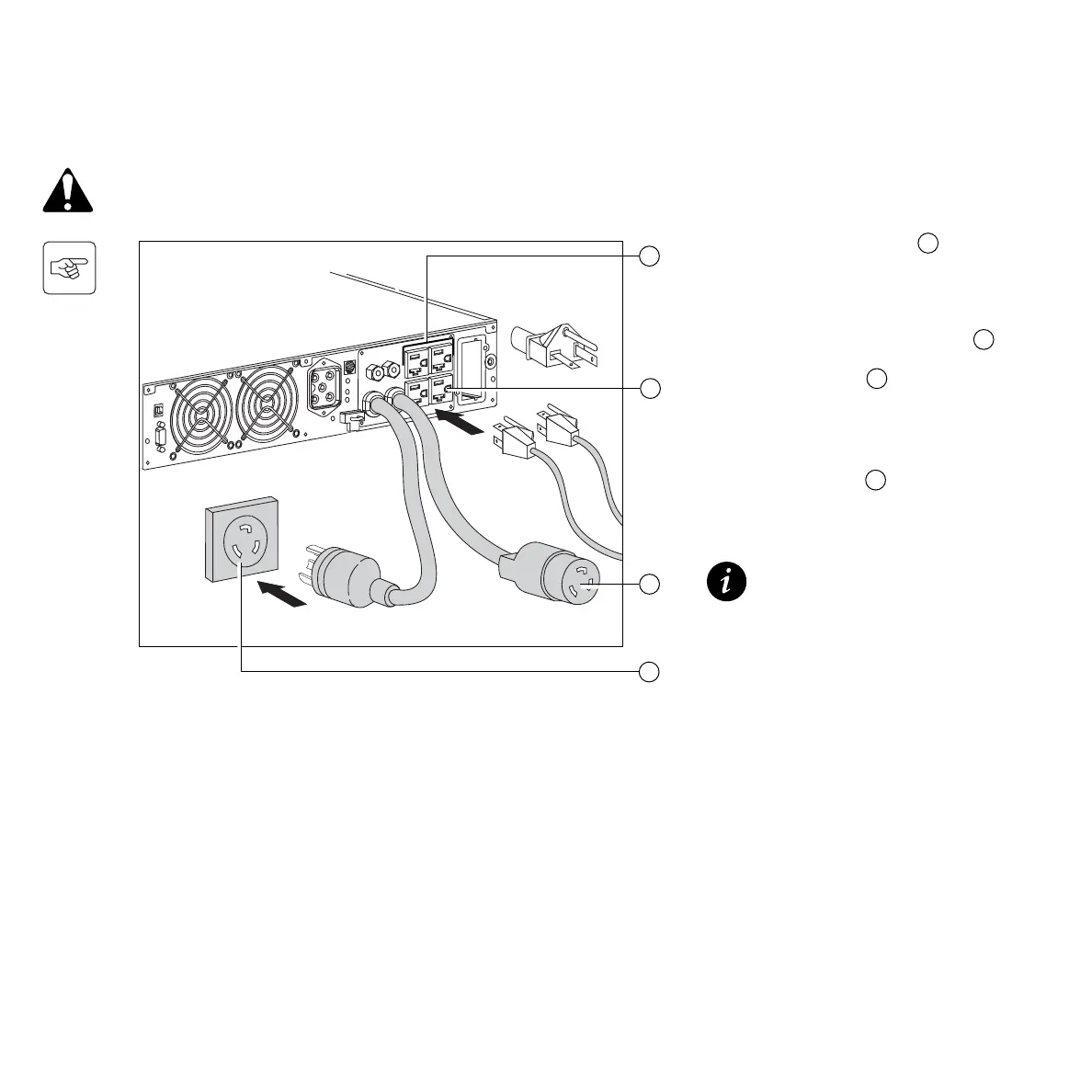
1. Connect the input power cord 7 to the
AC-power wall-receptacle.
2. Connect the protected equipment to the
UPS. It is advised to connect priority
loads to the outlets and/or power cord 4
and any non-priority loads to the two
programmable outlets 5 (If the UPS is
connected to a computer running MGE
UPS SYSTEMS, Inc. communication
software, it is possible to program the
interruption of power to the two
programmable outlets 5 during
operation on battery power, thus reserv-
ing backup power for the priority loads).
The battery begins charging the
instant the UPS unit is connected
to a power source. Eight hours are
required to charge to the full rated
backup time.
CAUTION: Check that the indications on the rating plate (on the back of the UPS), correspond to your AC-power
system, and to the actual electrical consumption of all the equipment to be connected to the UPS.
2.6 Connections
2. Installation






 To Next Page