Parameter Description
IP IP address provided by ISP.
Gateway IP ISP’s IP address gateway.
DNS ISP’s DNS server IP address.
Subnet Mask Enter the Subnet Mask provided by the ISP (e.g. 255.255.255.0).
Click <OK> to complete the Quick Setup Wizard and start using the broadband
router.
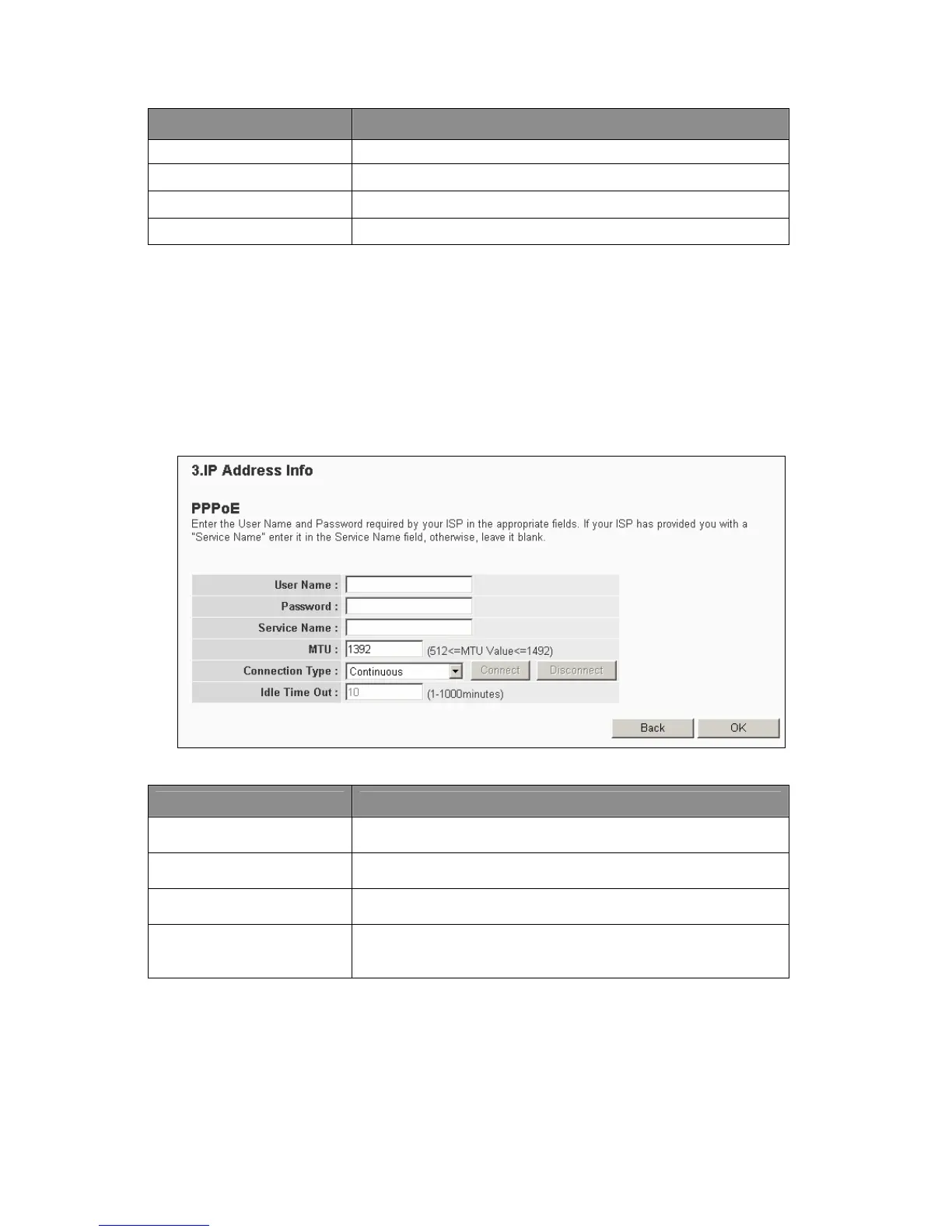
Step 2.3 PPPoE xDSL
Select PPPoE if the ISP requires the PPPoE protocol to connect to the Internet. The
ISP should provide all the information required in this section.
Parameter Description
Username
Enter the username provided by the ISP for the PPPoE
connection.
Password
Enter the password provided by the ISP for the PPPoE
connection.
Service Name
This is optional. Enter the Service name should the ISP requires
it, otherwise leave it blank.
MTU
This is optional. Users can specify the maximum size of the
transmission packet to the Internet. Leave it blank if users do not
wish to set a maximum packet size.
19



 To Next Page