EasyManua.ls Logo

Midea MAD - User Manual

Midea MAD
28 pages
Print Icon
To Next Page IconTo Next Page
Loading...
MAD
Dehumidifier
MAD22S1AWWT
MAD35S1AWWT
MAD50PS1AWBL
USER MANUAL
Warning notices: Before using this product, please read this manual carefully and keep it for future reference.
The design and specifications are subject to change without prior notice for product improvement.
Consult with your dealer or manufacturer for details.
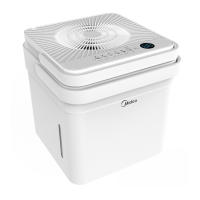
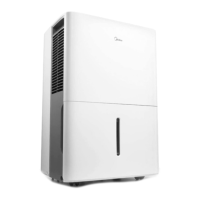
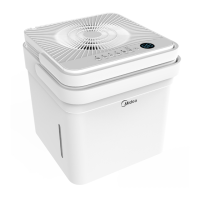
The diagram above is just for reference. Please take the appearance of the actual product as the standard.
Download the app
& activate product

Questions and Answers

  • F
    foxcrystalAug 15, 2025
    What to do if my Midea MAD Dehumidifier won't start?
    • L
      Laura WhiteAug 16, 2025
      If your Midea Dehumidifier isn't starting, first ensure the plug is fully inserted into the outlet. Then, check your house's fuse or circuit breaker box. Also, the dehumidifier might have reached its preset level, or the bucket could be full. Another possibility is that the side access tank isn't correctly positioned.
  • N
    Nathan NguyenAug 18, 2025
    What to do if water is leaking from my Midea Dehumidifier?
    • A
      Aaron TorresAug 18, 2025
      If water is leaking from your Midea Dehumidifier onto the floor, check if the hose connection is loose. Another reason may be that you intended to use the bucket to collect water, but the back drain plug was removed.
  • K
    Kelly BurgessAug 21, 2025
    What to do if the pump operation light is blinking on my Midea MAD Dehumidifier?
    • J
      Joseph MccarthyAug 21, 2025
      If the pump operation light on your Midea Dehumidifier is blinking, try cleaning the pump's filter. Also, check the pump hose for blockages or leaks. Finally, ensure the side access tank is empty.
  • H
    Holly HallAug 25, 2025
    What to do if my Midea MAD does not start?
    • M
      Michelle ChristianAug 25, 2025
      If your Midea Dehumidifier doesn't start, try the following: * Ensure the dehumidifier's plug is firmly connected to the wall outlet. * Check the house fuse/circuit breaker box. * Verify the dehumidifier hasn't reached its preset level or that the bucket isn't full. * Make sure the water bucket is correctly positioned.
  • I
    irollinsAug 27, 2025
    What to do if water is on the floor around my Midea MAD?
    • W
      walshdanAug 27, 2025
      If you find water on the floor around your Midea Dehumidifier, check if the hose to connector or the hose connection may be loose. Also, if you intend to use the bucket to collect water, ensure that the back drain plug is properly in place.
  • B
    Brian McgeeAug 30, 2025
    Why does frost appear on the coils of my Midea Dehumidifier?
    • F
      Felicia SnyderAug 30, 2025
      The appearance of frost on the coils of your Midea Dehumidifier is normal. The dehumidifier has an auto-defrost feature.
  • S
    Susan FletcherSep 2, 2025
    What to do if water collects around the bottom of my Midea MAD Dehumidifier when operating in bucketless mode?
    • C
      Chelsea SmithSep 2, 2025
      If water collects around the bottom of your Midea Dehumidifier when in bucketless mode: * Check to ensure the unit is level and that there is no debris on the surface. * Check the drain hose connection and ensure it is properly seated in the outlet.
  • D
    Devin LambSep 5, 2025
    Why is my Midea Dehumidifier not drying the air properly?
    • G
      Geoffrey LewisSep 5, 2025
      Your Midea Dehumidifier might not be drying the air effectively due to several reasons. Ensure enough time has passed for it to remove moisture. Check that curtains, blinds, or furniture aren't blocking the front or back of the unit. The humidity control setting may be too high. Verify that all doors, windows, and openings are securely closed. Also, the room temperature might be too low (below 5°C or 41°F), or there could be a source of water vapor, like a kerosene heater, in the room.
  • B
    brian44Sep 8, 2025
    Why is my Midea MAD making a loud noise?
    • B
      Brandi ElliottSep 9, 2025
      A loud noise from your Midea Dehumidifier could be due to a dirty air filter; cleaning it might help. The unit might also be tilted instead of upright, or the floor surface may not be level.
  • J
    James GoodmanSep 12, 2025
    What to do if my Midea MAD Dehumidifier is making a loud noise?
    • R
      Randy RobinsonSep 12, 2025
      If your Midea Dehumidifier is making a loud noise, consider the following: * The air filter may be dirty; clean it. * Ensure the unit is upright and not tilted. * Check that the floor surface is level.

Summary

SAFETY INSTRUCTIONS

Must read the warning message

Instructions to prevent injury and property damage, highlighting risk levels.

Explanation of Symbols

Explains warning and caution symbols used in the manual.

GET TO KNOW YOUR PRODUCT

Identification of Parts

Names and illustrates the components of the dehumidifier.

PRODUCT INSTALLATION

Positioning the Unit

Details safe distance requirements for optimal dehumidifier placement.

Using Your Product

Initial Use and Operation

Covers initial use, working conditions, power connection, grounding, and water tank installation.

Caster Installation

GET TO KNOW YOUR FEATURES

Control Panel Features

Explains the function and indicators of the dehumidifier's control panel.

Basic Operation

POWER ON;OFF Button

Turns the dehumidifier on and off.

TIMER Function

Enables setting automatic start and stop times for the unit.

Dehumidifier Operation Modes and Settings

MODE Function

Allows selection of different operating modes like Set, Continuous, Dryer, and Comfort.

UP AND DOWN Buttons

Controls humidity levels and timer settings.

FAN SPEED Function

Adjusts the fan speed between High and Low settings.

DISPLAY

Error Codes

Lists and explains common error codes displayed by the unit.

Additional Features

PUMP Function (only for pump model)

Activates the built-in pump for continuous water drainage.

More Features

Covers auto shut-off, filter check reminders, and auto-restart capabilities.

REMOVING COLLECTED WATER

When Your Bucket Is Full

Describes methods for removing water when the bucket is full.

Type 1: Bucket drainage

Step-by-step guide for emptying the water bucket.

Type 2: Water Hose Drainage (continuous)

Type 3: Pump Drainage (only for pump model)

APP INSTRUCTIONS

Specification of Wireless Module

Technical specifications for the wireless module.

Precautions

Important notes regarding app compatibility, security, and connectivity.

Using the SmartHome App

Step 1: Download the SmartHome app

Guide to downloading and installing the SmartHome application.

Step 2: Log in

Instructions for logging into or creating a SmartHome account.

Step 3: Connecting the device

Steps to connect the dehumidifier to the SmartHome app.

Controlling the Device via App

Compliance Information

Wireless module models

Lists FCC ID and IC for the wireless module.

CLEANING AND MAINTENANCE

Product Cleaning Procedures

Detailed steps for cleaning the grill, case, bucket, air filter, and pump filter.

Long-Term Storage

TROUBLESHOOTING TIPS

Malfunction Diagnosis

A chart to diagnose and resolve common problems with the dehumidifier.

WARRANTY

Dehumidifier Limited Warranty

Details the terms and conditions of the limited warranty.

Consumer Responsibilities

Lists the consumer's duties for warranty validity and product upkeep.

Warranty Exclusions

Outlines what is not covered by the product warranty.

Service Information

Provides instructions on how to obtain warranty service.

RETURN POLICY

Return Policy Details

Explains the policy for returning the product within 30 days of purchase.

Midea MAD Specifications

General IconGeneral
TypeDehumidifier
Smart ControlYes
App ControlYes
Continuous DrainYes
Filter TypeWashable
Operating Temperature41°F - 95°F
Capacity50 pints per day
Special FeatureAuto Restart
Dehumidification Capacity50 pints per day
Coverage Area4500 sq. ft.

Related product manuals