Preva Dental X-ray System User Manual, 00-02-1576, Revision ZA1
16
Operating Instructions
When powering on the Preva Dental X-ray System, the Operator Panel
displays the selections from the system’s last exposure.
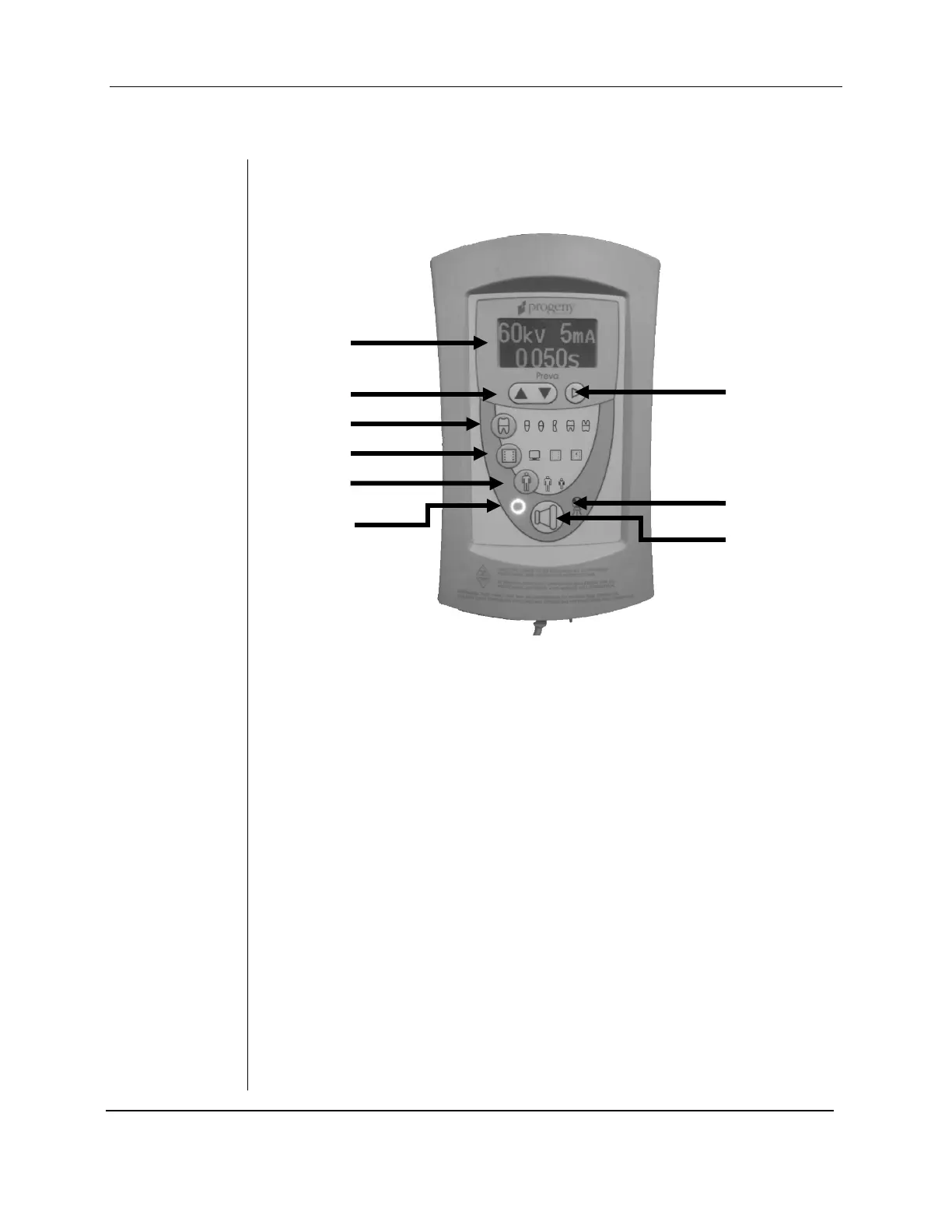
Figure 2
Preva Operator
Panel
1. An LED screen displays technique settings. It also displays menu
selections when the system is in menu mode.
2. Up and Down arrows are used to change kV, mA and time settings.
3. Tooth Icon: Pressing this button allows the user to select Incisor,
Bicuspid, Bitewing, Upper or Lower Molar.
4. Receptor Icon: Choices are: Digital, D Speed film, E/F Speed Film. If
using phosphor plates, select E/F Speed Film Setting.
5. Patient Size Icon: Press to select Large or Small
6. Ready Indicator: Circle lights up to indicate that the system is ready to
produce X-ray.
7. Right Arrow Button: Use this button to move between kV, mA and
time selections. This button is also used as an “Enter” key when the
system is in menu mode.
8. Radiation Indicator: This symbol lights up when an X-ray is produced.
9. Exposure Button: Pressing this button will produce an X-ray exposure.



 To Next Page