Controls
The oven controls consist of:
– the Programme selector, for select-
ing oven functions with, e.g. Light-
ing H, Fan D, Automatic roast-
ing E, ...
– the Function dial, for selecting oven
functions which require input e.g. the
time of day m, cooking dura-
tions g, ...
– the (–/+) Input dial, for entering and
changing settings on the oven func-
tion selected with the Function dial,
– the Display, where all changes and
settings are visible.
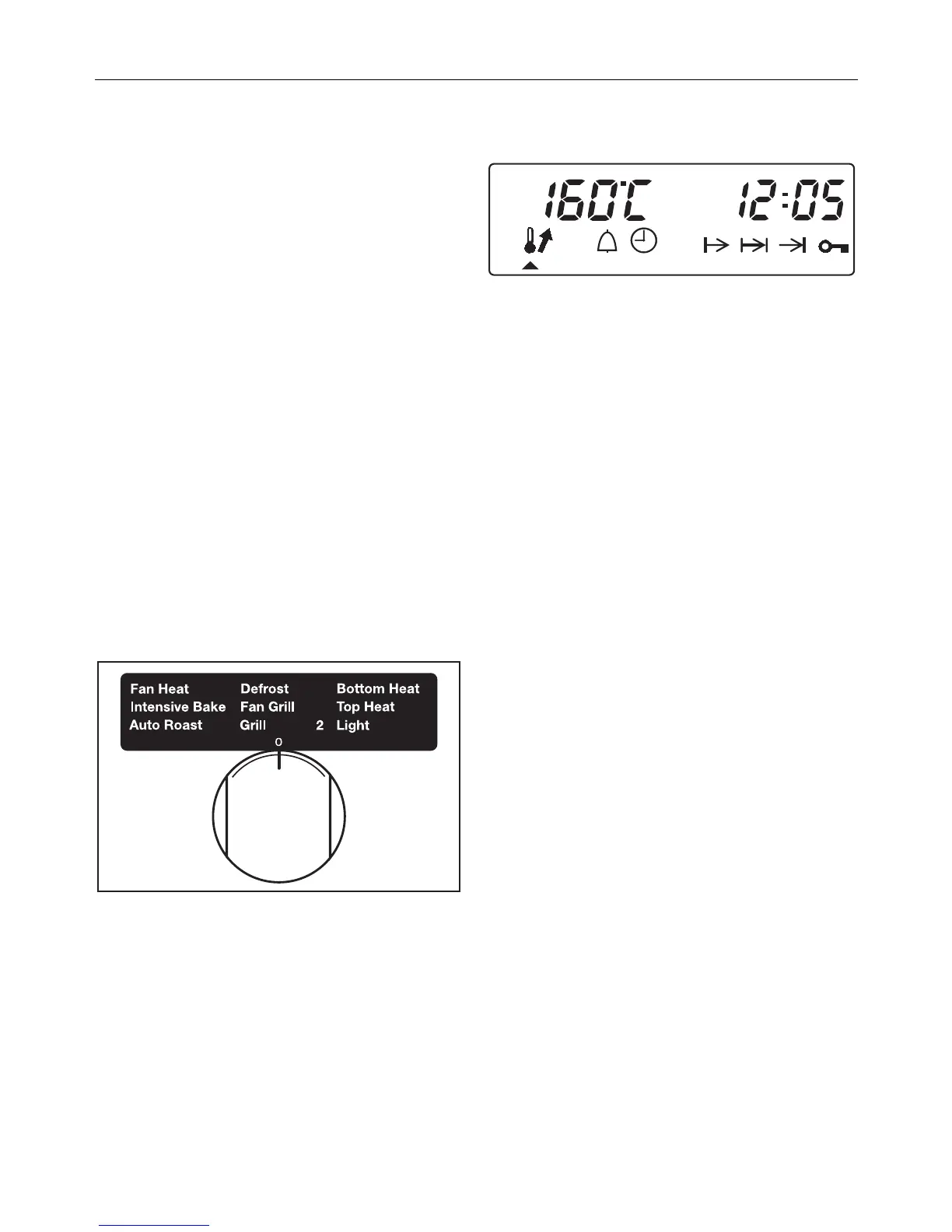
Programme selector
Use the programme selector to select
the required programme.
The programme selector can be turned
clockwise or anti-clockwise.
Display
The bottom line shows the Symbols of
functions where data can be changed.
To highlight these functions turn the
function dial (V).
The triangle V will appear in the dis-
play underneath the symbol of the func-
tion you have selected.
The top line shows:
– the time (time of day or a pro-
grammed cooking time).
– the oven temperature together with
the p or
U symbol.
– the key symbol 0--§ will appear if
e.g. the programme selector is
turned when the system lock is en-
gaged or a cooking programme has
been locked using the programme
lock.
– the e symbol if the roast probe is
being used.
– EC for Residual heat being utilised.
Night dimming
Between the hours of 22:00 and 6:00
the lighting in the clock / timer display
is dimmed automatically to give a slight
energy saving.
The display will appear dimmer during
this period if the time of day is set to be
on all the time.
Controls
20



 To Next Page