Operating the washer-dryer
16
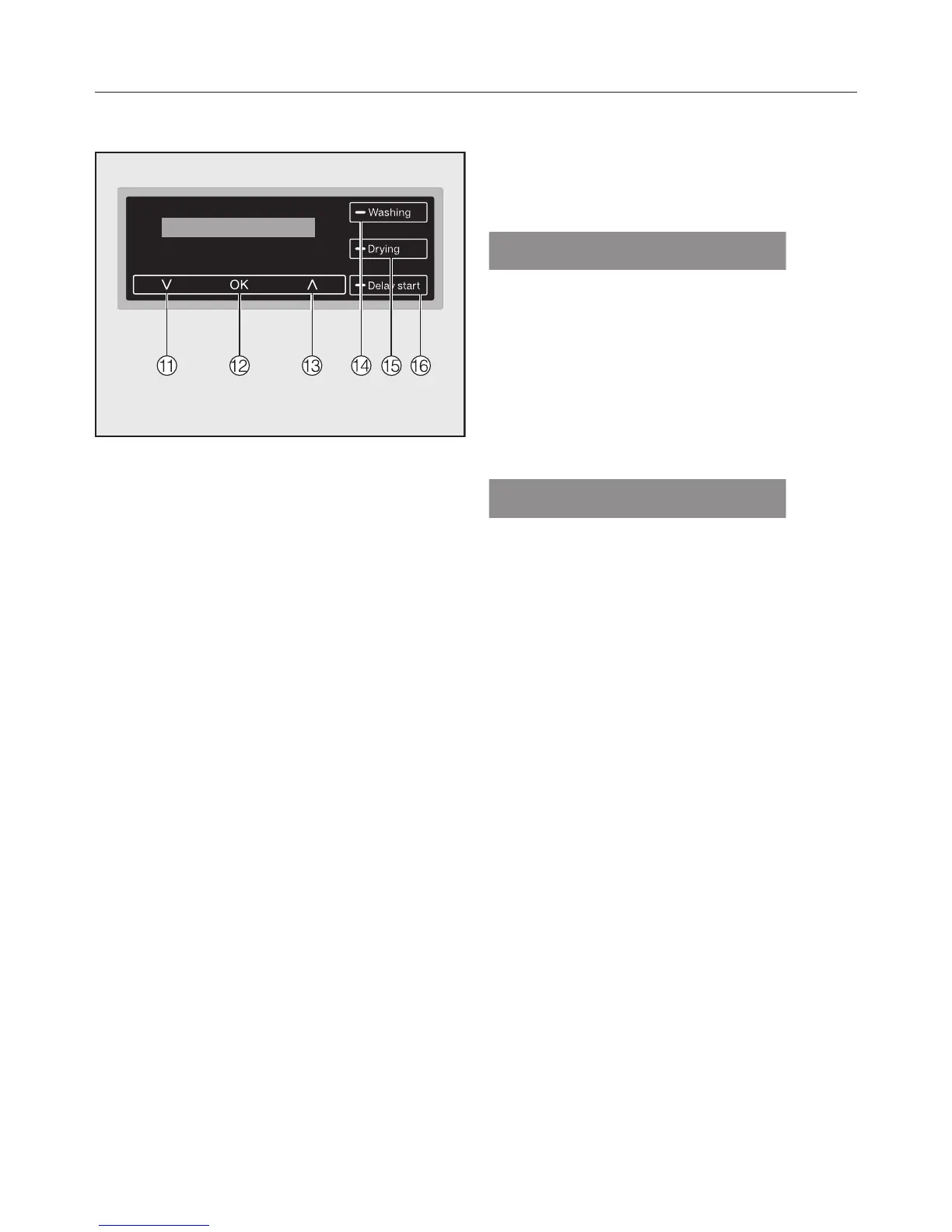
Display with sensor controls
k
sensor
Scrolls down the list to the next op-
tion or decreases a value.
l
OK sensor
Confirms the programme selected, a
value set or opens a sub-menu.
m
sensor
Scrolls up the list to the next option
or increases a value.
n
Washing sensor
For selecting the washing function
o
Drying sensor
For selecting the drying function
p
Delay start sensor
For selecting delay start
Standard display
The standard display for a wash pro-
gramme shows the following values
from left to right:
– the programme duration
– the selected wash temperature
– the selected spin speed
The standard display for a drying pro-
gramme shows the following values
from left to right:
– the programme duration
– the drying level selected (only briefly)
– the spin speed selected for the
thermo-spin (if applicable for the pro-
gramme being used)
The standard display of a continuous
programme for washing followed by
drying shows the following:
– the programme duration
– the drying level selected (only briefly)
– the selected wash temperature
– the selected spin speed
Tip: The illuminated and arrow
sensors can be used to see the drying
level selected.


 To Next Page
 Loading...