
 Need help?
Do you have a question about the Mighty Mule FM500 and is the answer not in the manual?
Classifies gate openers based on application type.
Procedure for manual gate operation and opener disconnection.
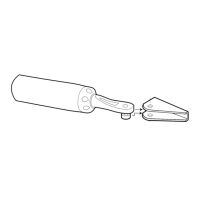
Steps to safely detach the opener for manual operation.
Safety checks and considerations before starting installation.
Safety precautions to follow during the installation process.
Post-installation safety requirements and maintenance.
Description of the audio alarm for entrapment events.
Instructions for placing warning signs on the gate.
Overview of safety devices for preventing entrapment.
Details on the gate opener's drive mechanism and performance.
Information on the system's power source and battery requirements.
Overview of the control board's features and capabilities.
Chart detailing gate cycles based on weight and length.
Determining the correct gate swing direction for installation.
Verifying gate dimensions and material compatibility.
Ensuring the gate is installed correctly for opener function.
Guidance for installing the opener on column-mounted gates.
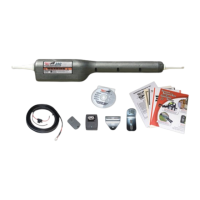
List of components provided with the gate opener kit.
List of tools required for installation.
List of necessary items not supplied with the kit.
Step-by-step instructions for mounting the pull-to-open configuration.
Instructions for installing the stop plate for the closed gate position.
Step-by-step instructions for mounting the push-to-open configuration.
Instructions for installing the stop plate for the closed gate position.
Guide for mounting and wiring the main control box.
Detailed steps for connecting the AC transformer power supply.
Instructions for installing the radio receiver for remote control.
Instructions for setting up the optional solar power system.
Guidance on connecting multiple solar panels in parallel.
Explanation of DIP switch functions for configuration.
Procedure to set the closed position limit for pull-to-open gates.
Steps to clear and reset the closed gate limit.
Procedure to set the open position limit for push-to-open gates.
Steps to clear and reset the open gate limit.
Adjusting safety sensitivity and auto-close duration.
Customizing the remote transmitter's access code.
General considerations for adding external devices.
Details on wiring and function of control inputs.
Wiring diagrams for common accessories like keypads.
Instructions for wiring the automatic gate lock.
Information on connecting devices like sirens or lights.
Regular care and upkeep for the gate opener.
Guide to diagnose and resolve operational issues.
Interpreting LED status lights for diagnostics.
Diagnosing issues related to power supply and battery.
Fields for recording product serial number and purchase details.
Details of the 5-watt solar panel charger.
Information on the wired doorbell button accessory.
Description of the lock that secures the opener to the gate.
Overview of the compact key chain transmitter.
Details of the standard entry transmitter.
Information on the programmable digital keypad.
Details of the pedestal for mounting access control devices.
Description of the electromagnetic vehicle detection sensor.
Information on the automatic lock for added security.
Overview of the wireless intercom and keypad system.
Details on the approved 12-volt replacement battery.
Information on the recommended wire for connections.
Description of the bracket for push-to-open configurations.
Details on mounting the lock receiver in limited spaces.
Information on the approved AC transformer.
Overview of the receiver for operating garage doors.
 General
| Maximum Gate Weight | 500 lbs |
|---|---|
| Maximum Gate Length | 16 ft |
| Control Type | Remote control |
| Battery Backup | Yes |
| Type | Swing Gate Opener |
| Gate Type | Swing |
| Battery Included | No |
| Solar Compatible | Yes |
| Solar Panel Included | No |
| Remote Controls Included | 2 |
| Weather Resistance | Yes |
| Installation | DIY |
| Warranty | 1 Year |
| Battery Type | 12V DC |
| Motor Type | DC motor |








 To Next Page