Enable digital input to detect status and upload the data.
Click to get the current input status.
It’s recommended to enable when pulse period is greater than 250 us.
Click to start/stop counting. Note that UC300 will send non-changeable
counting values if you do not click “Start”.
Refresh to get latest counter values.
Note: the counting value will lose if UC300 loses the power.
4.3.3 Digital Output Settings
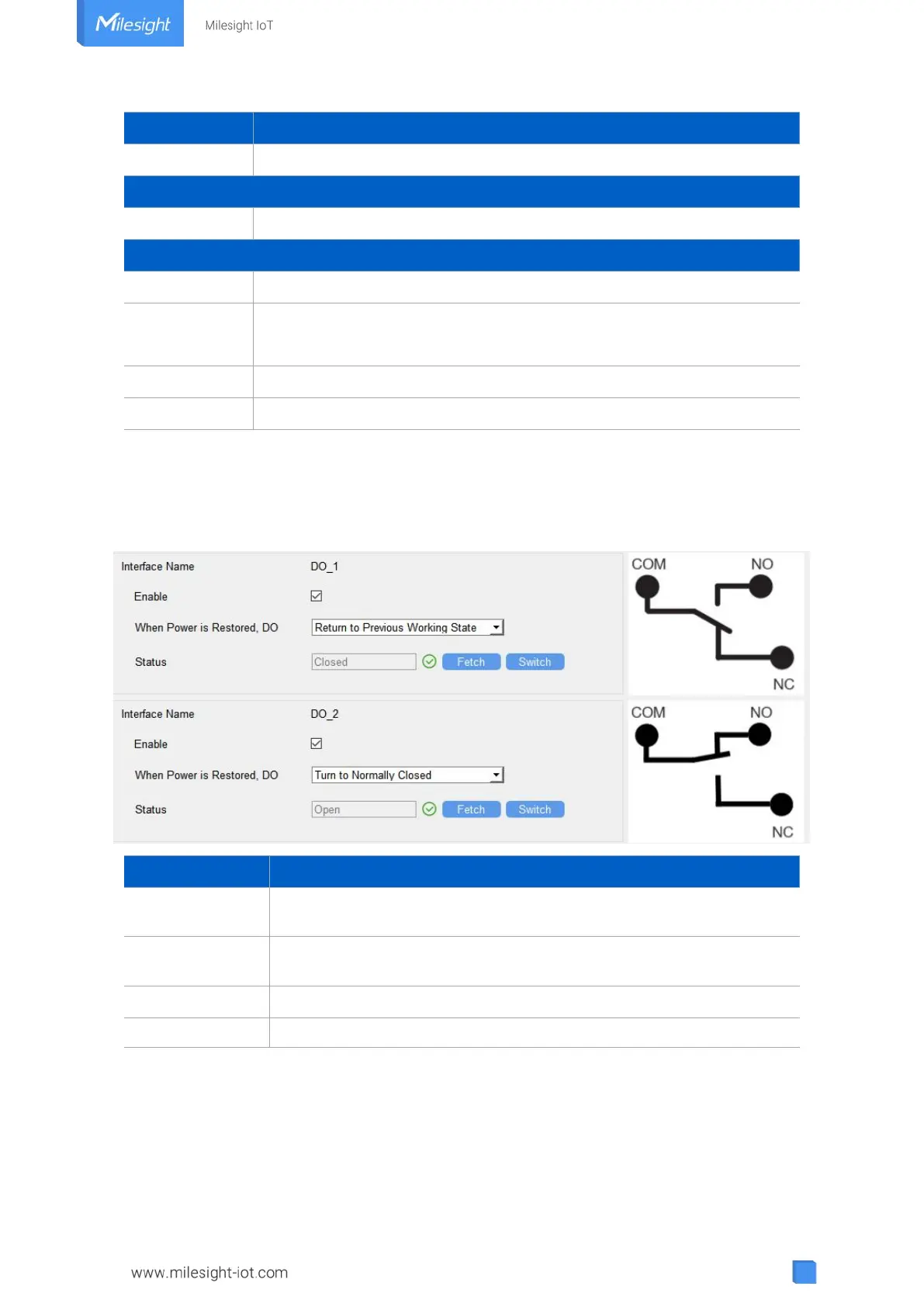
UC300 supports 2 digital outputs to control the devices.
Enable the digital output to control the device and upload changed
status.
When Power is
Restored, DO
After the device power is restored, the DO status will return to normally
closed or normally open according to this parameter.
Click to get the current output status.
Click to change the DO status.
4.3.4 RS485 Settings
UC300 has one RS485 port for Modbus RTU device connection.
1. Connect RS485 device to RS485 port.
2. Go to “General -> RS485” to enable RS485 and configure serial port settings. Serial port



 To Next Page