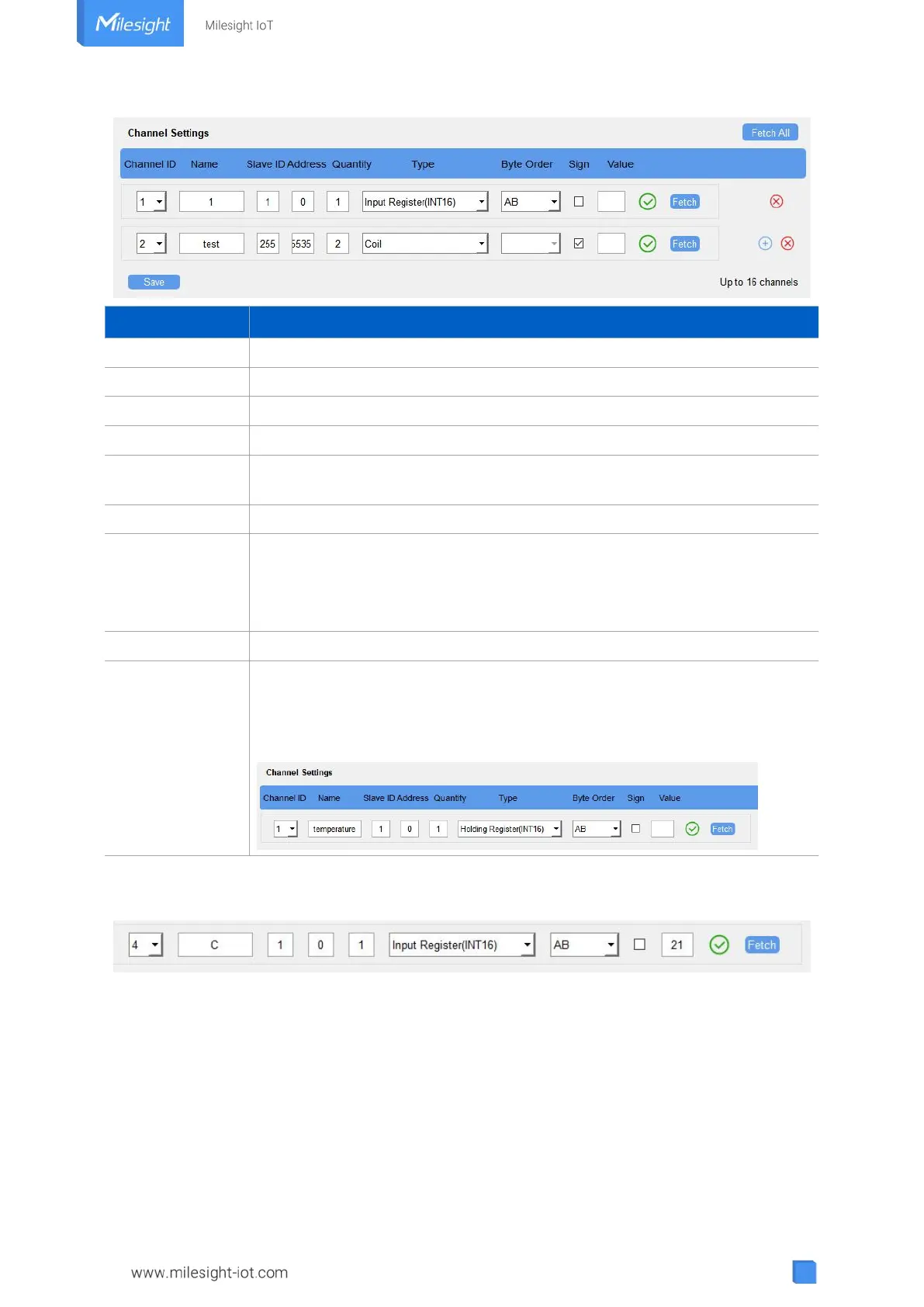
Select the channel ID you want to configure from 16 channels.
Customize the name to identify every Modbus channel.
Set Modbus slave ID of terminal device.
The starting address for reading.
Set read how many digits from starting address. For LoRaWAN
®
version, it
fixes to 1; for cellular version, it can be set as 1 to 4.
Select data type of Modbus channels.
Set the Modbus data reading order if you configure the type as Input register
or holding register.
INT32/Float: ABCD, CDBA, BADC, DCBA
INT16: AB, BA
The tick indicates that the value has a plus or minus sign.
After click, UC300 will send Modbus read command to test if it can read
correct values.
Example: as this setting, the device will send command: 01 03 00 00 00 01
84 0A
4. Click “Fetch” to check if UC300 can read correct data from terminal devices.
Note: Do not click “Fetch” frequently since response time to reply is differ for every terminal
device.
4.3.5 RS232 Settings
UC300 has one RS232 interface for transparent communication. Usually it will use different
tunnels from other data interfaces to communicate with server.



 To Next Page