Reset
Cumulative
Count on
Schedule
Enable to periodically reset cumulative count on schedule.
Cumulative Count includes:
Total In/Out counting of each detection line.
Max./Avg. Dwell Time of each detection region.
Report the people counting data periodically.
Set the period of reporting periodic report.
Range: 1-1080 mins, default: 10 mins
Report immediately when there is a change of the line cross people
counting number or region people counting number.
Note:
Due to the error in ToF distance measurement (0.035 m), the Max. Target Height should be set
as maximum pedestrian height plus 0.035 m and the Min. Target Height as minimal pedestrian
height minus 0.035 m in the actual applications. For example, if the pedestrian height is 1.6 m to
1.8 m, the Max. and Min. Target Height should be configured as 1.835 m and 1.565 m
respectively.
5.3 Communication
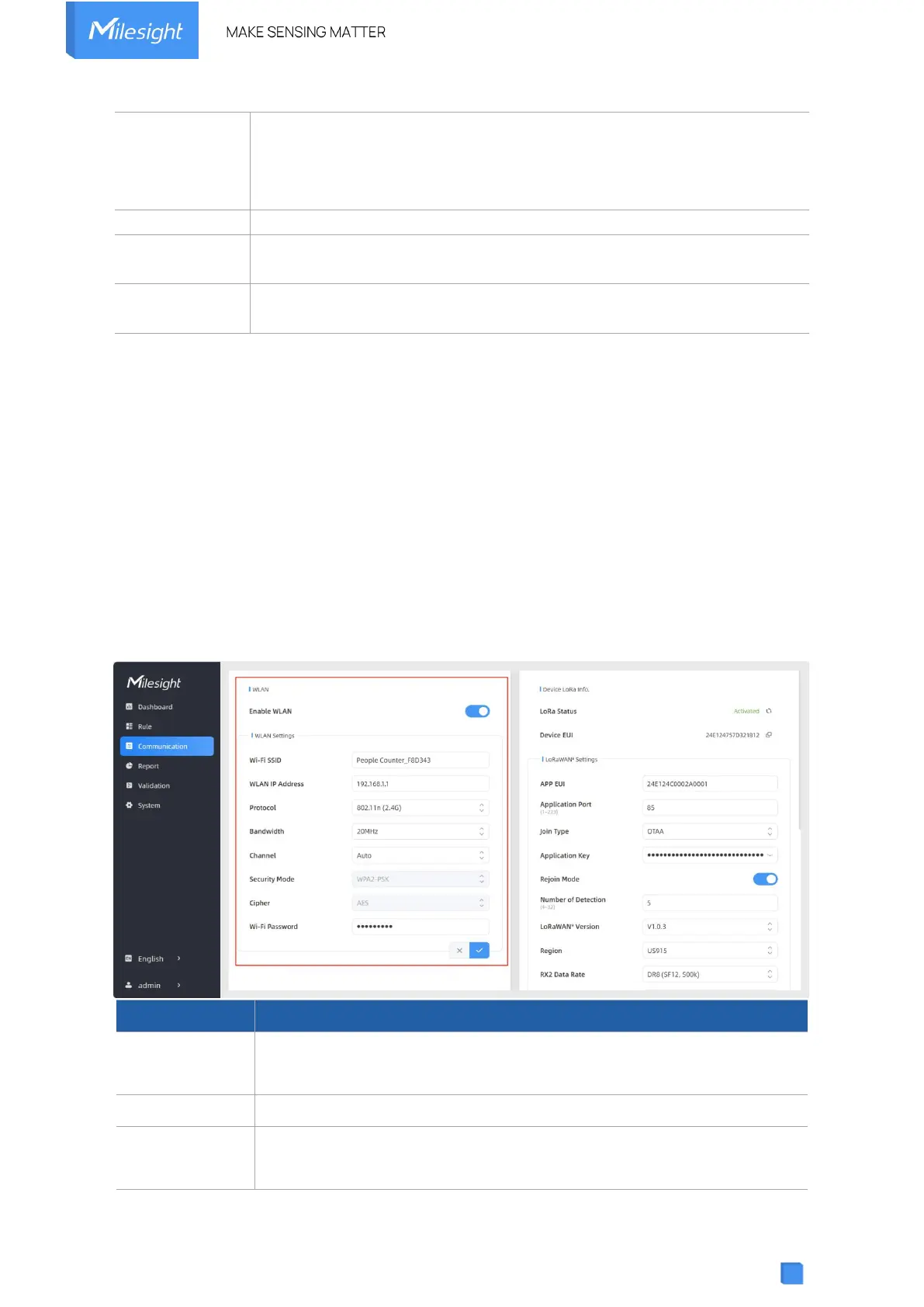
5.3.1 WLAN
VS133 supports wlan feature to work as AP mode to configure device and it can not connect to
other access point.
Enable or disable Wi-Fi feature. If disabled, users can use button or
LoRaWAN
®
downlink command to enable it.
The unique name for this device Wi-Fi access point.
Configure WLAN IP address for web access, the default IP address is
192.168.1.1.



 To Next Page