12
3-3-2. Selecting Calibration Mode
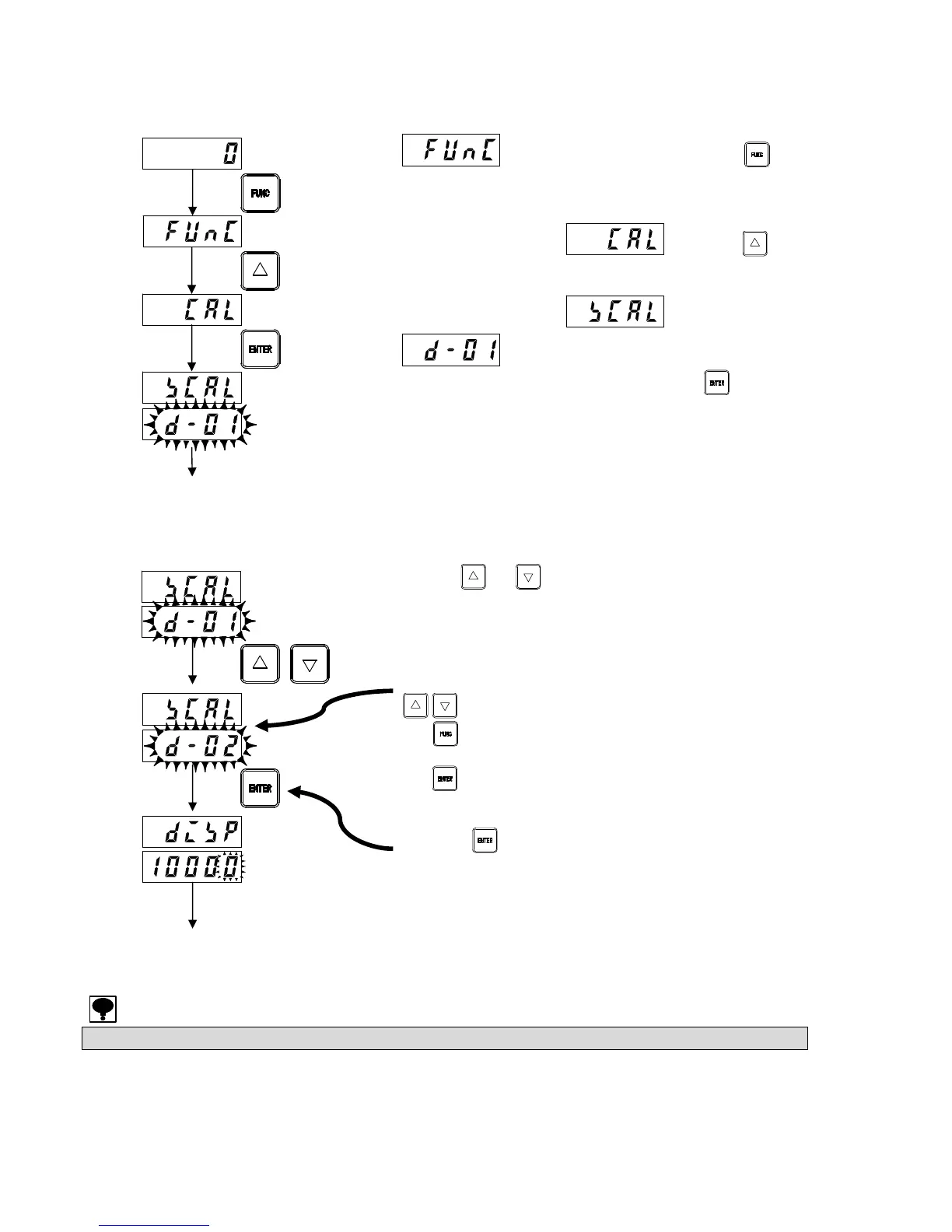
Calibration mode can be selected from measurement mode as follows.
appears in the upper part when the key
is depressed for approximately 2 seconds in measurement
mode.
The upper display reads when the key
is pressed.
The upper display reads and
flashes on the lower display, indicating
calibration mode has been selected when the key is
pressed.
(If the equipment has been previously calibrated, the
minimum scale division registered at that time will be
displayed.)
3-3-3. Minimum Scale Division Setting
Set the minimum scale division for torque.
Use the or key to set the required minimum scale
division on the lower display. Select from [1], [2], [5], or [10].
* Enter value (1) on the calibration certificate sheet. (No
decimal point)
For example, if the minimum digit is 100.00 N·m, set to [d-01].
: Selects the minimum scale division.
: Cancels the setting and returns to
measurement mode.
: Registers the value displayed and proceeds
to the next step.
Press the key after setting. (If the equipment has been
previously calibrated, the torque value registered at that time
will be displayed.)
The maximum readout resolution for valid performance is 10,000.
Measurement
mode
To minimum scale
division setting
Registered minimum
scale division
Registered minimum
scale division
Minimum scale
division used
To torque setting
Registered torque
value



 To Next Page