5
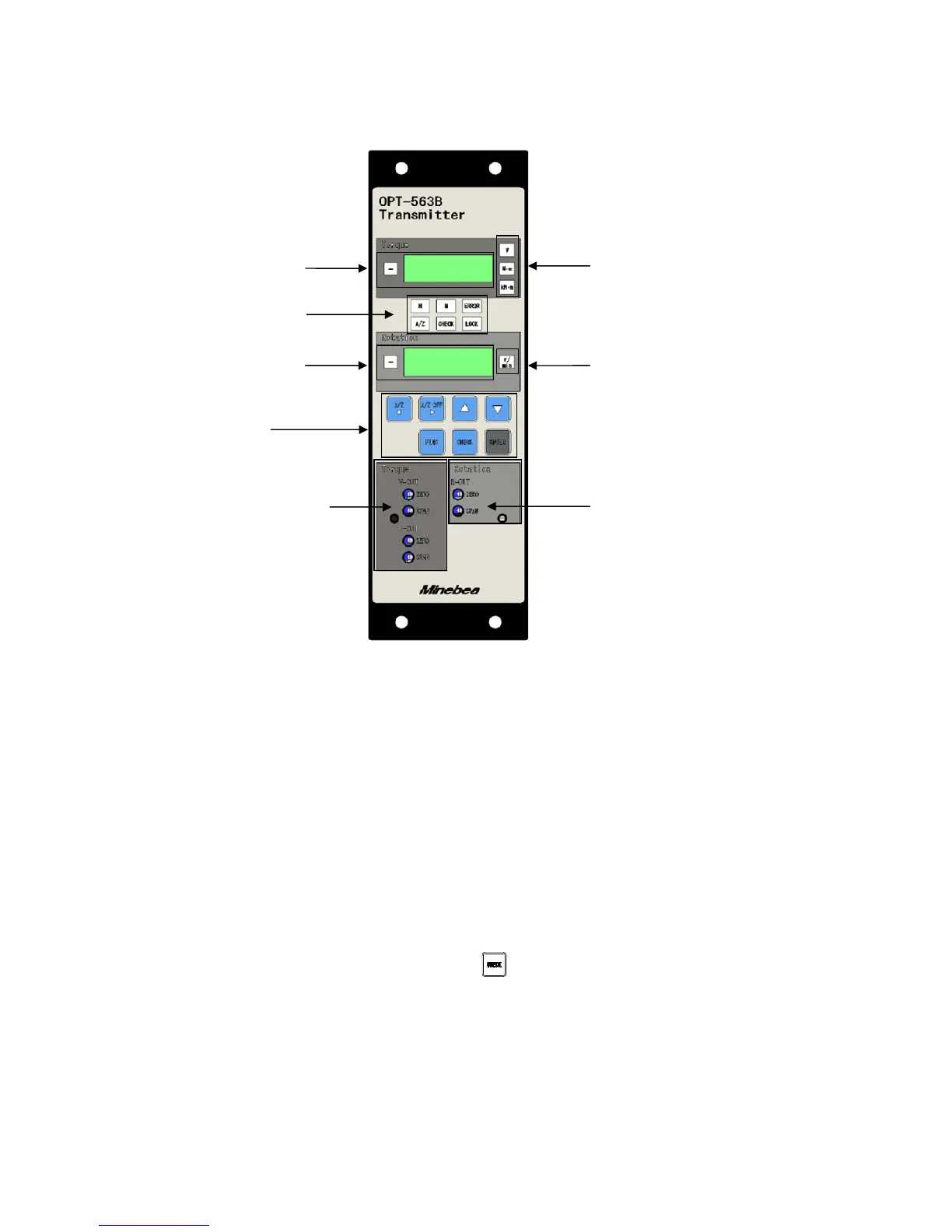
1. Part Names and Functions
1-1. Front Panel
(1) Torque units display
Displays the measurement units set.
(2) Torque display
Displays the torque reading and [OL] (for over limit).
(3) Status display
Indicates the OPT-563B status.
H : Illuminates when the torque meter light level is normal.
M : Illuminates when the torque meter light level is low.
Note that [M] does not illuminate if used in conjunction with the DBX-001 power
supply box.
A/Z : Illuminates when the A/Z function operates.
CHECK : Illuminates when the key is pressed to turn CHECK on.
LOCK : Illuminates when external control input LOCK to COM1 is short-circuited.
ERROR : Illuminates when an error signal is output.
(4) Rotation speed units display
Displays the rotation speed units.
(4) Rotation speed units
display
(2) Torque display
(1) Torque units display
(3) Status display
(6) ~ (12) Key
switches
(13) Torque analog output
trimmer section
(14) Rotation speed analog
output trimmer section
(5) Rotation speed
display



 To Next Page