15
3-3-6. Zero Calibration
Register the input at the zero point.
To calibrate by entering the torque value for the torque transducer, press the key and then press
the key.
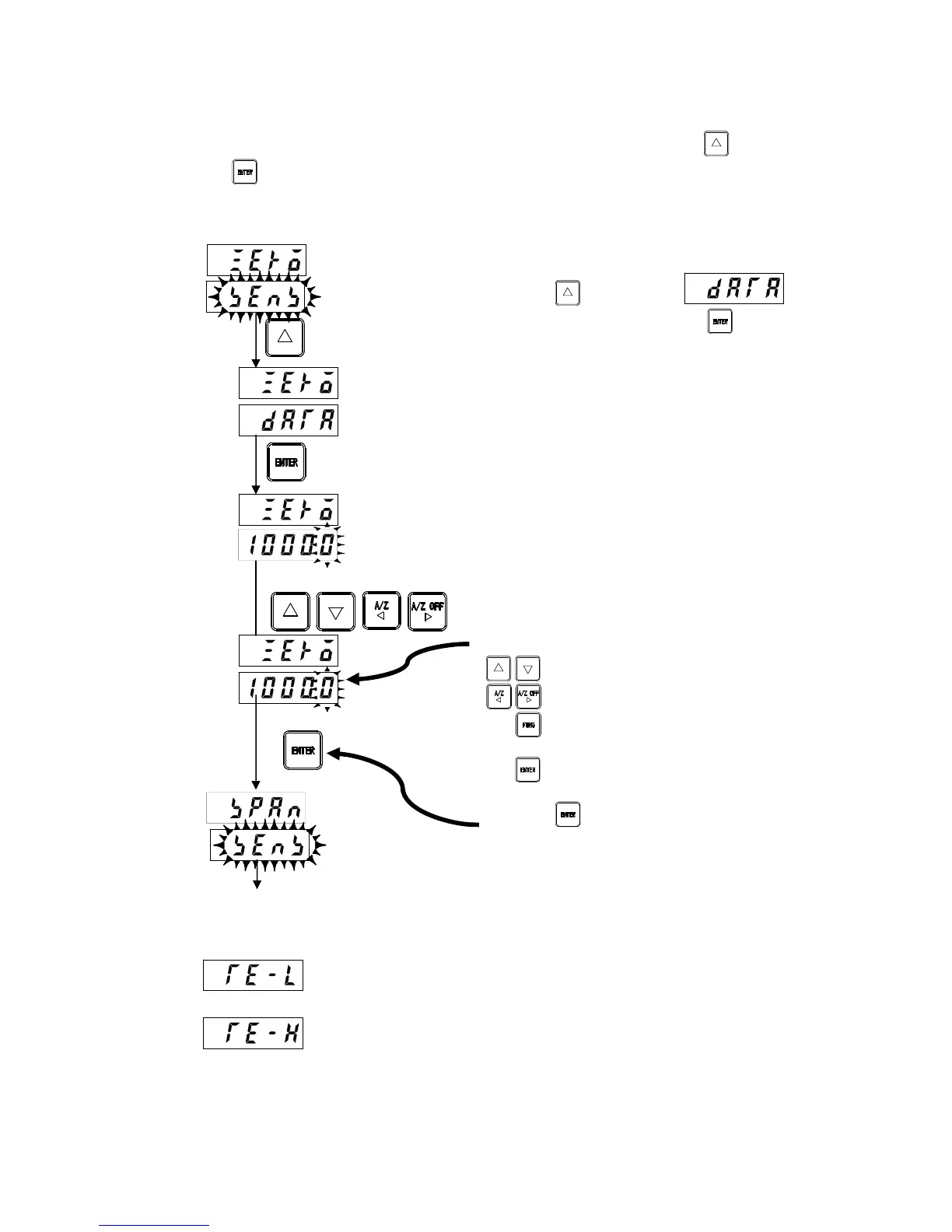
Calibrate zero by entering the zero point torque (frequency) for the torque transducer.
Calibration by entering the torque value for the torque
transducer
Press the key to display in the
lower display, and then press the key to display the
value.
The value displayed will be the output frequency for the
torque transducer at the initial torque state previously
registered.
Set the torque value (frequency) corresponding to the zero
point in 1 Hz intervals.
* Enter the torque calibration value zero frequency
included on the calibration certificate sheet for the torque
transducer.
* Enter value (4) on the calibration certificate sheet. (No
decimal point)
For example, if the torque calibration value (zero) is
9.957 kHz, set to [9957].
: Alters the value of the digit to be altered.
: Selects the digit to be altered.
: Cancels the setting and returns to
measurement mode.
: Registers the value displayed and
proceeds to the next step.
Press the key after setting.
Zero calibration error display
: The display flashes for approximately 2 seconds when the torque transducer
frequency output is less than 9,500 Hz or if the value entered is less than 9,500 Hz.
: The display flashes for approximately 2 seconds when the torque transducer
frequency output exceeds 10,500 Hz or if the value entered exceeds 10,500 Hz.
To span calibration
Hz
Registered torque transducer output
value
Hz
Set torque transducer output value



 To Next Page