18
3-4. Zero/Span Fine Adjustment Function
This function fine-adjusts the zero point and span point if there are discrepancies between the actual
torque and the reading displayed.
3-4-1. Selecting Zero Point Fine-adjustment Mode
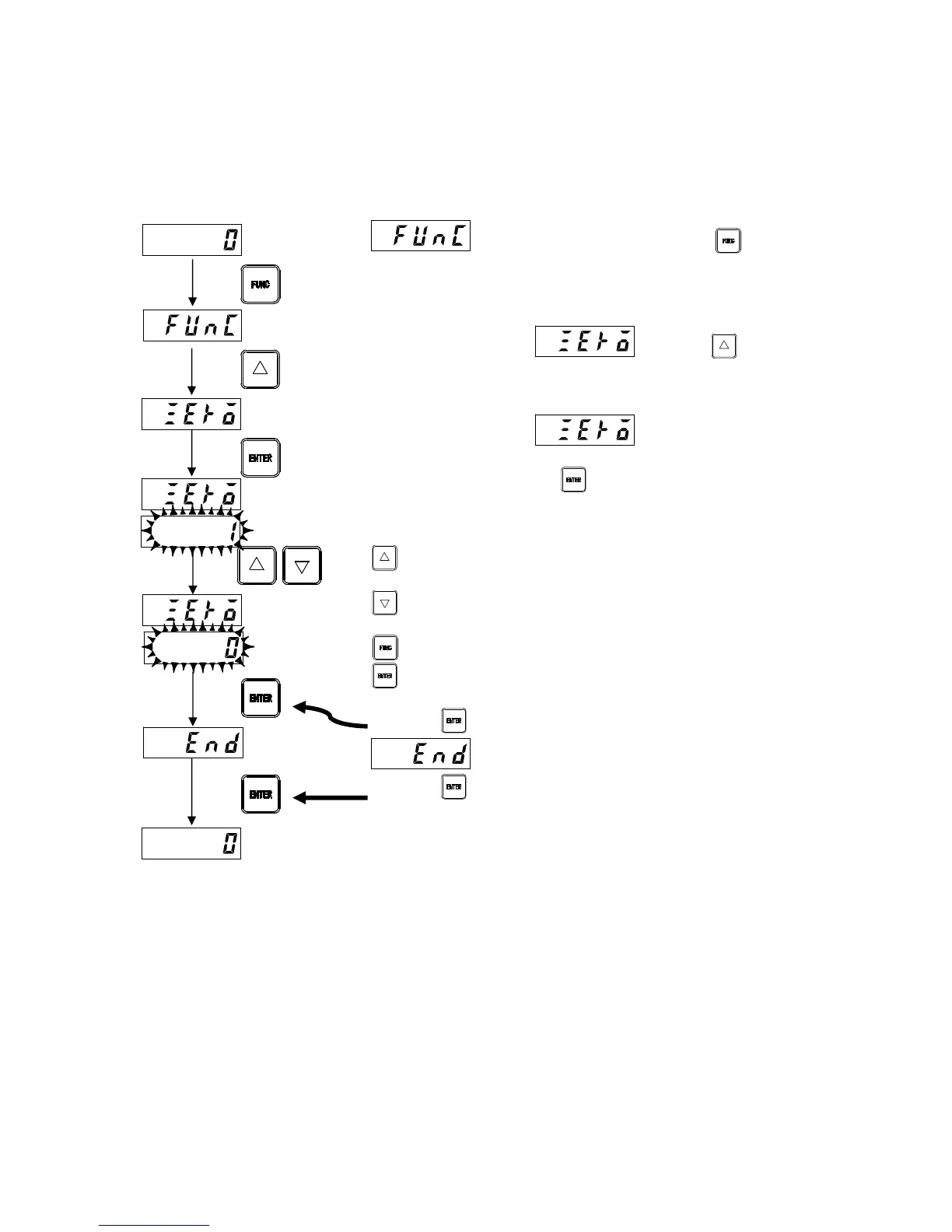
Zero point fine-adjustment mode can be selected from measurement mode as follows.
appears in the upper part when the key is
depressed for approximately 2 seconds in measurement mode.
The upper display reads when the key is
pressed twice.
The upper display reads and the reading on the
lower display flashes, indicating zero point fine-adjustment mode
has been selected when the key is pressed. The lower display
displays the torque value currently entered. Set the torque
transducer to the initial torque state, and adjust the display to
[ZERO].
: Increments the torque.
Hold down the key to increment the torque continuously.
: Decrements the torque.
Hold down the key to decrement the torque continuously.
: Cancels the setting and returns to measurement mode.
: Registers the value displayed and proceeds to the next
step.
Press the key after setting.
is displayed after zero point fine-adjustment.
Press the key to exit zero point fine-adjustment mode. The
system switches to measurement mode and the data set is
registered.
Measurement
mode
Current
torque value
(twice)
Measurement
mode



 To Next Page