EasyManua.ls Logo

miniDSP DDRC-24 - User Manual

miniDSP DDRC-24
64 pages
Print Icon
To Next Page IconTo Next Page
Loading...
miniDSP Ltd, Hong Kong / www.minidsp.com / Features and specifications subject to change without prior notice 1
DDRC-24
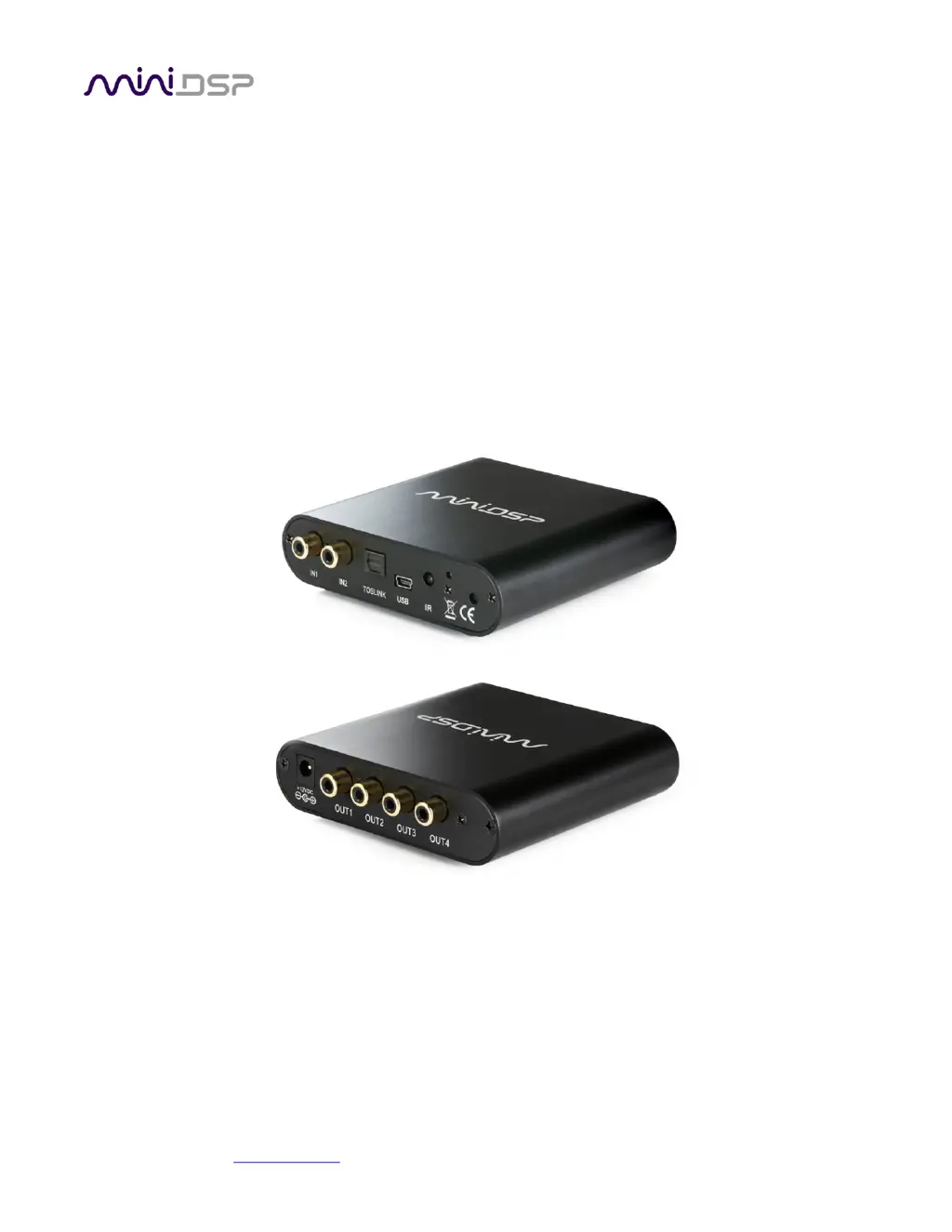
ULTRA-COMPACT 2-IN 4-OUT AUDIO PROCESSOR WITH
DIRAC LIVE® ROOM CORRECTION TECHNOLOGY
User Manual

Table of Contents

Questions and Answers

  • W
    Wanda MyersSep 9, 2025
    Why can't I reload a configuration on my miniDSP Recording Equipment?
    • K
      Kevin MosleySep 10, 2025
      If you cannot reload a configuration on your miniDSP Recording Equipment, confirm the file format of your file is .xml and confirm the version of the file.
  • M
    Marie ShortSep 12, 2025
    What to do if the DDRC-24 doesn’t appear in the Sound System tab for miniDSP Recording Equipment?
    • A
      Alexandra WigginsSep 12, 2025
      If the DDRC-24 doesn’t appear in the Sound System tab for your miniDSP Recording Equipment, re-read the installation instructions and confirm that you have executed the 'copy.bat' (Windows) or 'copy.command' (Mac) batch/command file. Make sure that you quit DLCT before doing it. Check that the USB cable to the DDRC-24 is firmly connected and that you do not have any other program running that is attempting to communicate with the DDRC-24, such as the DDRC-24 plugin. Ensure that you have the miniDSP version of the software installed, called Dirac Live Calibration Tool For miniDSP. Finally, go to the Sound System tab and click the Rescan button.
  • M
    Matthew CarterSep 14, 2025
    Why doesn't the Dirac activation screen recognize the serial number for miniDSP DDRC-24?
    • C
      Carmen AndersonSep 14, 2025
      If the Dirac activation screen does not recognize the serial number for your miniDSP Recording Equipment, do not use the serial number printed on the label of the unit. You must use the serial number obtained from the firmware using the DDRC-24 plugin program.
  • B
    Benjamin MillerSep 16, 2025
    Why doesn’t the license validation screen accept my username and password for miniDSP DDRC-24 Recording Equipment?
    • S
      Stephen OrtizSep 16, 2025
      If the license validation screen doesn’t accept your username and password for your miniDSP Recording Equipment, the 'username' must be the email address that you used when activating your license on the Dirac Live activation screen. Check that you are using the same email address and password.

Summary

Important Information

System Requirements

Specifies minimum hardware and operating system requirements for configuring the DDRC-24 audio processor.

Software Installation and License Activation

Configuring with the DDRC-24 Plugin

Acoustic Measurement for Dirac Live

Measurement Setup and Positioning

Guidelines for loudspeaker/microphone positioning and required connections for acoustic measurements.

Dirac Live Calibration Process

Running Measurements

Procedures for executing acoustic measurements, managing listening environments, and saving projects.

Designing Your Target Curve

Guides on creating, editing, and adjusting the desired in-room frequency response target curve.

Dirac Live Filter Design and Loading

Firmware Upgrade

Troubleshooting and Support

Plugin and Dirac Live Issues

Common problems and solutions for the DDRC-24 plugin and Dirac Live calibration software.

miniDSP DDRC-24 Specifications

General IconGeneral
Input Channels2
Output Channels4
Sample RateUp to 96 kHz
Bit Depth24-bit
Digital Signal ProcessingYes
Weight0.5 kg
DSP Resolution32-bit floating point
THD+N<0.005%
USB AudioYes
Signal to Noise Ratio> 100 dB
Dirac LiveYes
USB Audio InterfaceYes
Room CorrectionYes
CompatibilityWindows, macOS
Frequency Response20 Hz - 20 kHz
Digital InputToslink (optical)
Input TypeRCA (unbalanced), Toslink (optical)

Related product manuals