EasyManua.ls Logo

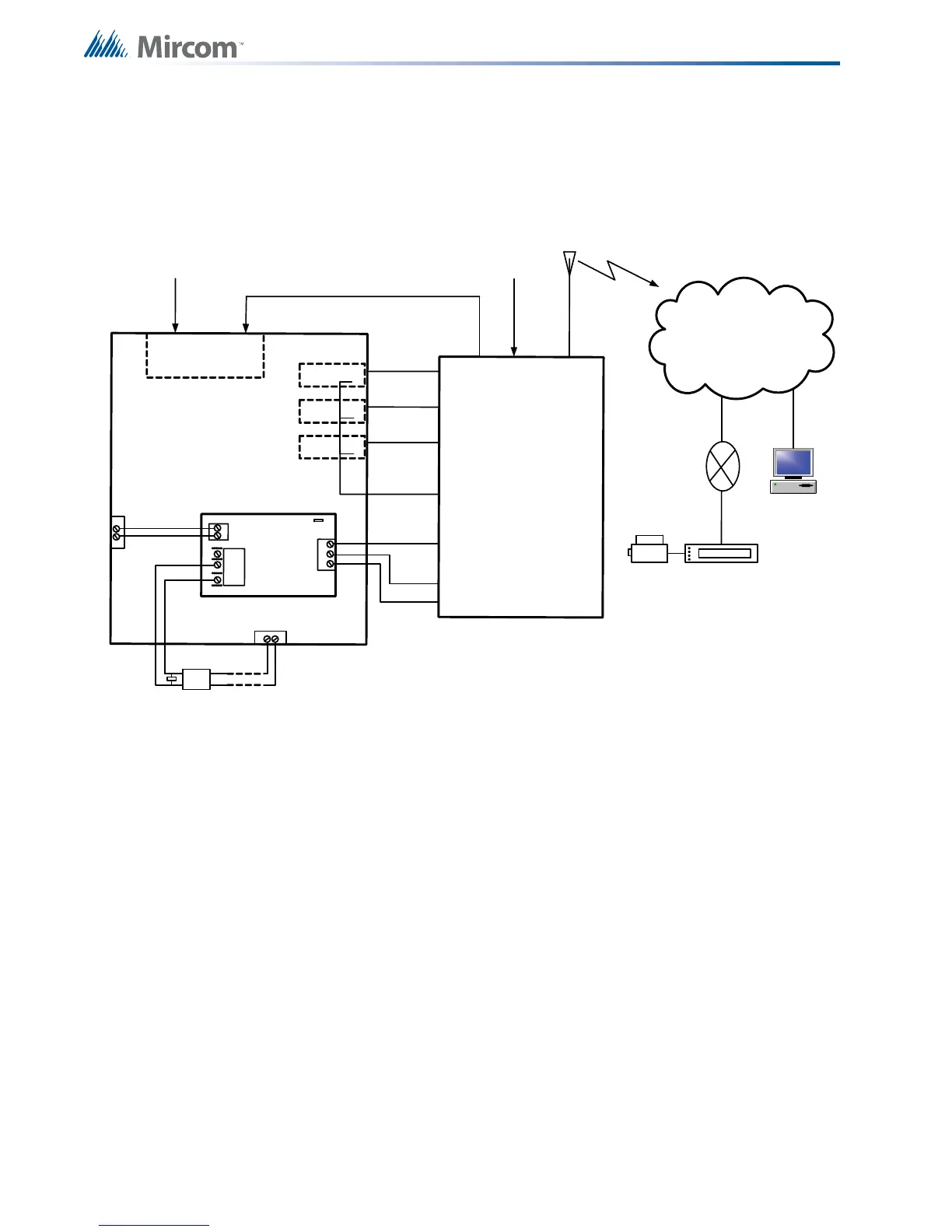
Mircom FX-3500 - Connecting to a DCS Surguard Receiver; Figure 20 Connecting an FX-3500 FACP to a DCS Surguard System Receiver

Mircom FX-3500
112 pages
Print Icon
To Next Page IconTo Next Page
To Previous Page IconTo Previous Page
Loading...
74
Wiring
7.5.2 Connecting to a DCS SurGuard Receiver
A typical connection is shown in Figure 20. For information on Compatible DACR Receivers
see Chapter 8.0 Appendix A - Compatible Receivers.
Figure 20 Connecting an FX-3500 FACP to a DCS Surguard System Receiver
A
L
A
R
M
R
E
L
A
Y
S
P
V
R
E
L
A
Y
T
R
B
L
R
E
L
A
Y
F
X
-
3
5
0
0
R
i
n
g
T
i
p
Telephone
Line A
Connection
G
S
3
0
6
0
G
S
3
0
6
0
T
R
B
L
1
2
V
E
O
L
3
.9
K
-
A
l
l
u
n
it
s
m
u
s
t
b
e
i
n
s
t
a
l
le
d
in
t
h
e
s
a
m
e
ro
o
m
.
-
A
ll
e
x
t
e
n
d
e
d
w
i
r
in
g
m
u
s
t
b
e
i
n
c
o
n
d
u
i
t
.
-
D
is
ta
n
c
e
m
a
x
1
8
m
t
s
-
R
e
p
r
o
g
r
a
m
m
e
s
s
a
g
e
s
fr
o
m
G
S
3
0
6
0
Z
1
,
Z
2
,
a
n
d
Z
3
To GSM/GPRS
T
yp
i
c
a
l
In
s
t
a
ll
a
t
i
o
n
in
C
a
n
a
d
a
Line 2
Ring
Tip
Line 1
Ring
Tip
PCS-100
P
O
W
E
R
2
4
V
G
N
D
P
G
M
4
G
N
D
1
4
V
N
C
C
O
M
N
O
T
B
L
R
E
L
A
Y
J
W
1
1
0
P
G
M
4
AUX 1
+
-
+
-
L
o
o
p
1
M
5
0
2
M
A
P
Internet
Computer
Printer
SUR-GARD
SYSTEM II
Internal IP: X.X.X.X
External IP: X.X.X.X
SG-Systems
Console 2.1
Default Gateway: X.X.X.X
Sub-Net Mask:X.X.X.X
Port #: YYYY (UDP)
Router
F
X
-
3
5
0
0
G
S
3
0
6
0
C
o
n
n
e
c
t
i
o
n
T
y
p
i
c
a
l
D
i
a
g
r
a
m
N
O
C
N
O
C
N
O
C
1
4
C
O
M
1
7
Z
3
1
6
Z
2
1
5
Z
1
T
1
R
1
Telephone
Line B
Connection
2
0
(
-
)
1
9
(
+
)

Table of Contents

Related product manuals