107
7521
7521
Plus / N N/B MAINTENANCE
Plus / N N/B MAINTENANCE
Symptom:
Symptom:
When the power button is pressed, nothing happens, no fan activi
When the power button is pressed, nothing happens, no fan activi
ty is heard and power indicator is not light up
ty is heard and power indicator is not light up
.
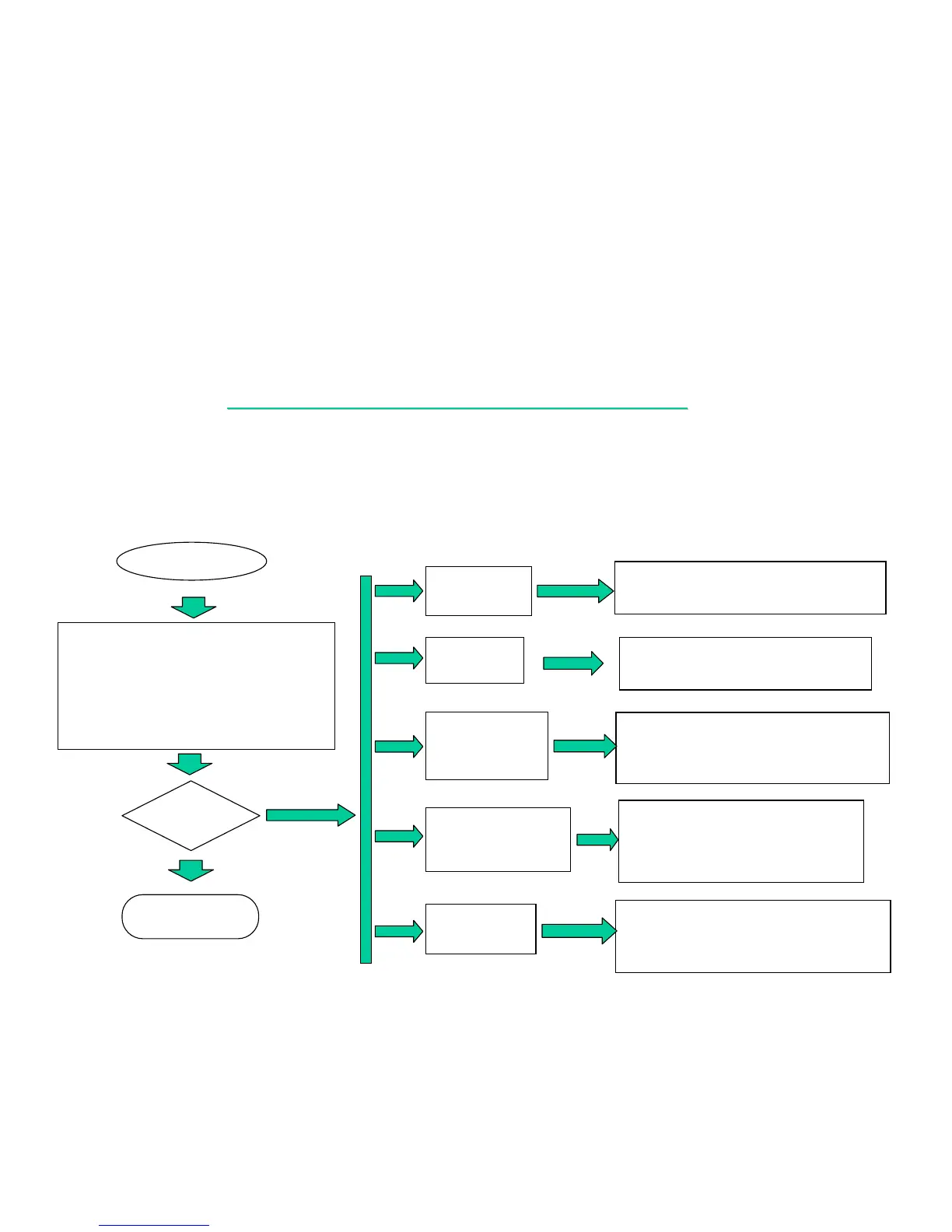
8.1 NO POWER:
.
CONTINUE
2. Check the power source
from AC adapter. (PJ501)
PL501
PF501
PC2
PC509 PR15 PR16
PD501 PR14 PD3
PU2 PR13 ……..
SIGNAL: PARTS:
ADINP
LEARING
POWER
OK?
END
NO
If “D/VMAIN”
failure.
CHECK: PD3,PD4,PL3,PR20,PR21,PQ12,
PU9,PR23,PC58,PC57…….
CHECK : PD1,PD2,F2,U32,C247,Q22....
If “VDD5”
failure.
If “VCC_CORE”
(CPUVCC)
failure.
CHECK: PL12,PU18,PU12,PU19,PU20,
PU22,PU23,PL11,PD21,PR79,
PR80,PC122,PC119,PC123,….
CHECK : PU10,PQ502,PQ503,PQ7,
PQ9,PL504,PD505,PU501,
PD502,PL503,PR1,PL502,
PR3,PD504…….
If “+S12V, +S5V_P
or +S3V_P” failure.
YES
CHECK: PU14,PU4,PU5,PD7,PD8,PD10,
PD11,PD15,PL5,PL6,PR32,PR35
,PR46,PR47,PR41,PR42….
If “1.5V, 1.8V”
Failure.


 To Next Page