32/1531-ANF 901 43 Uen B2 2016-04-01
Installation Guide
Base Station
16
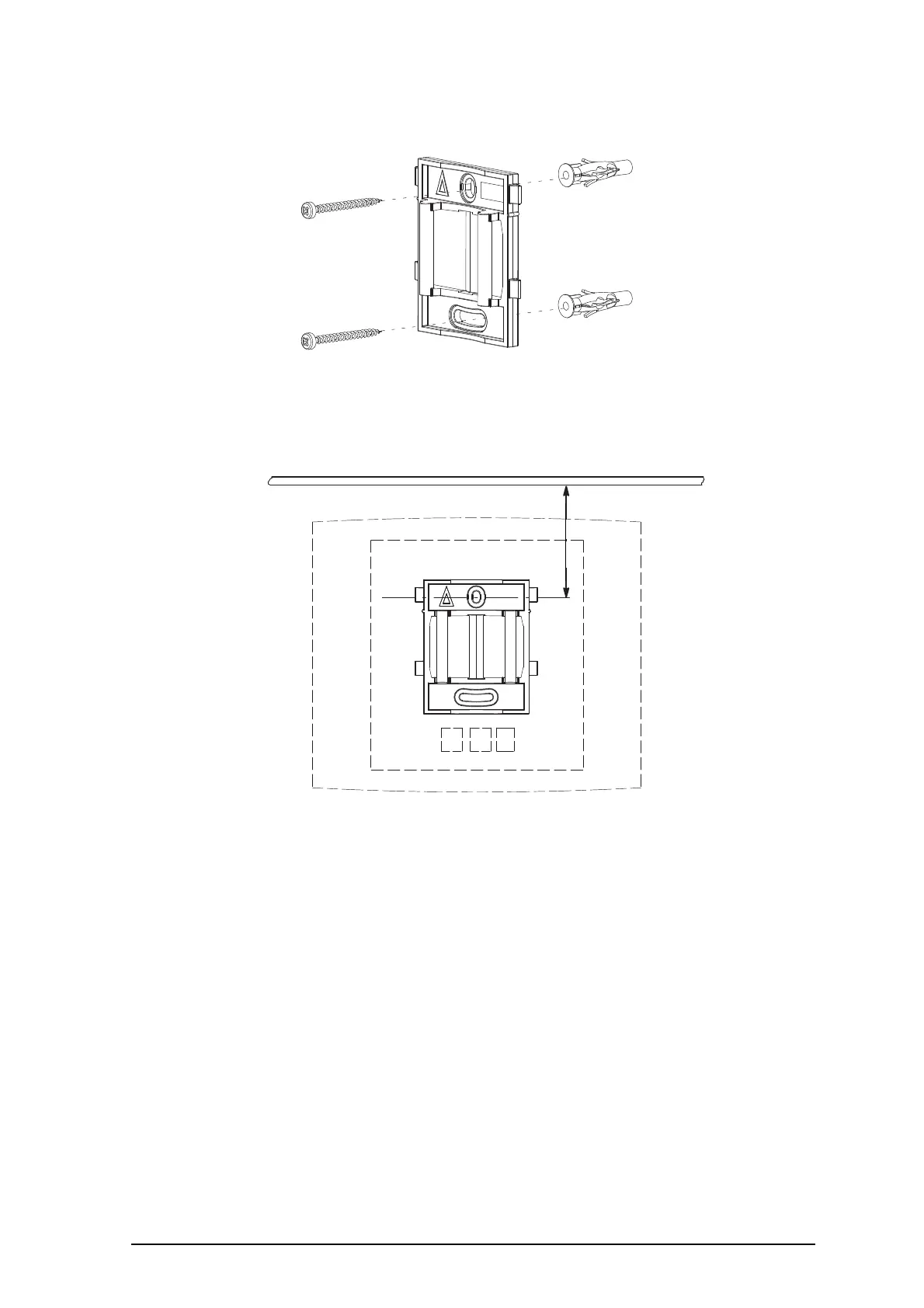
Figure 7. Fixing the mounting bracket to a wall.
3.2.2 FIX THE MOUNTING BRACKET TO A CEILING
Fixing to a ceiling is done in the same way as the a wall, see 3.2.1 Fix the Mounting
Bracket to a Wall. When the base station has to be positioned above a suspended
ceiling, make sure that the front of the base station points downwards.
3.2.3 FIX THE MOUNTING BRACKET TO A POLE OR BEAM
The mounting bracket can be fixed to a pole (diameter 45 mm) or a beam (wider than
50 mm) by means of a strap or flexible band less than 30 mm wide. The strap or
flexible band is not included in the box.
1 Fix the mounting bracket to a pole or beam using the band, see figure 8 on page
17.
TOP
100 mm (IPBS442, BS342)
65 mm (IPBS440)
Ceiling
011
65 mm IPBS430, BS330
100 mm IPBS4x2, BS3x2
156 mm IPBS440, BS340



 To Next Page