5.
Handing
Component Equipment
Modules
MELSEC
GOT
5.2
Memory
Cassettes
5.2.1
Types
of
memory cassettes
Product Contents
Model
I
Circuit monitor
cassette
I
A8GT-MCAM
For circuit monitor functions
A8GT-MCA1 MFDW
cassette
Internal
memory
expansion
1
M
byte
t
circuit
monitor
fundtions
Internal memory expansion
4M
byte
t
circuit
monitor
fundtions
A8GT-MCA4MFDW
Internal
memory
expansion
2M
byte
t
circuit
monitor
fundtions
A8GT-MCA2MFDW
Expanded
memory
5.2.2
lnstallina and removing memow cassettes
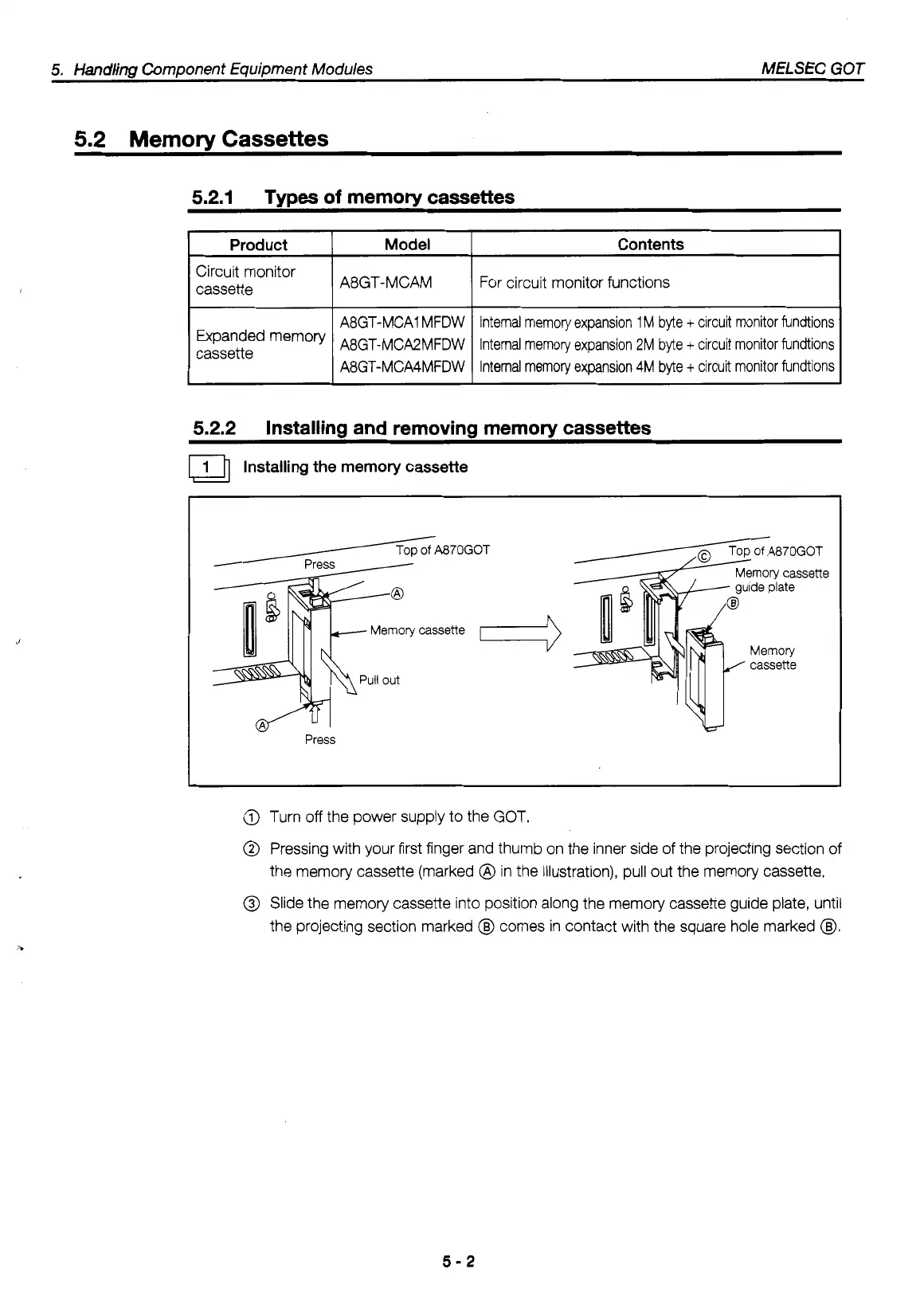
Installing the memory cassette
Memory
cassette
i
Press
@)
Turn
off
the power supply to the GOT.
@
Pressing with your first finger and thumb on the inner side of the projecting section
of
the memory cassette (marked
@
in the illustration), pull out the memory cassette.
@
Slide the memory cassette into position along the memory cassette guide plate, until
the projecting section marked
@I
comes in contact with the square hole marked
@I.
5-2
.



 To Next Page
 Loading...