lel
Setting the clock
Your TV contains an internal clock. If there is a broadcaster in your
area that is sending the current time atoag with its regular broad-
cast signal, then your TV can automatically set its clock with this
signal. Otherwise, you can set the clock yourselfi
[]'TV Main Menu
[] First Time Setup
[] Customize Display
r_ Advanced Features
[] Select AN Memory
-_ DJUST to select
ENTER to enter
r_7 MENU to exit menus
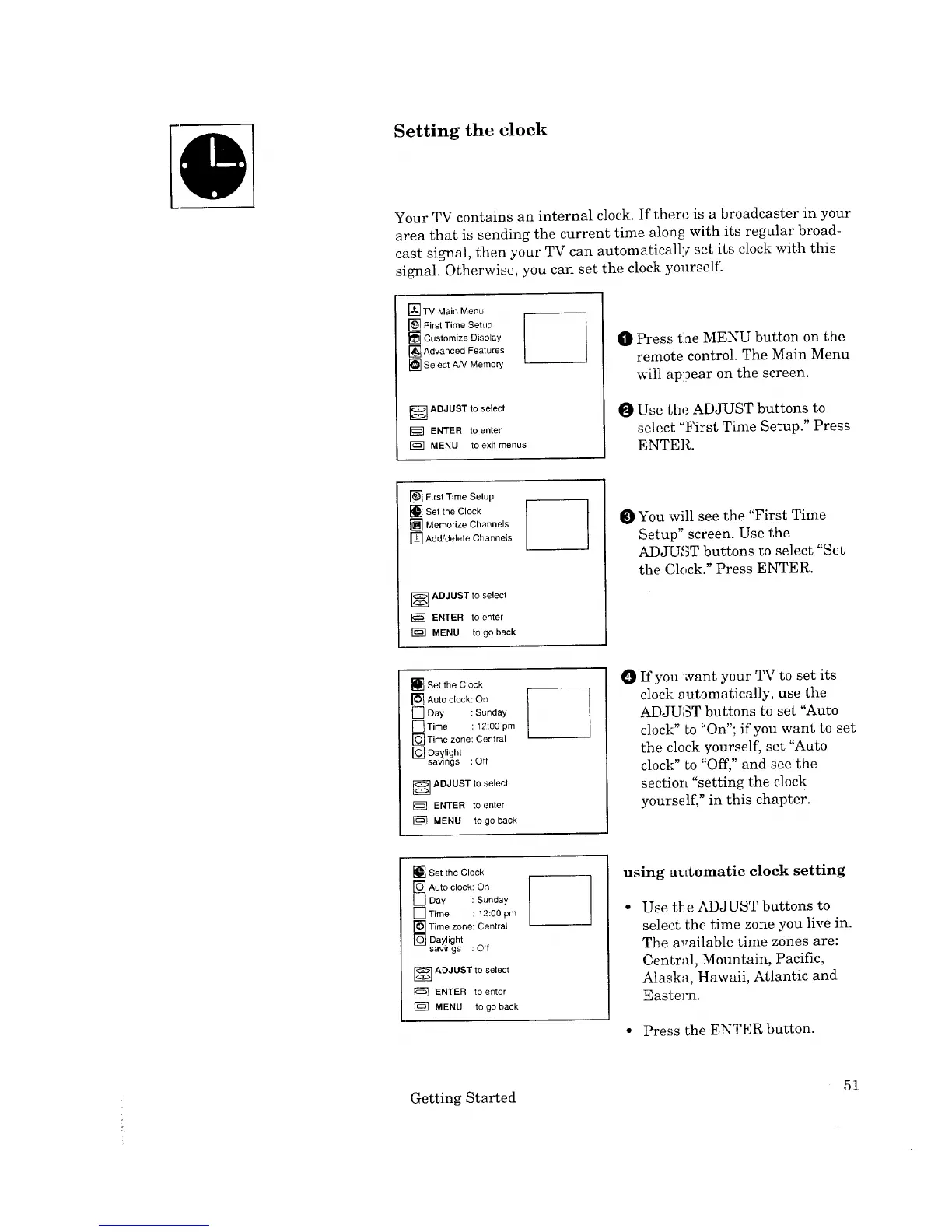
O Press tlae MENU button on the
remote control. The Main Menu
will appear on the screen.
O Use the ADJUST buttons to
select "First Time Setup." Press
ENTER.
[] First Time Setup
[] Set the Clock
[] Memorize Channels
[] Add/delete Channels
_ DJUST to select
ENTER to enter
r_ MENU to go back
You will see the "First Time
Setup" screen. Use the
ADJUNCT buttons to select "Set
the (]lock." Press ENTER.
[] Set the Clock
[] Auto clock: On
[] Day : Sunday
[] Time : 12:00 pm
[] Time zone: Central
[] Daylight
sawngs :Off
---] DJUST to select
ENTER to enter
[_ MENU to go back
If you want your TV to set its
clock automatically, use the
ADJUST buttons te set "Auto
clock" Lo"On"; if you want to set
the clock yourself, set "Auto
clock" Lo "Off," and see the
section "setting the clock
yourself," in this chapter.
[] Set the Clock
[] Auto clock: On
[] Day : Sunday
[--]Time : 12:00 pm
]Time zone: Central
r_ Daylight
sawngs : Off
] ADJUST to select
ENTER to enter
MENU to go back
using automatic clock setting
Use tl=e ADJUST b_ttons to
select the time zone you live in.
The available time zones are:
CenLral, Mountain, Pacific,
Alaska, Hawaii, Atlantic and
Eastern.
• Pre,;s the ENTER button.
Getting Started
51


 To Next Page
 Loading...