Selecting the menu type
You can display the on-screen menus in one of two ways. Tile
"Standard menu," which is illustrated in this raanual, provides
step-by-step instructions for all features. The "Advanced menu" lets
you select each feature directly by its name and icon.
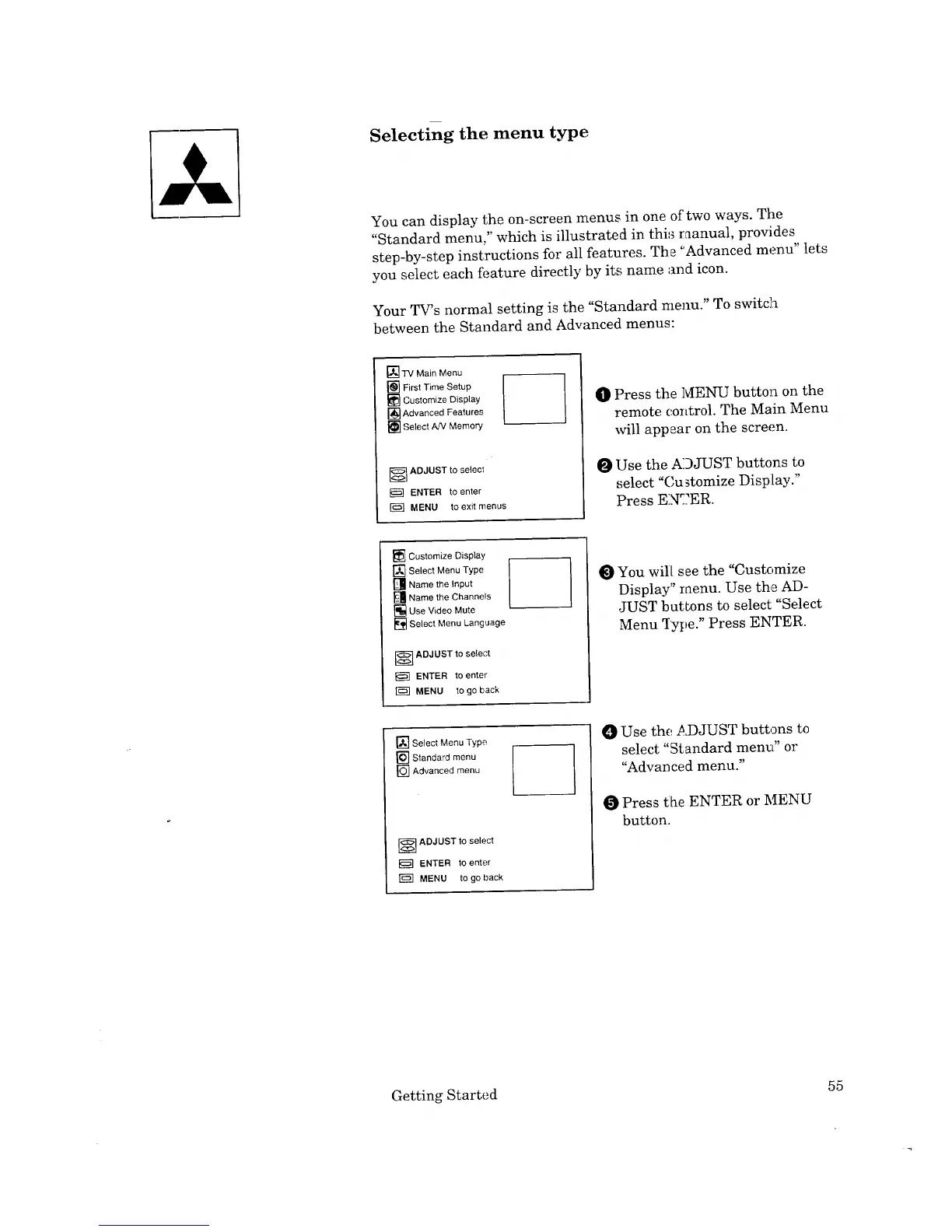
Your TV_s normal setting is the "Standard menu." To switch
between the Standard and Advanced menus:
[] TV Main Menu
[] First Time Setup
[] Customize Display
[] Advanced Features
[] Select A/v' Memory
--_J ADJUST to select
ENTER to enter
MENU to exit menus
O Press the MENU button on the
remote control. The Main Menu
will appear on the screen.
O Use the ADJUST buttons to
select "Cu _tomize Display."
Press EN_.?ER.
[] Customize Display
[] Select Menu Type
[] Name the Input
[] Name the Channels
[] Use Video Mute
[] Select Menu Language
_ ADJUST to select
ENTER to enter
MENU to go back
You will see the "Customize
Display" menu. Use th,_ AD-
JUST buttons to select "Select
Menu Type." Press ENTER.
[] Select Menu Type
[] Standard menu
_[] Advanced menu
_ DJUST to select
ENTER to enter
[]_] MENU to go back
0 Use the ,ad3JUST buttons to
select "Standard menu" or
"Advanced menu."
Press the ENTER or MENU
button.
Getting Started 55


 To Next Page
 Loading...