
 Need help?
Do you have a question about the Mitsubishi Q12PRHCPU and is the answer not in the manual?
Configure safety circuits externally for system safety during faults.
Use the controller in an environment meeting general specifications to avoid hazards.
Shut off external power supply before wiring to prevent electric shock or damage.
Do not touch terminals while power is on to prevent electric shock.
Treat the product as industrial waste and dispose of batteries according to local regulations.
Follow transportation regulations when transporting lithium batteries.
Use the product where faults do not cause major accidents and fail-safe functions are external.
Lists manual revisions, manual numbers, and dates of changes.
Lists related manuals with their manual numbers for additional information.
Explains the manual's organization into sections for configuration, troubleshooting, etc.
Defines generic terms and abbreviations used for Redundant CPU explanation.
Explains the concept of a redundant system and its basic configuration.
Details the features of a redundant system, including configuration and network aspects.
Illustrates examples of redundant system configurations across various networks.
Lists modules and software packages compatible with redundant system configuration.
Provides cautions for system configuration, especially regarding extension base units.
Details the specifications of tracking cables, including length and mass.
Explains the procedures and cautions for connecting and disconnecting tracking cables.
Details the procedure and cautions for mounting modules onto base units.
Explains wiring procedures for power supply, battery, and tracking cable connections.
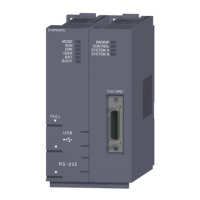
Explains how to identify System A and System B using CPU module LEDs.
Describes the process of writing parameters and programs to CPU modules using GX Developer.
Provides procedures for restarting System A and System B after power or switch operations.
Explains the fundamental concepts of a redundant system, including its structure.
Explains how to determine control and standby systems based on startup sequence or reset.
Details the three operation modes: backup, separate, and debug modes.
Explains the execution, timing, and precautions for system switching.
Details how to change the operation mode between backup and separate modes.
Explains the tracking function for maintaining data consistency between systems.
Describes how to perform online program changes for redundancy.
Explains the procedure for copying memory from the control to the standby system.
Details how to replace modules online without stopping the system.
Explains settings for network module redundancy to maintain communication during errors.
Lists restricted Redundant CPU functions in a redundant system.
Explains how to forcibly turn external I/O ON/OFF from GX Developer.
Details remote operations like RUN, STOP, PAUSE, and reset for Redundant CPUs.
Explains communication methods between GX Developer/PX Developer and redundant CPUs.
Provides an overview of networks applicable to redundant systems.
Details communication and operation for CC-Link IE and MELSECNET/H networks.
Explains operation and system switching for MELSECNET/H remote I/O networks.
Describes Ethernet communication and external device operation at system switching.
Details CC-Link operation, including master/standby master setup and system switching.
Explains communication using serial modules and MC protocol via extension base units.
Describes PROFIBUS-DP communication and operation during system switching.
Explains GOT connection methods and communication with redundant CPU modules.
Cautions on accessing redundant CPUs from other networks, especially regarding relay stations.
Provides precautions for writing device data and checking system switching.
Lists instructions that have restrictions or require special handling in redundant systems.
Explains cautions related to fixed-scan clocks and programs during system switching.
Provides precautions for using annunciators and their impact on system switching.
Details precautions for accessing intelligent modules and handling device data during system switching.
Lists precautions for programming when using extension base units with PX Developer and GX Developer.
Provides a flowchart for diagnosing and resolving common system issues.
Troubleshooting steps when the "MODE" LED on the CPU module is not illuminated.
Troubleshooting steps when the "BACKUP" LED is red, indicating a backup error.
Troubleshooting steps when the "SYSTEM A/B" LED is flashing, indicating a tracking cable issue.
Troubleshooting steps when the "RUN" LED on the CPU module is not lit.
Troubleshooting steps when system switching has occurred, focusing on error logs.
Troubleshooting steps when system switching fails to complete successfully.
Corrective actions for "TRK. INIT. ERROR" during redundant system startup.
Corrective actions for "CONTROL SYS. DOWN" errors during redundant system startup.
Troubleshooting steps for "ETX.CABLE ERR." related to extension cables.
Troubleshooting steps for "BASE LAY ERROR" related to module mounting and base units.
Troubleshooting steps for "UNIT LAY. DIFF." errors related to module and network configurations.
Troubleshooting steps for "SP. UNIT DOWN" errors, often related to module compatibility.
Troubleshooting steps for "SP. UNIT LAY ERROR" related to module quantity restrictions.
Troubleshooting steps for "LINK PARA. ERROR" related to network parameter settings.
Troubleshooting steps for "SP. UNIT VER. ERR." related to module function versions.
Troubleshooting steps for "CAN'T SWITCH" errors related to communication issues.
Explains methods for clearing host and standby CPU module errors.
Details procedures for replacing CPU, power supply, I/O, and network modules.
Provides procedures for replacing CPU modules while maintaining system operation.
Explains the procedure for replacing power supply modules, including redundant ones.
Details the procedure for replacing redundant power supply modules safely.
Guides on replacing I/O modules during power off or online module change.
Explains the procedure for replacing network modules, including system switching.
Details the procedure for replacing the main base unit of the redundant system.
Provides the procedure for replacing the tracking cable safely.
Details the replacement procedures for extension cables.
Explains how tracking affects scan time and provides calculation methods.
Details the time required for system switching and its calculation.
Compares Q4ARCPU and QnPRHCPU redundant systems regarding performance and configuration.
Compares Qn(H)CPU and QnPRHCPU systems regarding performance and configuration.
Compares QnPHCPU and QnPRHCPU systems regarding performance and configuration.
Provides sample programs for CC-Link control in redundant systems.
Details the CPU module and CC-Link devices used in sample programs.
Outlines PLC and network parameter settings for sample programs.
Provides sample programs for CC-Link control, covering different serial numbers.
Explains methods for starting up the previous control system, especially when network modules are mounted.
Details precautions for using serial communication modules and dedicated instructions.
Explains the CSET instruction for initial unit settings and I/O signal/buffer memory usage.
Details the UINI instruction for mode switching and transmission specifications.
Explains the INPUT instruction for receiving data via nonprocedural protocol.
Details the PUTE instruction for registering user registration frames.
Explains the GETE instruction for reading user registration frames.
Details the ONDEMAND instruction for sending data via on-demand function.
Explains the OUTPUT instruction for sending data via nonprocedural protocol.
Details the PRR instruction for sending data by user registration frame via nonprocedural protocol.
Explains the BIDOUT instruction for sending data via bidirectional protocol.
Details the BIDIN instruction for receiving data via bidirectional protocol.
Provides cautions for communications via modules on extension base units, including MC protocol.
Details the gratis warranty term and range, including exclusions and conditions.
Explains terms for accepting product repairs after production discontinuation.
Information on obtaining repairs through Mitsubishi's local overseas FA Centers.
States Mitsubishi's exclusion of liability for damages like loss of opportunity or profits.
Notes that product specifications are subject to change without prior notice.
 General
| Series | Q Series |
|---|---|
| Model | Q12PRHCPU |
| Number of I/O Points | 4096 points |
| Communication Interface | Ethernet, RS-232, RS-485 |
| Power Supply | 24V DC |
| Weight | 1.2 kg |
| Programming Language | Structured Text |
| Operating Temperature | 0 to 55°C |
| Storage Temperature | -25 to 70 °C |
| Humidity | 5 to 95% RH (non-condensing) |
| Type | Programmable Logic Controller (PLC) |


 To Next Page