2.3
REAR
PANEL
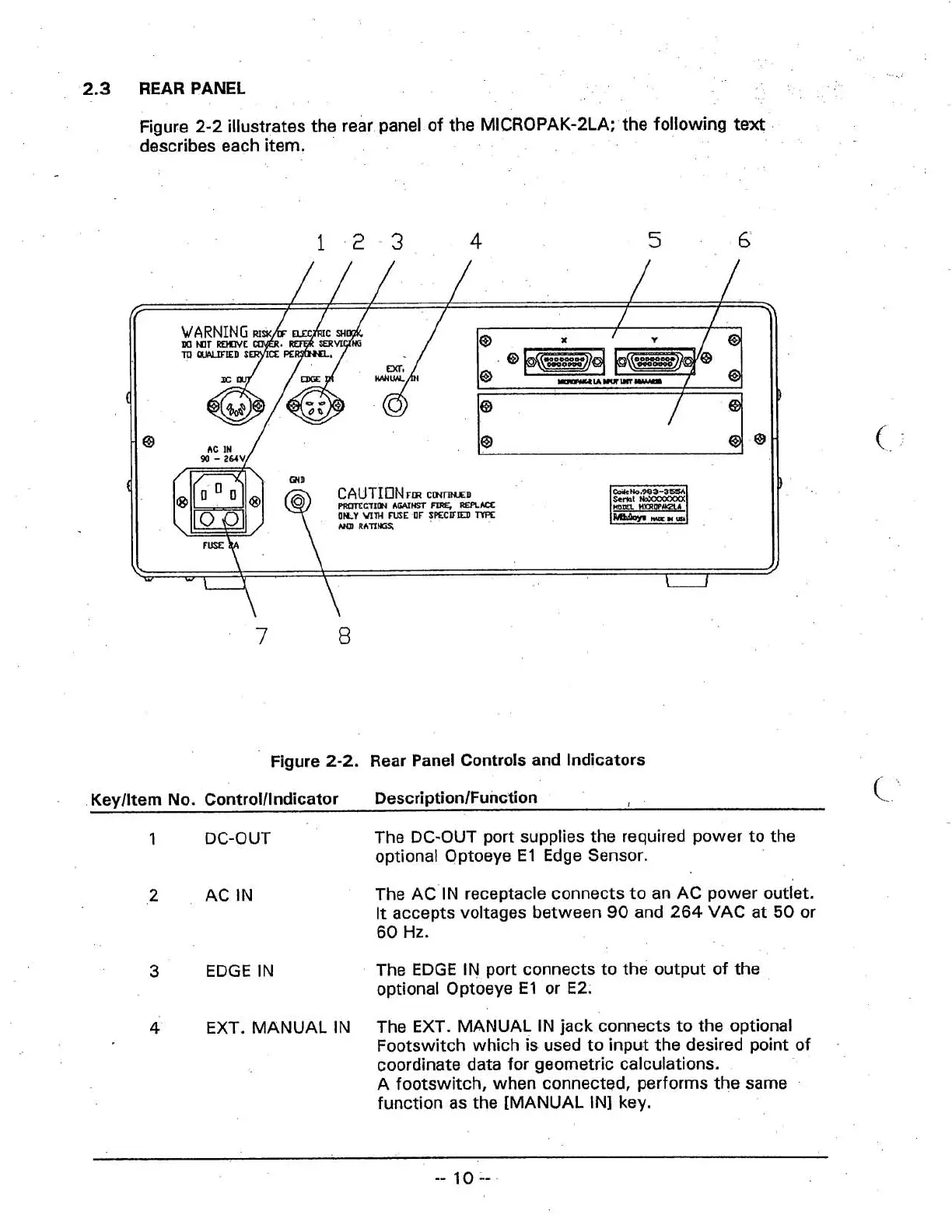
Figure 2-2 illustrates the rear panel of the MICROPAK-2LA; the following text
describes each item.
CAUTIONFIR
cmnwn
rnC'TIPI
FIRE,
-AQ
1
mm
MrnWWI
LILY
WTH
ME
OF
SECUIEI)
TYPE
AW
Rhnw
L
1)
W
\
1
I
-
7
8
Figure
2-2.
Rear Panel Controls and Indicators
Keylltem
No.
Controlllndicator DescriptionlFunction
c
1
DC-OUT
The DC-OUT port supplies the required power to the
optional Optoeye El Edge Sensor.
3
EDGE IN
The AC IN receptacle connects to an AC power outlet.
It accepts voltages between
90
and 264 VAC at
50
or
60
Hz.
The EDGE IN port connects to the output of the
optional Optoeye El or E2.
4
EXT. MANUAL IN
The EXT. MANUAL IN jack connects to the optional
Footswitch which is used to input the desired point of
coordinate data for geometric calculations.
A footswitch, when connected, performs the same
function as the [MANUAL
IN] key.



 To Next Page