Mobileye Proprietary and Confidential
support@mobileye.com
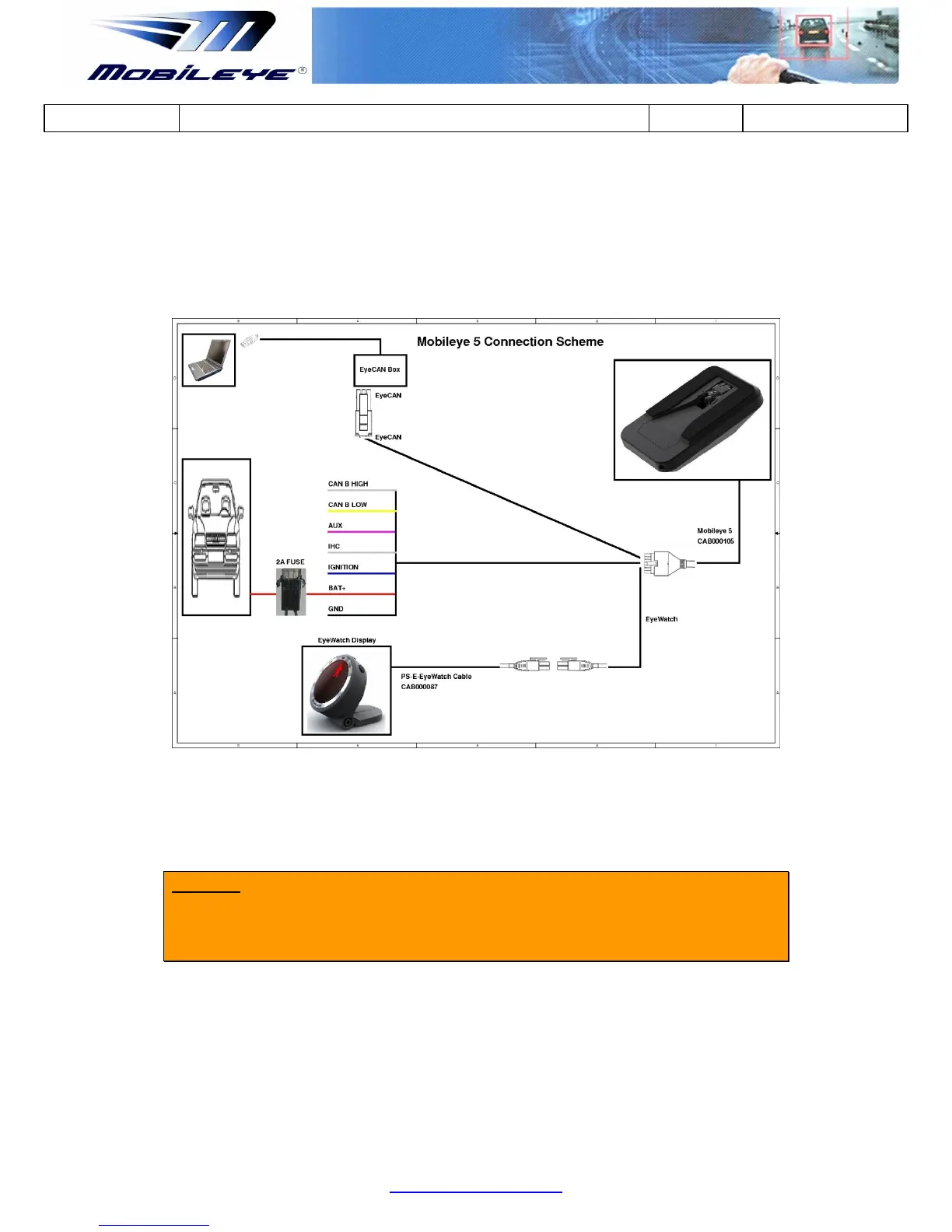
3.2.1 Mobileye 5 Connection Scheme
Please ensure that you identify the Mobileye 5 cables according to diagram below.
The paragraphs that follow will present the function of each cable, and then guide
you through their actual connection procedures with the car signals.
3.2.2 Connecting to Vehicle Signals
CAUTION: Identifying the vehicle’s electrical signals requires having the keys in the
ignition in the ACC (Accessory) position or Ignition ON. Make sure the car
headlights and/or any other power consuming devices are turned off during
Mobileye 5 installation to prevent battery drainage.
1. Identify the wires in the vehicle that carry the required electrical signals
(according to table below).
2. After identifying the required signals locations in the vehicle, pass the
Mobileye 5 cable (CAB000105) behind the vehicle trimmings so that it
reaches all vehicle signals (it is recommended to hang the Mobileye 5 Main



 To Next Page