105/152
Network And Power Connection
© MOBOTIX AG • Security-Vision-Systems • Made in Germany
www.mobotix.com • sales@mobotix.com
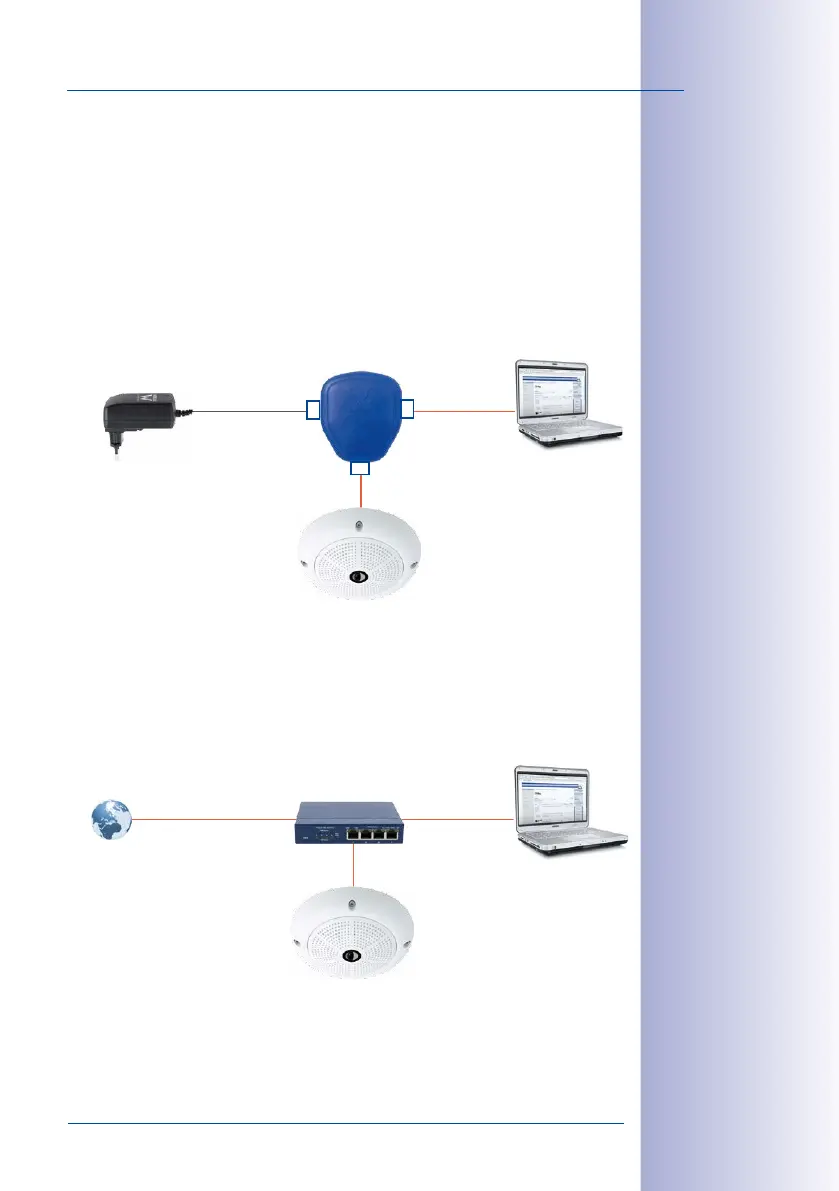
2.9.4 Power Supply When Connected Directly to a Computer
1. Connect the factory pre-installed cable of the camera to the camera connector of
the PoE adapter.
2. Connect the PC/Power connector of the PoE adapter to the Ethernet port of the
computer.
3. Plug the RJ45 connector of the power supply unit into the LAN/Power connector
of the PoE adapter.
2.9.5 Power Supply with Power-Over-Ethernet Products
Connect the factory pre-installed cable of the camera to the Ethernet connector of the PoE
switch/router. The switch/router must support the PoE standards IEEE 802.3af or IEEE 802.3at.
IP addresses in the
gure are shown only
as an example!
PoE adapter
Power supply
PC
(10.8.0.11/255.0.0.0)
LAN/Power
PC/Power
Camera
RJ45
RJ45
RJ45
Camera
(10.8.0.99)
IP addresses in the
gure are shown only
as an example!
Camera
(10.8.0.99)
PC
(10.8.0.11/255.0.0.0)
PoE/PoE+ switch/
router
LAN/www



 To Next Page