106/152
Q25 Camera Manual: Installation
© MOBOTIX AG • Security-Vision-Systems • Made in Germany
www.mobotix.com • sales@mobotix.com
2.9.6 Connecting a USB Cable
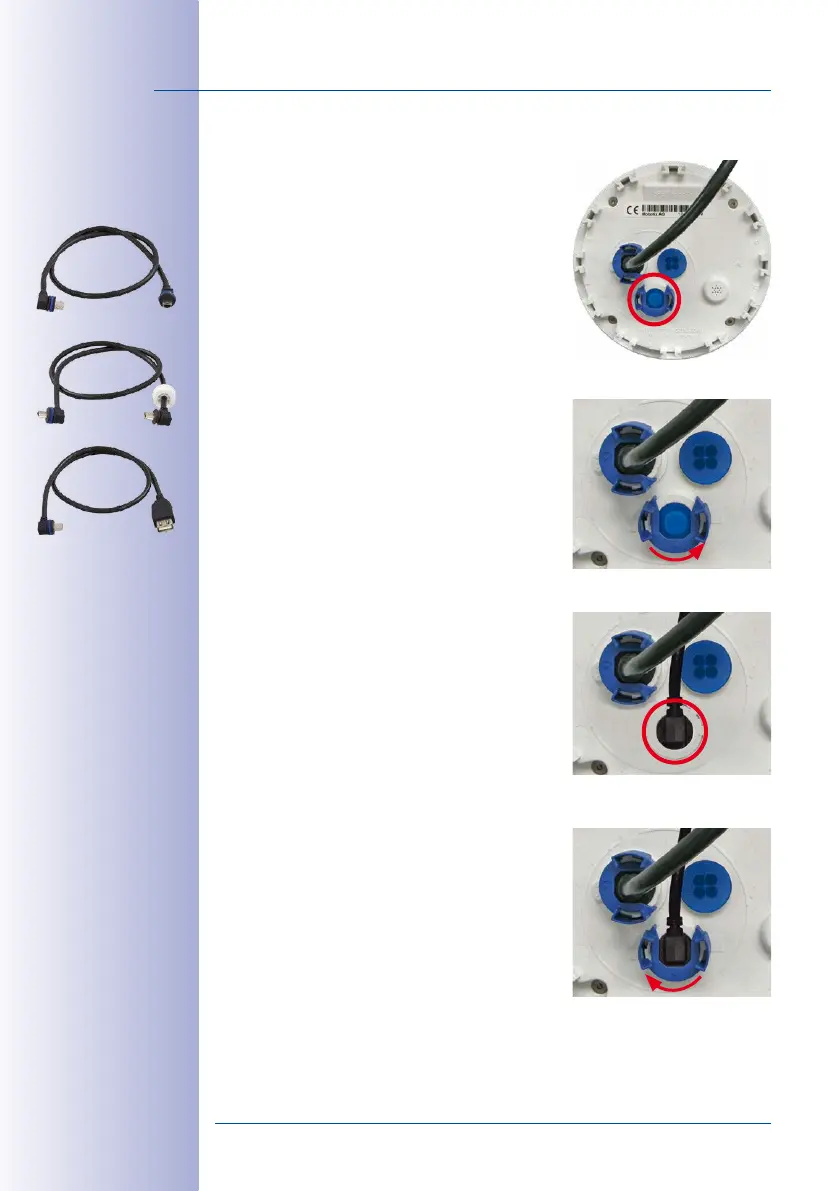
Using the USB plug (red circle in figure), you can attach
existing expansion modules, such as the MOBOTIX ExtIO
(USB), the MX-232-IO-Box or external USB hard drives to
the camera in a weatherproof and well-protected manner.
Procedure
1. In case the camera had already been installed,
remove the camera so you can access the con
-
nectors on the back.
2. Remove bayonet catch and USB plug: Turn the
bayonet catch to the left (red arrow in figure), take
it o and remove the blue USB plug.
3.
Connect USB cable: Push the MOBOTIX cable with
the angled MiniUSB plug into the connector (red
circle in figure).
4. Attach bayonet catch: Attach bayonet catch and
turn it clockwise until it gently snaps shut (see figure).
Only use USB cables with
angled plugs inside the
housing of the Q25!


 To Next Page