66/152
Q25 Camera Manual: Installation
© MOBOTIX AG • Security-Vision-Systems • Made in Germany
www.mobotix.com • sales@mobotix.com
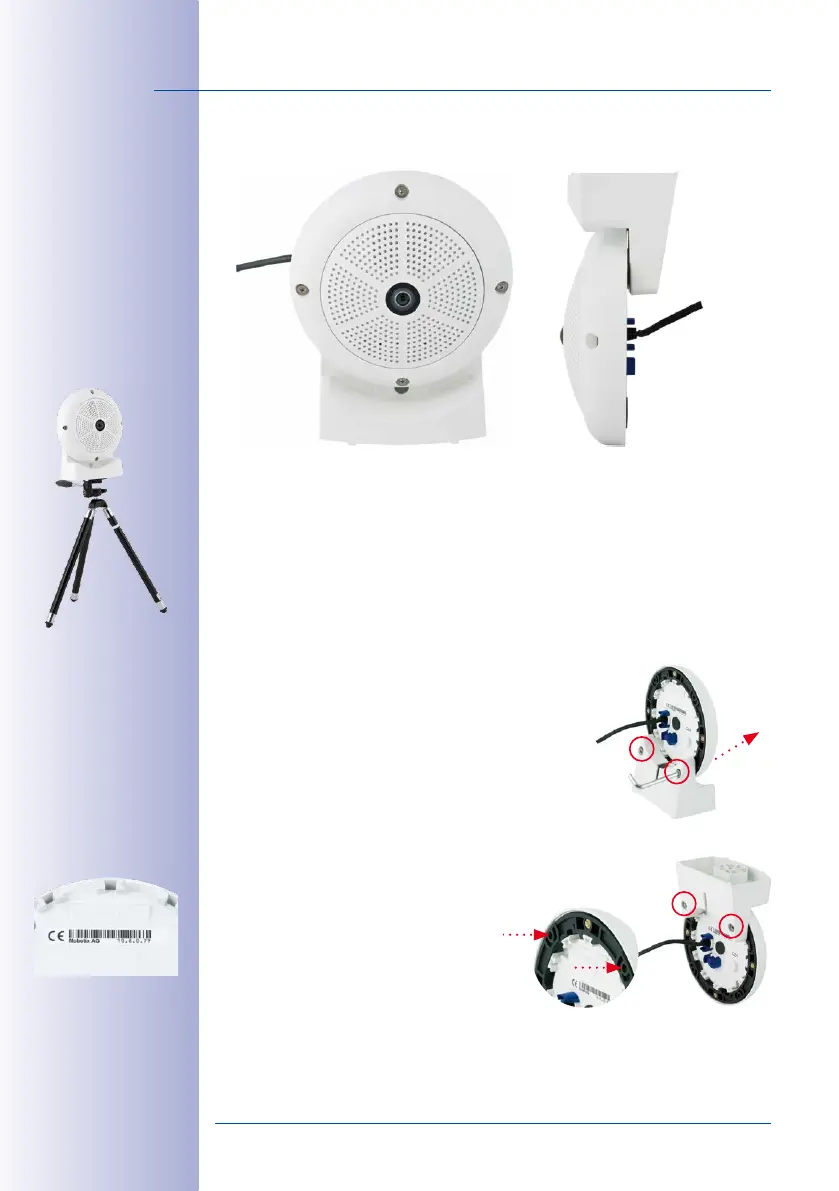
Stand/Wall Mount for Camera Tests (MX-OPT-TW-Demo-1)
The Stand/Wall Mount is a useful accessory for testing and for finding the optimum mounting
position of the camera. The set also includes an Allen wrench as well as a Torx screw with
dowel and the corresponding Torx wrench for installing as alternative wall mount for testing.
Using as a Stand (with/without tripod)
Using this stand, you can now place the camera upright on a flat surface or mount the
whole assembly on a tripod (1/4” tripod thread at the bottom of the stand).
Converting to a wall mount (simulation of On-Wall set with 10 deg. tilt)
1. If required, release the two stainless steel Allen screws
and remove the camera from the stand/wall mount.
2. Place the camera with the two upper
body screws exactly into the two recep-
tacles of the Stand/Wall Mount. Note:
The print on the camera back is legible.
Installation hint: The
print on the camera
back is legible.



 To Next Page