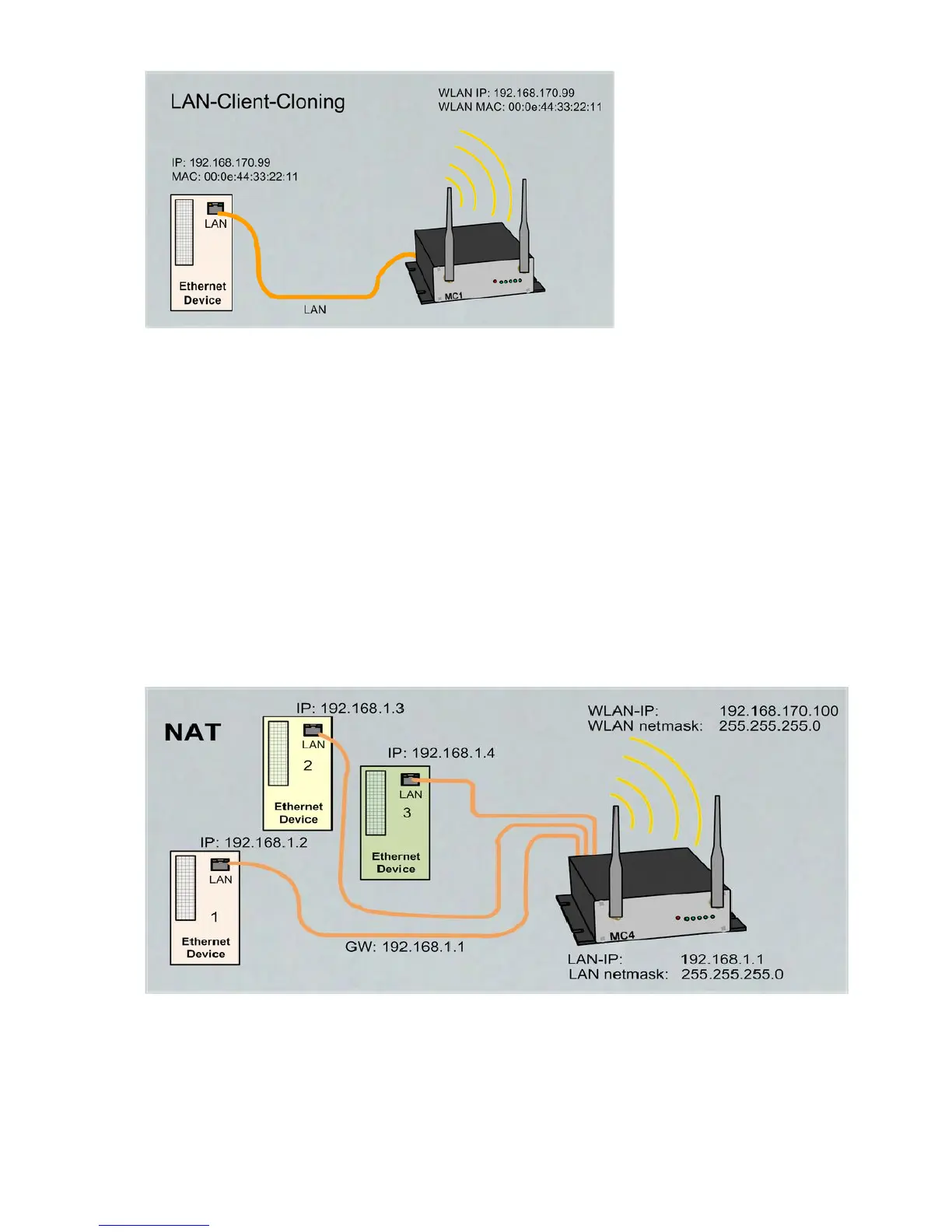
To use the MC device internal interfaces (website, serial, relay or USB) the IP address of the LAN-Client
must be used. To avoid collisions with the internal used port numbers the user has to adjust this. Specially
the website port number of the MC device can be configured at „Configuration“-> „Admin“
Advantage of the LAN Client Cloning-Mode:
1. In the WLAN network, the MC will appear along with the LAN client only with one IP address.
Disadvantage of the LAN Client Cloning-Mode:
1. Only one LAN-Client can be connected to the MC.
4.1.2 NAT- und Single Client NAT Mode
The NAT mode is characterized in that the LAN clients connected to the MC work in a separate network from
the wireless network. The traffic of the LAN clients via WLAN to the stationary network is transformed by the
MC, so that all data is sent and received via the IP address of the MC.
This example shows 3 LAN Clients connected to the MC. This LAN Clients have IP addresses that are
configured fix or they get them from the DHCP-Server of the MC device. It is important, that the Gateway IP
is set to the LAN site IP of the MC device.
What to consider:
If only one LAN client is connected to the MC, the "Single Client NAT" mode should be used. In this mode
the LAN client can be reached better without further configurations.
MC Manual Version 2.10c



 To Next Page