www.modecom.eu
18
WIRELESS ROUTER ADSL
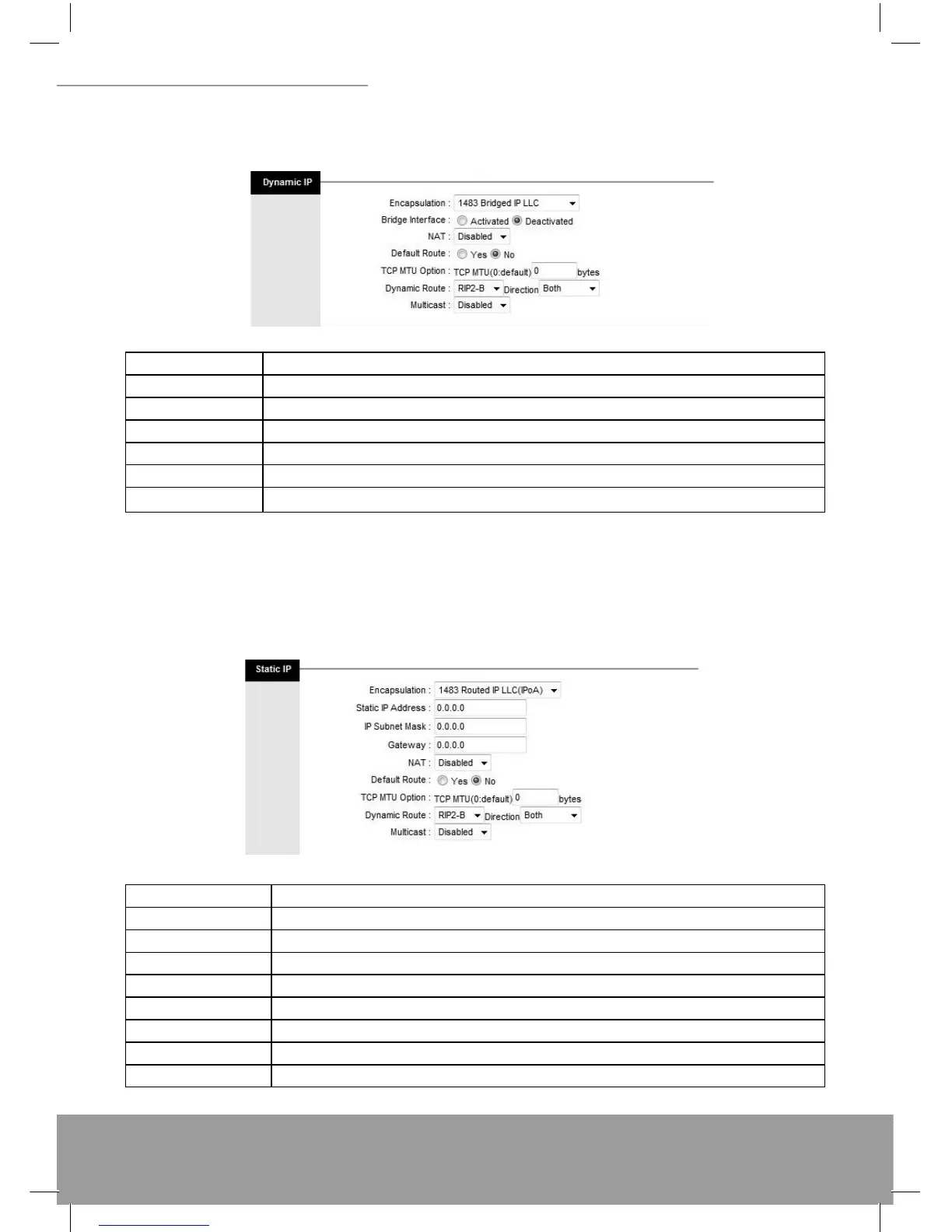
(1) Dynamic IP Address
Select this option if your ISP provides you an IP address automatically. Please enter the Dynamic IP information ac-
cordingly.
The following table describes the labels in this screen.
LABEL DESCRIPTION
Encapsulation Select your encapsulation type from the dropdown list.
NAT Select whether NAT is Enabled or Disabled.
Default Route Select whether this PVC will be the default route for Internet data.
TCP MTU Option Enter TCP MTU Value here
Dynamic Route Select the RIP type and direction from the dropdown lists.
Multicast Select the multicast protocol you wish to use from the dropdown list.
(2) Static IP Address
Select this option to set static IP information. You will need to enter in the encapsulation type (1483 Bridged IP LLC,
1483 Bridged IP VC-Mux, 1483 Routed IP LLC (IPoA), 1483 Routed IP VC-Mux), IP address, subnet mask, and gate-
way address provided to you by your ISP. Each IP address entered in the fi elds must be in the appropriate IP form,
which is 4 IP octets separated by a dot (x.x.x.x). The Router will not accept the IP address if it is not in this format.
The following table describes the labels in this screen.
LABEL DESCRIPTION
Encapsulation Select your encapsulation type from the dropdown list.
Static IP Address Enter the static IP Address here.
IP Subnet Mask Enter the IP Subnet Mask here.
Gateway Enter the Gateway address here.
NAT Select whether NAT is Enabled or Disabled.
Default Route Select whether this PVC will be the default route for Internet data.
Dynamic Route Select the RIP type and direction from the dropdown lists.
Multicast Select the multicast protocol you wish to use from the dropdown list.


 To Next Page