19
WIRELESS ROUTER ADSL
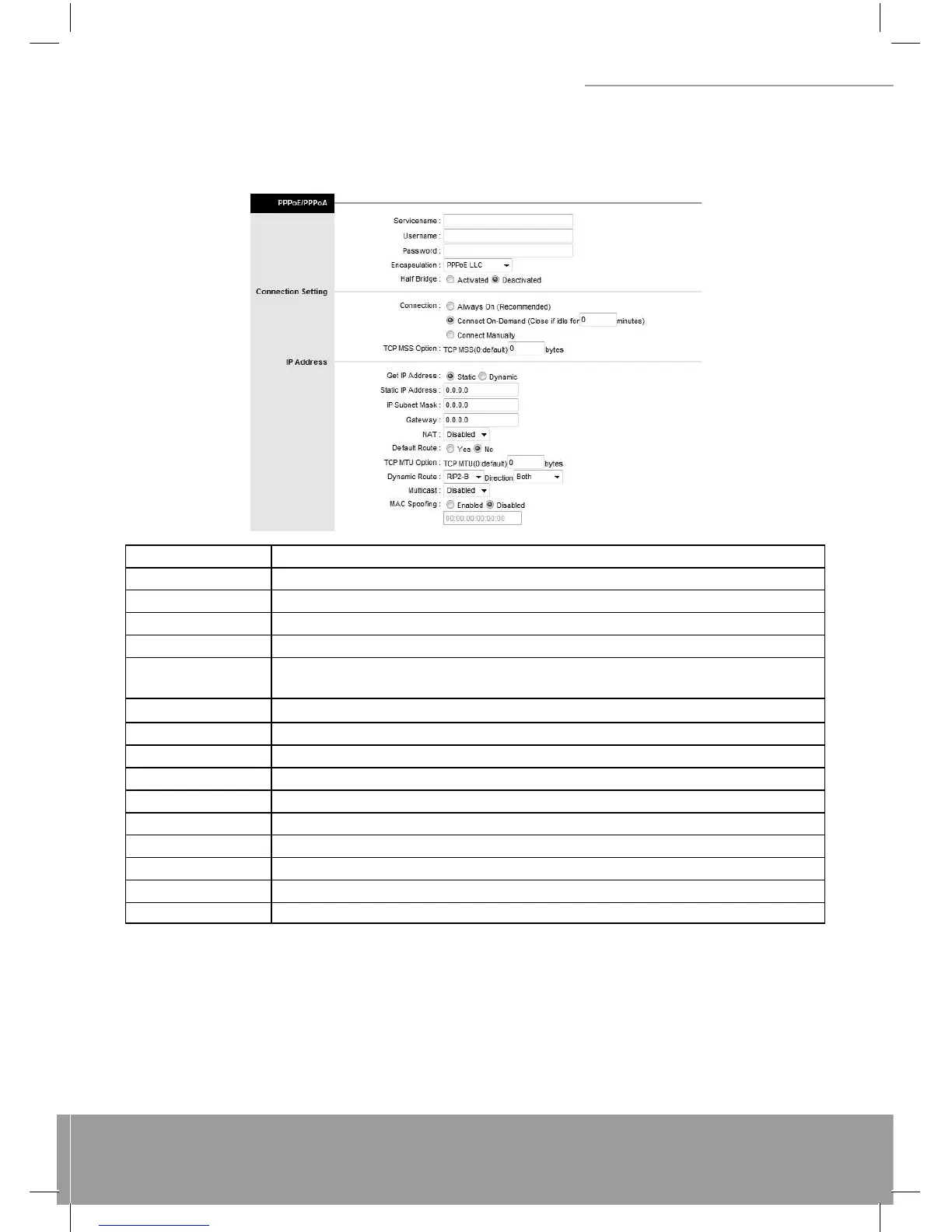
(3) PPPoA / PPPoE
Select this option if your ISP requires you to use a PPPoE connection. This option is typically used for DSL service.
Select Dynamic PPPoE to obtain an IP address automatically for your PPPoE connection. Selection Static PPPoE to
use static IP address for your PPPoE connection. Please enter the information accordingly.
LABEL DESCRIPTION
Username Enter your username for your PPPoE/PPPoA connection.
Password Enter your password for your PPPoE/PPPoA connection.
Encapsulation Select your encapsulation type from the dropdown list.
Bridge Interface Select whether the Interface will be Activated or Deactivated.
Connection
Select whether your connection is always on or if it connects on demand. If on demand,
specify how many minutes the connection may be idle before it disconnects.
TCP MSS Option Enter the TCP MSS you wish to use here.
Get IP Address Choose whether the ROUTER obtains the IP address statically or dynamically.
Static IP Address Enter the static IP address here. Only if you chose Static above.
IP Subnet Mask Enter the IP subnet mask here. Only if you chose Static above.
Gateway Enter the gateway here. Only if you chose Static above.
NAT Select whether NAT is Enabled or Disabled.
Default Route Select whether this PVC will be the default route for Internet data.
TCP MTU Option Enter TCP MTU Value here.
Dynamic Route Select the RIP type and direction from the dropdown lists.
Multicast Select the multicast protocol you wish to use from the dropdown list.
Connection Setting: For PPPoE/PPPoA connection, you can select Always on or Connect on-demand. Connect on de-
mand is dependent on the traffi c. If there is no traffi c (or Idle) for a pre-specifi ed period of time, the connection will tear
down automatically. And once there is traffi c send or receive, the connection will be automatically on.
IP Address: For PPPoE/PPPoA connection, you need to specify the public IP address for this ADSL Router. The IP ad-
dress can be either dynamically (via DHCP) or given IP address provide by your ISP. For Static IP, you need to specify
the IP address, Subnet Mask and Gateway IP address.
NAT: Select this option to Activate/Deactivated the NAT (Network Address Translation) function for this VC. The NAT
function can be activated or deactivated per PVC basis.


 To Next Page