EasyManua.ls Logo

Molbio Trueprep AUTO - Alert Messages and Actions

Molbio Trueprep AUTO
20 pages
Print Icon
To Next Page IconTo Next Page
To Previous Page IconTo Previous Page
Loading...
DIAGNOSTICS
13
8.2 Alert Messages
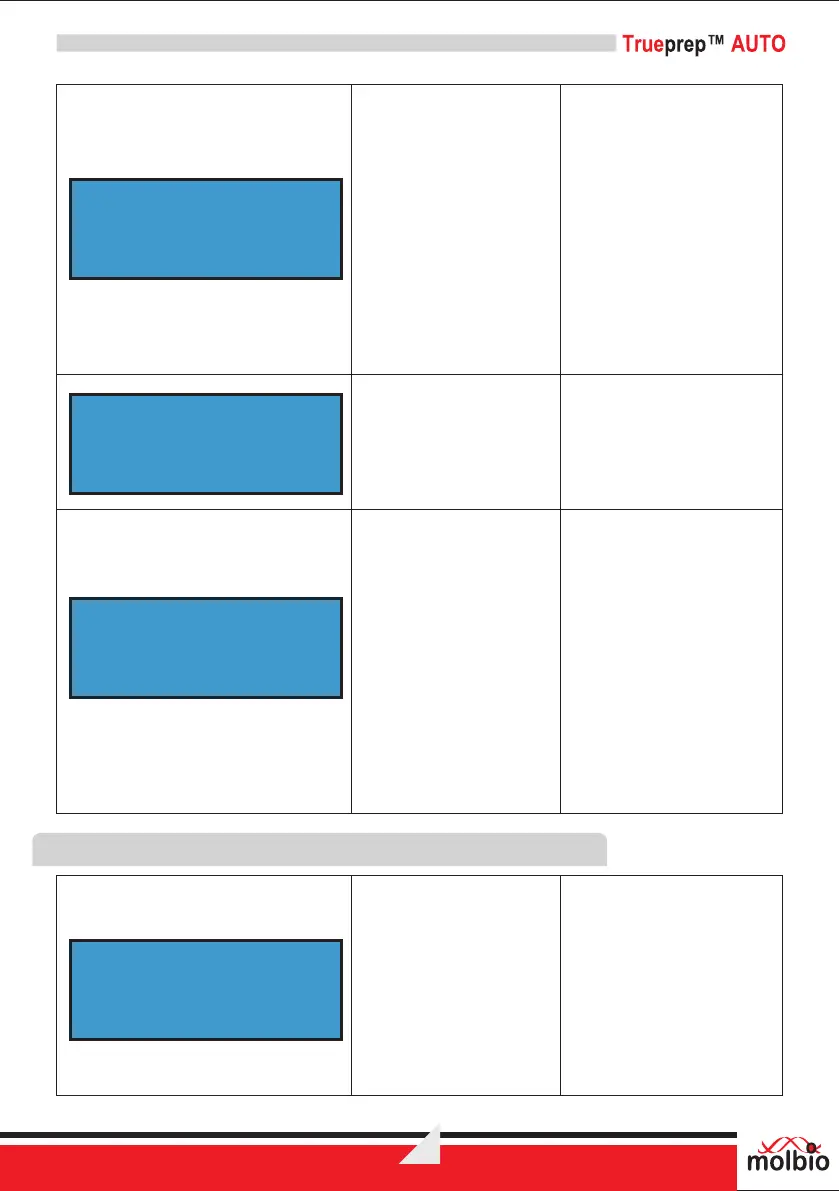
The Screen displays the
error message
“CARTRIDGE ERROR
PRESS EJECT”
Reason:
There is a leak in the
cartridge.
Solution:
Check for spillage in the
tray below the cartridge in
the cartridge holder. If
necessary, replace the tray
(refer 7.4.6).
In case the Problem
persists contact Molbio
support.
The Screen displays
the error message
“RTD ERROR”
Reason:
The heater is not working.
Solution:
Contact Molbio Support.
The Screen displays the
error message “Self Test
Failed, Press Eject”
Reason:
This error message
appears when the device
is powered ON because
the pressure from
previous run is not
released.
Solution:
Press Eject. When the
cartridge holder opens,
close it gently.
The screen displays the
alert message
“Battery Low !, Connect
Charger”
Reason:
This alert appears when
the battery is low and the
charger needs to be
plugged in. The device
cannot start a run when
the battery is low
CARTRIDGE ERROR
PRESS EJECT
RTD ERROR
SELF TEST FAILED
PRESS EJECT
BATTERY LOW !
CONNECT CHARGER

Related product manuals