ImageXpress Micro High Content Imaging System Options User Guide
60 5014166 D
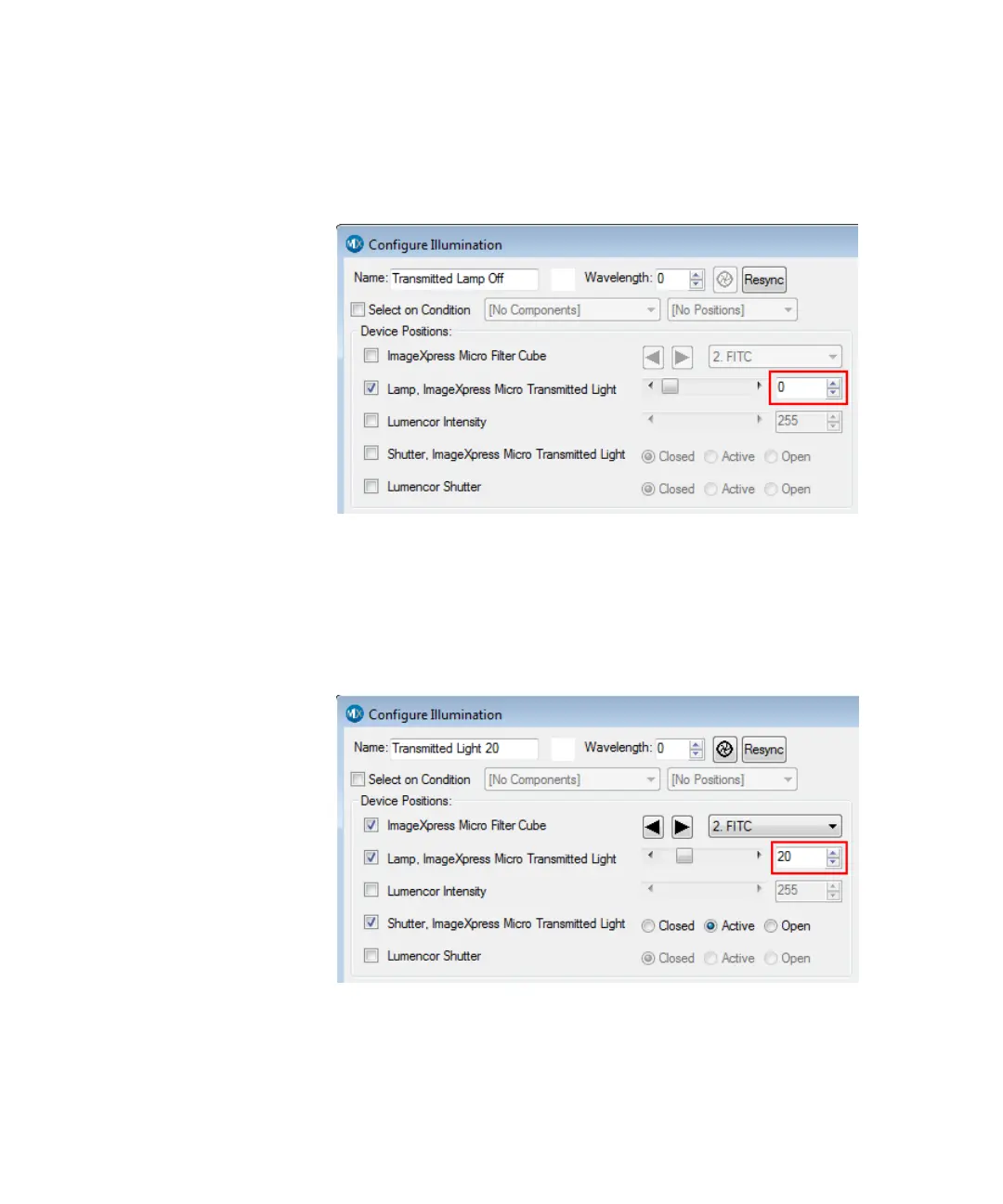
2. In the Configure Illumination dialog, create an illumination
setting named Transmitted Lamp Off, select Lamp, ImageXpress
Micro Transmitted Light, and set the lamp illumination to zero,
as shown in Figure 4-6.
Figure 4-6: Configure Illumination dialog: Transmitted Lamp Off
3. Create an illumination setting named Transmitted Light, select
Lamp, ImageXpress Micro Transmitted Light, and set lamp
illumination as a percentage of full power, as shown in
Figure 4-7.
The example sets the lamp power to 20% of maximum. You can
adjust this setting to meet the requirements of your experiment.
Figure 4-7: Configure Illumination dialog: Transmitted Light
After the settings have been configured, Transmitted Light can be
selected as a wavelength in the Plate Acquisition Setup dialog.
ImageXpressOptionsUserGuide.book Page 60 Wednesday, September 9, 2015 3:54 PM



 To Next Page