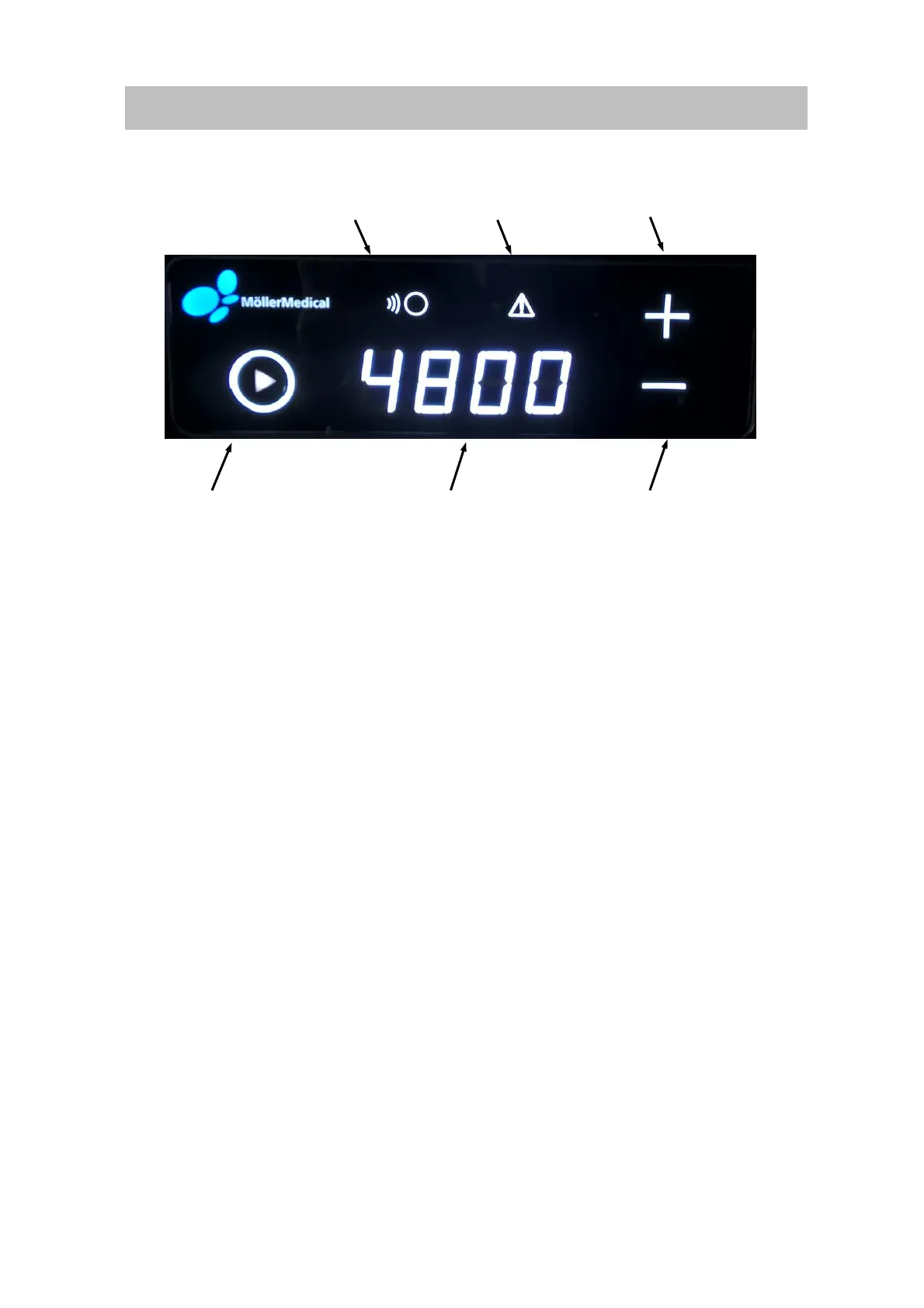
1. Segment display shows the set stroke rate per minute
2. Start / Stop – vibration button ON/OFF
3. Signal display – connected to the superordinate control unit
4. Minus - button to lower the stroke rate
5. Plus - button to increase the stroke rate
6. Warning – in the event of malfunctions (e.g. handle is not connected)
5.2 Operation
To make work as simple and convenient as possible, the Vibrasat
®
Pro provides various
operating options.
5.2.1 Setting the vibration speed Vibrasat
®
Pro Wand
Setting the desired vibration speed in strokes per minute. The setting can be made at any
time with one of the following actions:
• Press the Plus / Minus buttons on the Vibrasat
®
Pro Console
• Press the Up / Down buttons on the foot switch
Pressing once increases or reduces the vibration speed by 100 strokes/minute. Pressing for
longer increases/lowers the speed automatically.
5.2.1.1 Boost function
The boost function can only be activated on the Vibrasat
®
Pro Wand .
Press the button on the Vibrasat
®
Pro Wand for longer than 2 seconds to start the boost with
6000 strokes per minute for max. 1 minute. The button must remain pressed during this time.
The device then switches automatically to the last set vibration speed.



 To Next Page