Remote Control
9
1
10
2
3
11
4
12
5
13
6
14
7
8
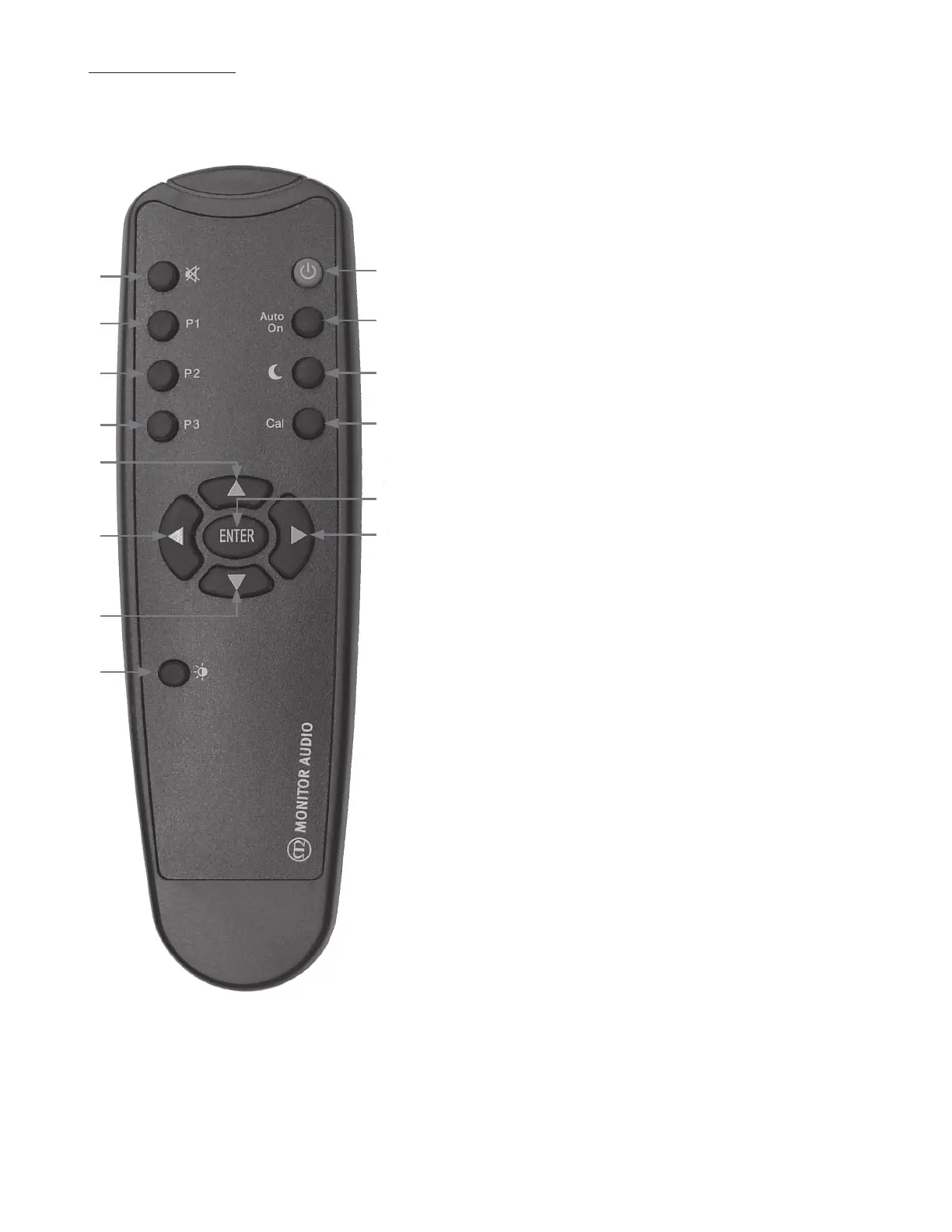
1. Mute
Toggle between mute and normal operation. Mutes output
so nothing can be heard, and can only be accessed by the
remote.
2. Preset 1
.FNPSZ 1SFTFU *OEFQFOEFOU GPS FBDI JOQVU 3FGFS UP
QBHF
3. Preset 2
.FNPSZ 1SFTFU *OEFQFOEFOU GPS FBDI JOQVU 3FGFS UP
QBHFT
4. Preset 3
.FNPSZ 1SFTFU *OEFQFOEFOU GPS FBDI JOQVU 3FGFS UP
QBHFT
5. 6Q"SSPX
*ODSFBTFT7PMVNFBOEXIFOJOUIFNFOVTZTUFNBEKVTUT
the selected option.
6. Left Arrow
Allows scrolling back through the menu system.
7. Down Arrow
Decreases volume and when in the menu system, adjusts
the selected option.
8. %JTQMBZ#SJHIUOFTT
"EKVTUTUIFJOUFOTJUZPGUIFEJTQMBZ3FGFSUPQBHF
9. 4UBOE#Z
Manually turns the Gold W15 on , out of stand by mode, or
puts it into stand by mode. This does not function when
Auto on is selected.
10. "VUP0/
5PHHMFTUIF"VUP0OGFBUVSFPOBOEPˋ8IFOPOUIFVOJU
JTGVMMZBVUPNBUJDJOPQFSBUJPO8IFOPˋUIFVTFSIBTUP
UVSOUIF(PME8POBOEPˋ3FGFSUPQBHF
11. Night Mode
-JNJUT UIF PVUQVU CZ E# XJUIPVU MPPTJOH BOZ PG UIF
EZOBNJDTPGUIF(PME83FGFSUPQBHF
12. -&0$BMJCSBUJPO
3VOTUIF-&0SPPNFRVBMJTBUJPOTZTUFN3FGFSUPQBHF
13. Enter
Selects desired menu option.
14. Right arrow
&OUFSTUIFNFOVTZTUFN"MMPXTTDSPMMJOHUISPVHIUIFNFOV3FGFSUPQBHF
(PME80XOFST.BOVBM6



 To Next Page