One-Net/DASDEC User Manual 4-5v3.0 | r0616
• Navigaon Tabs & Radio Buons: The web interface contains dozens of unique
screens; they are organized with a system of tabs and radio buons. The main tabs
located across the top of the header are: Setup, System, Alert Events, and Send
Alerts. Within each tab are subsecons organized by radio buons, located directly
below the tabs.
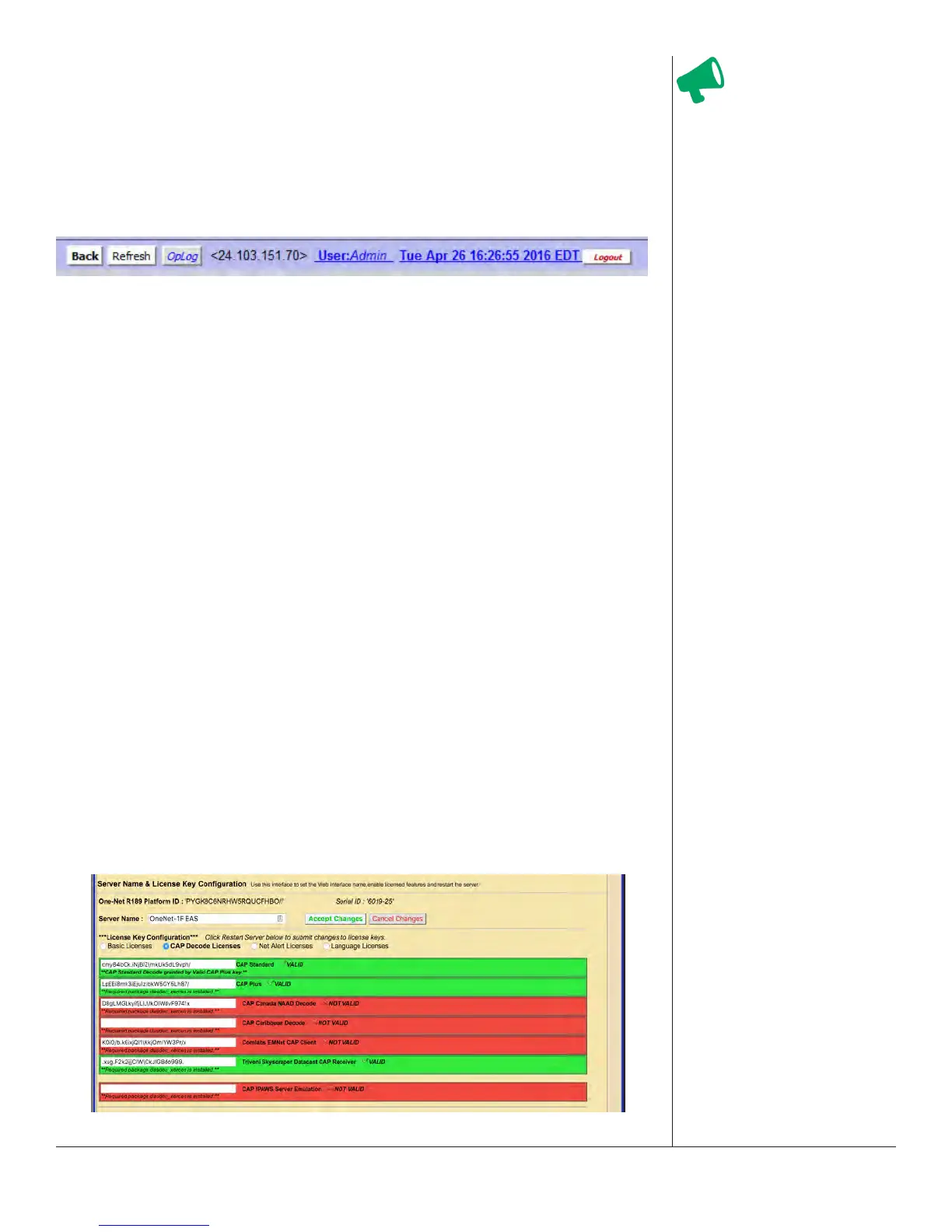
• Device Status and Navigaon Buons: Located just under the tab and radio but-
tons are navigaon buons and device status informaon in a single line.
• Back Buon: The preferred means of navigang back to the previously
viewed web interface screen.
• Refresh Buon: The preferred method to refresh the web interface.
• OpLog Buon: A quick way to navigate to the System > Logs > Operaon Log
screen.
• IP Address of the Current User: To the right of the OpLog buon is the IP
address of the current user in the EAS device, denoted in standard IPv4
formang: <xxx.xxx.xxx.xxx>.
• User ID: The current user is noted in the hyperlink text to the right of
the the IP address. In instances where mulple users are logged in to the
same device, the User Name will be followed by parentheses. Inside the
parentheses will be a single number or mulple numbers.
• If there is just one number, only one user with that username is
currently logged into the device. Example: A (2) means two users are
currently logged in.
• If you see (1:2), the rst number (1) is the number of users with the
same credenals as the current user, and the second number (2) means
two total users are logged in to the device. Clicking the hyperlink
navigates the web interface to the Setup > Users screen.
• Date and Time: Displayed to the le of the logout buon, this stac display
shows when the interface screen was loaded. Clicking the Refresh Buon
updates the informaon. Clicking the hyperlink brings you to the Setup >
Time screen.
• Logout Buon: Located at the far right, this buon logs the user out of the
EAS device, and sends the user back to the login screen.
Body
Web Interface - Body Secon
Aenon
Using the back/refresh
buons on your web
browser can provide
misleading/out-of-date
server informaon, and
in some cases can result
in unintended acons
being performed. A
good habit is to use
the Back and Refresh
navigaon buons in
the web interface.


 To Next Page