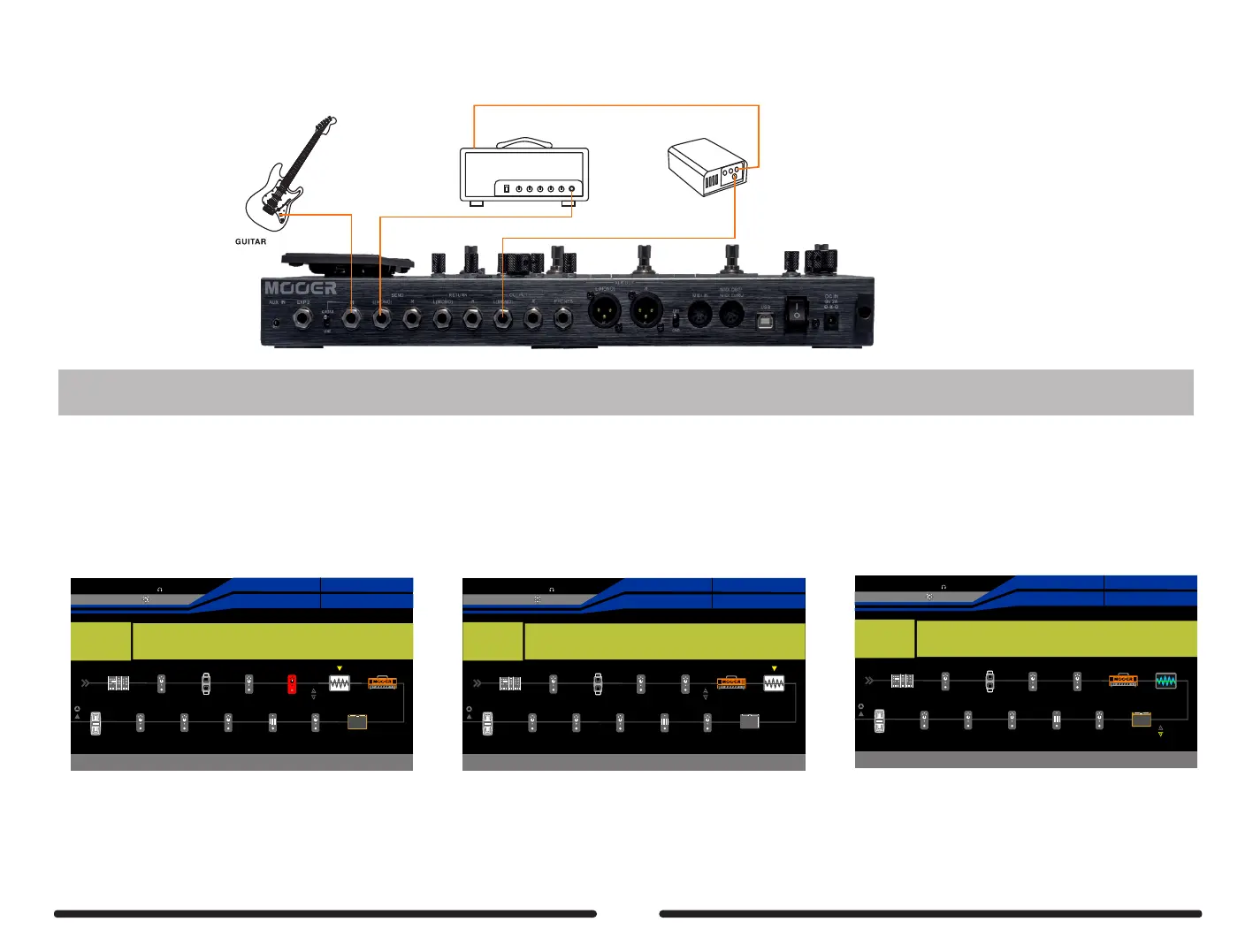
If your amp does not have an effects loop then connect the speaker out of your amplifier to a loadbox of the correct impedance. Connect the line out or DI out of
the loadbox to your GE300 RETURN.
Speaker In
Speaker Out
Input
DI out/Line out
WARNING do not connect the speaker out of any amplifier to your GE300. This can result in damage to both your GE300 and your amplifier. Never operate your
amplifier without a speaker or speaker load of the correct impedance connected to the amplifier’s speaker out
STEP 1
STEP 2
Press the DISPLAY button until the signal chain screen is displayed and ensure that the TONE CAP effect block is after the DS/OD effect block if you will capture
a Stompbox, or after the AMP effect block if you will capture an amplifier or preamp pedal. Other than CAB, make sure all other effects blocks are off for best results.
Empty
64D
AMP
SYNTH
EQ
DELAY
REVERB
FX B
Low Mid High Lev el
50 50 50 0dB
EXP2:SYNTH
EXP1:SYNTH
Pitch 1
Pitch 1
45%
BPM 12 0.0
OUTPUT
XLROUT
INPUT
NS
VOL
COMP
FX A
FX A
WAH
WAH
DS/OD
TONE CAP
CAB
Empty64D
SYNTH
EQ
DELAY
REVERB
FX B
Low Mid High Lev el
50 50 50 0dB
EXP2:SYNTH
EXP1:SYNTH
Pitch 1
Pitch 1
45%
BPM 12 0.0
OUTPUT
XLROUT
INPUT
NS
VOL
COMP
FX A
FX A
WAH
WAH
DS/OD
TONE CAP
AMP
CAB
Empty64D
SYNTH
EQ
DELAY
REVERB
FX B
EXP2:SYNTH
EXP1:SYNTH
Pitch 1
Pitch 1
53%
BPM 12 0.0
OUTPUT
XLROUT
INPUT
NS
VOL
COMP
FX A
FX A
WAH
WAH
DS/OD
TONE CAP
AMP
CAB
Send Level Return Level Dry Output Mode
+1.0dB 0dB 0 Mono
Wet
100
Loop Mode
Series
( Capture Stompbox : DS/OD > Send, Return
> Tone Cap > Amp > Cab )
( Capture Amp : Amp > Tone Cap ) If you need the CAB module to monitor, please
turn on CAB and set the send/return to before CAB.
45


 To Next Page