MOON Stellar DVD Player
Progressive Scan Video Connections
Available ONLY with the optional Faroudja DCDi™ Line-Doubler
The Progressive Scan connection offers the very best quality video reproduction. This connection can
only be made to a TV or video projection unit that is ‘Progressive Scan’ ready. A Progressive video
signal is non-interlaced and therefore, cannot work with regular component video inputs. You will find
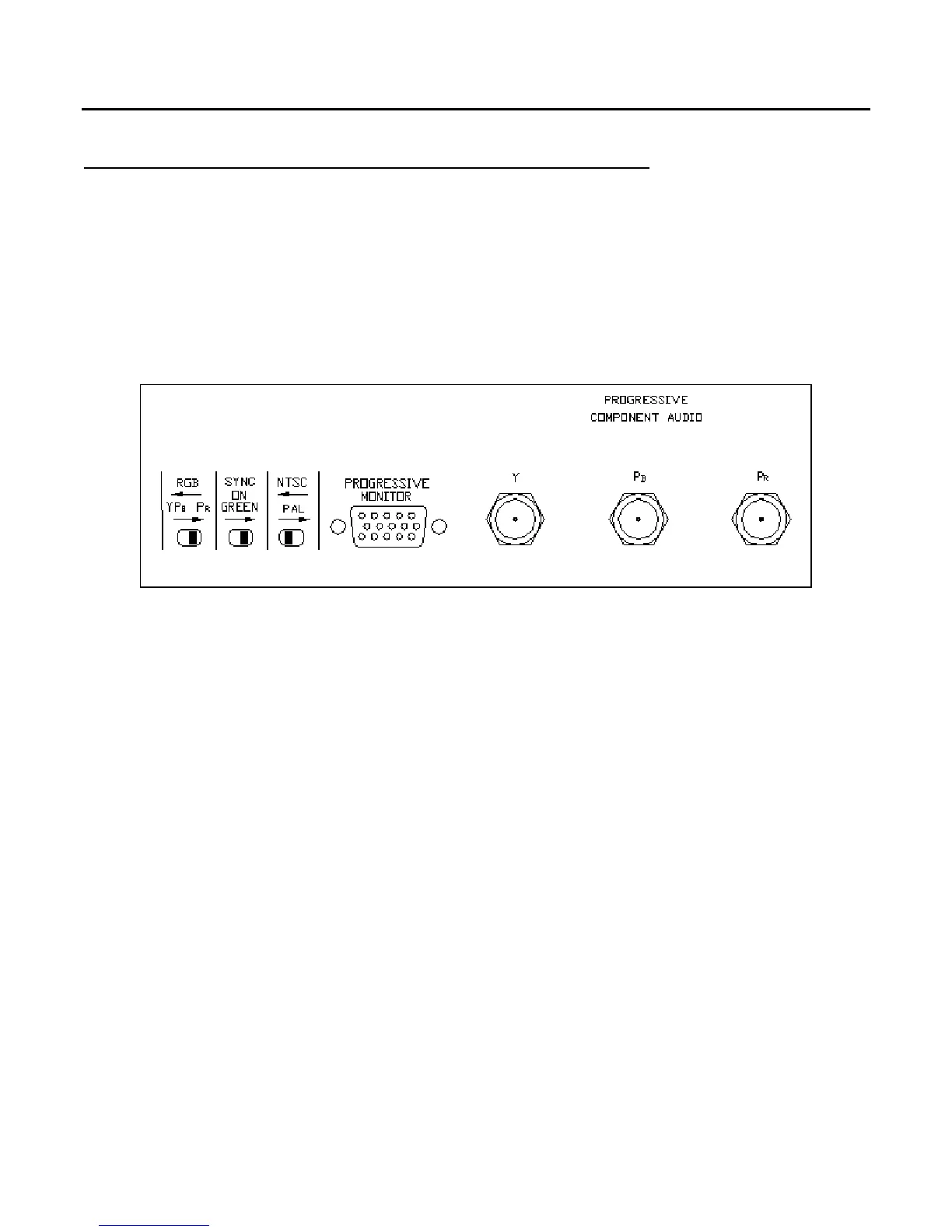
three (3) switches located on the back panel that control the settings for different components types
(figure 2). They must be properly set for the Progressive Scan circuitry to function.
Figure 2: MOON Stellar DVD Player Optional Progressive Scan Settings and Connectors
‘NTSC/PAL’ for Television Standard: American (NTSC) or European (PAL).
‘RGB/YP
B
PB
R
’
for Colorspace: Depending upon the equipment you use, select the proper Colorspace,
whether RGB (Red Blue Green) or YP
B
P
R
.
‘SYNC ON GREEN’ Allows you to remove the synchronization signal from the Green (or Y) output. This
is only for equipment that requires separate horizontal and vertical sync. signals.
D) Progressive Component
This uses three (3) BNC type connectors. You should use video cables terminated with BNC connectors.
In the event that these aren’t available, you can also use video cables terminated with RCA connectors
and RCA-to-BNC adaptors. Connect the three outputs labeled Y, P
B
and P
R
to the corresponding inputs
on your video equipment. If you selected the RGB mode, Red is on P
R
, Green is on Y and Blue is on P
B
.
E) Progressive Monitor
The DB-15 connector labeled ‘Progressive Monitor’ provides RGB output with separate sync. when
‘SYNC ON GREEN’ is disabled. Applications include certain projectors and computer monitors.
____________________________________________________________________________________
Progressive Scan Video Connections 9



 To Next Page