www.miinet.comMoore Industries-International, Inc.
- 83 -
User’s Manual
238-741-00K
May 2019
Programmable Smart HART Temperature Transmitter
THZ
3
/ TDZ
3
SECTION 5
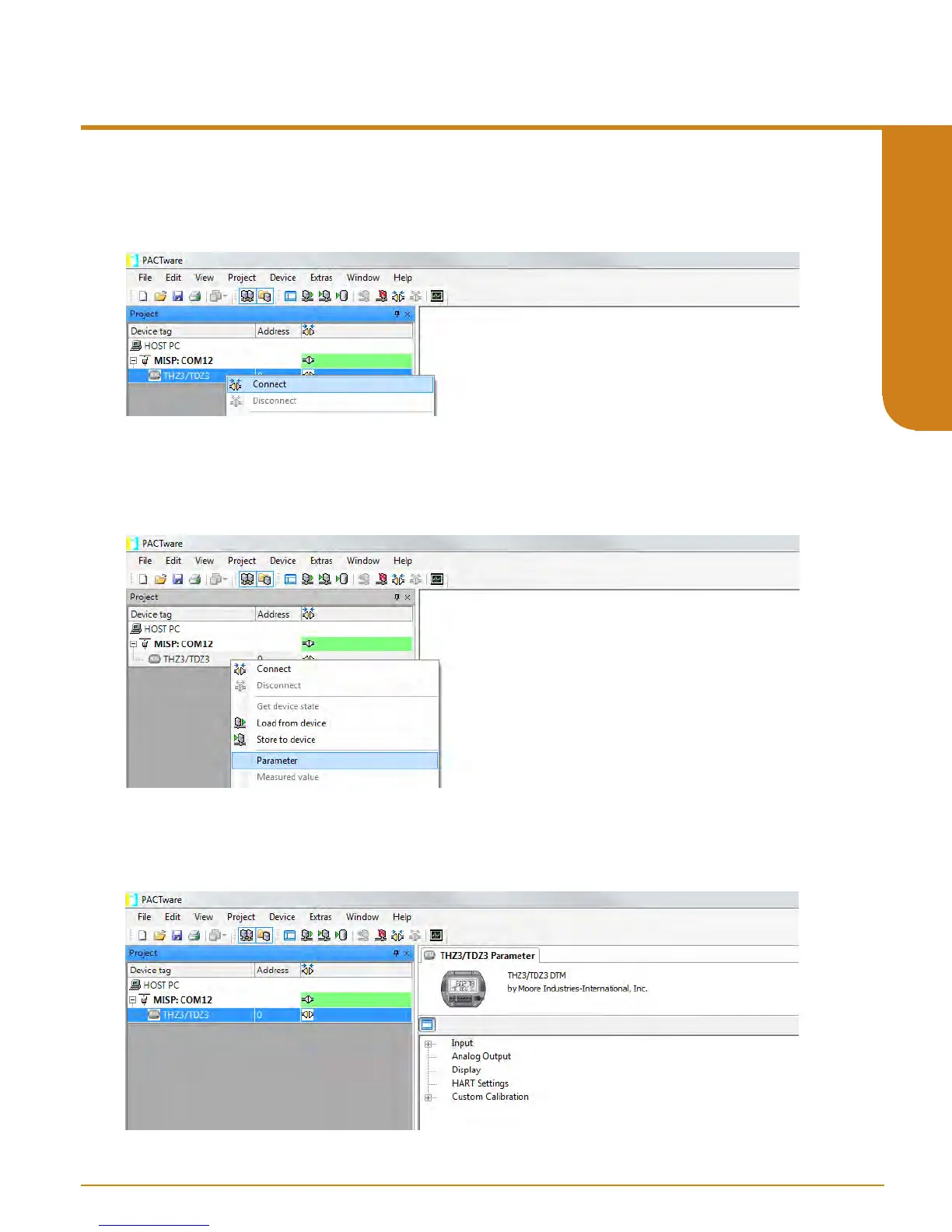
Figure 5.11. Connecting to selected Device DTM for THZ
3
/ TDZ
3
9. Now right click on selected DTM (i.e. TDZ
3
[HP]) in the Device Tag menu and select “Connect”.
You will now see the “online state” turn green to indicate you have a connection.
Figure 5.12. Enabling Parameters Configuration page for THZ
3
/TDZ
3
DTM
Figure 5.13. THZ
3
/ TDZ
3
Parameters
10. Right click on DTM (i.e. TDZ
3
[HP]) in the Device Tag menu and select “Parameters”. This
will bring up screen for the TDZ
3
parameters. You are now ready to start your conguration of
the device. You may also acquire the factory default settings directly form device by right clicking
on DTM (i.e. TDZ
3
[HP]) in the Device Tag menu and selecting “Load from device”.
11. You will now see the “online state” turn green to indicate you have a connection. Now you
can go ahead and congure parameters of the DTM (i.e. TDZ
3
[HP]) .
Please go to THZ
3
/TDZ
3
DTM Conguration section



 To Next Page